How to Import Products in Bulk to a POS System in Nigeria — Complete 2026 Guide for Retail Shop Owners
SwiftPOS Team
Published May 10, 2026
If you have ever opened a new shop, restocked after a supplier delivery, or tried to move from a spreadsheet to a POS system, you already know the nightmare. You have hundreds — sometimes thousands — of products to enter, and doing it one by one is not just slow. It is the kind of task that makes you want to give up on the whole idea of using software.
This is the exact pain point that bulk product import solves. And yet, most shop owners in Nigeria either do not know it exists, or they are using a POS system that does not support it properly. In this guide, you will learn how to import products in bulk to a POS system in Nigeria, what to watch out for, and how tools like SwiftPOS make the whole process take minutes instead of days.
By the end of this article, you will know exactly how bulk product import works, what file format to use, what mistakes to avoid, and how to get your entire product catalogue live on your POS in one clean move.
Why Manually Adding Products Is Destroying Your Productivity
Let us be direct. If your shop stocks 200 products and it takes you 3 minutes per product to enter the name, price, category, barcode, and stock quantity manually — that is 600 minutes. Ten full hours of your life, just to get your catalogue set up. And that is before you account for errors, typos, and the products you forget to add.
Now imagine you are a supermarket with 1,500 SKUs. Or a pharmacy with 800 medicines, dosages, and variants. Or an electronics shop where every product has a model number, a purchase price, a selling price, and a warranty detail. Manual entry is not just inconvenient — it is a genuine business risk.
Here is what typically goes wrong when Nigerian shop owners skip bulk import and enter products manually:
- Price errors — A staff member enters ₦7,500 instead of ₦750 for a product. The error goes unnoticed for weeks. Customers complain. You lose money or credibility.
- Missing products — Some products never get entered, so staff sells them without recording the transaction. This creates invisible losses in your inventory.
- Inconsistent naming — One staff enters "Indomie 70g" and another enters "Indomie Noodles Small Pack". Your reports become messy and unreliable.
- Wasted launch time — You spend two weeks just setting up your product list instead of focusing on sales.
None of this is necessary. Bulk product import exists specifically to eliminate these problems — and any serious POS system for Nigerian retail should support it out of the box.
What Is Bulk Product Import and How Does It Work?
Bulk product import is the ability to upload many products at once into your POS system using a structured file — usually a CSV or Excel spreadsheet — instead of adding them one by one through a form.
Here is how the process typically works:
- Download a template — Your POS software provides a sample spreadsheet with the correct column headers (product name, SKU, category, purchase price, selling price, stock quantity, barcode, etc.).
- Fill in your product data — You populate each row with one product. This can be done in Microsoft Excel, Google Sheets, or any spreadsheet application.
- Upload the file — You go to the import section of your POS dashboard and upload the completed file.
- Review and confirm — The system processes the file, flags any errors, and asks you to confirm before saving.
- Done — All your products appear in the system instantly, ready for selling.
What used to take 10 hours now takes 30 minutes. Most of that time is simply filling in your spreadsheet — which you may already have from your supplier or your old records.
How to Import Products in Bulk to a POS System in Nigeria — Step by Step
Whether you are just launching your business or switching from another system, here is the practical process for getting your entire product list into a Nigerian POS system through bulk import.
Step 1: Gather Your Product Data
Before you touch any software, collect all the product information you already have. This might be:
- A handwritten stock book you have been using
- A supplier invoice or price list
- A spreadsheet from your previous system
- A WhatsApp catalogue you share with customers
You do not need everything to be perfect. Start with what you have. You can always update prices or add missing details later. The goal is to get the bulk of your catalogue in fast.
Step 2: Download the Import Template from Your POS
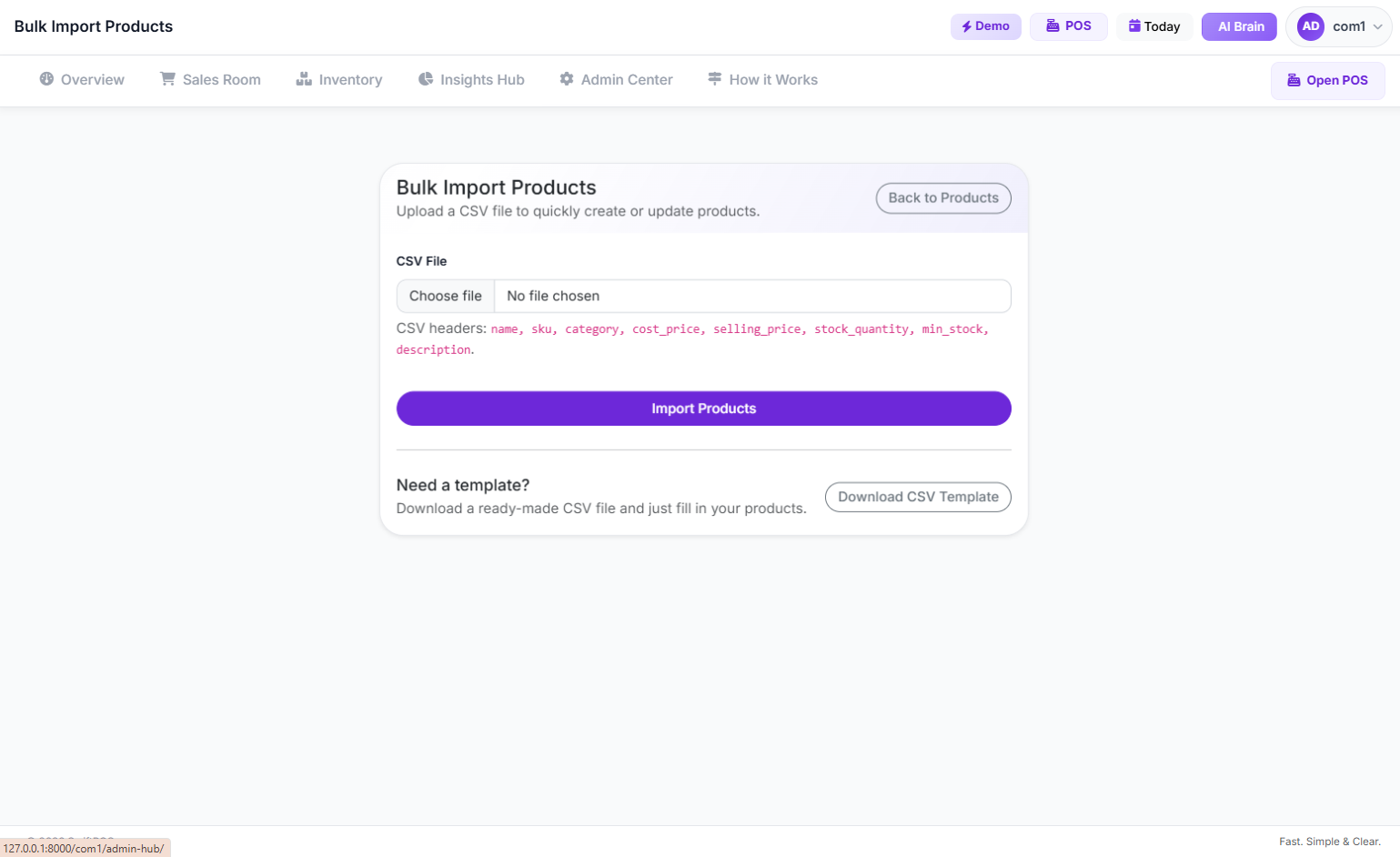
Login to your POS software and navigate to the inventory or product management section. Look for an "Import" or "Bulk Upload" button. Most systems — including SwiftPOS — allow you to download a pre-formatted CSV or Excel template with the exact columns the system expects.
Using this template is critical. If you upload a file with wrong column headers or missing fields, the import will fail or produce errors.
Step 3: Fill in the Spreadsheet
Open the template in Microsoft Excel or Google Sheets and start filling in your product data. Each row is one product. The standard columns you will typically need are:
- Product Name — Use clear, consistent naming (e.g., "Peak Milk 400g Tin")
- Category — Organize products into logical groups (e.g., Beverages, Dairy, Toiletries)
- Purchase Price — The price you pay the supplier
- Selling Price — The price your customers pay
- Stock Quantity — How many units you currently have
- Barcode / SKU — If you use a barcode scanner, this is essential
- Unit of Measurement — Piece, carton, litre, kg, etc.
Pro tip: If your supplier sends you an invoice in Excel format, you can often restructure that file to match the import template columns — saving yourself significant data entry time.
Step 4: Clean Your Data Before Uploading
This step is often skipped, and it causes most import failures. Before uploading your file:
- Remove any empty rows at the bottom
- Check for duplicate product names
- Make sure prices are numbers only — no ₦ sign, no commas (e.g., 1500 not ₦1,500)
- Ensure categories match exactly what is in your system (if category "Beverages" already exists, do not type "beverage" or "Bev")
- Remove any special characters from product names that might confuse the system
Step 5: Upload and Review
Go to the bulk import section of your POS, upload the file, and let the system process it. A good POS system will show you a preview of the products being imported, highlight any rows with errors, and let you fix them before confirming.
Never upload and just click "confirm" without reviewing. Take 2 minutes to scroll through and spot any obvious issues.
Step 6: Verify and Go Live
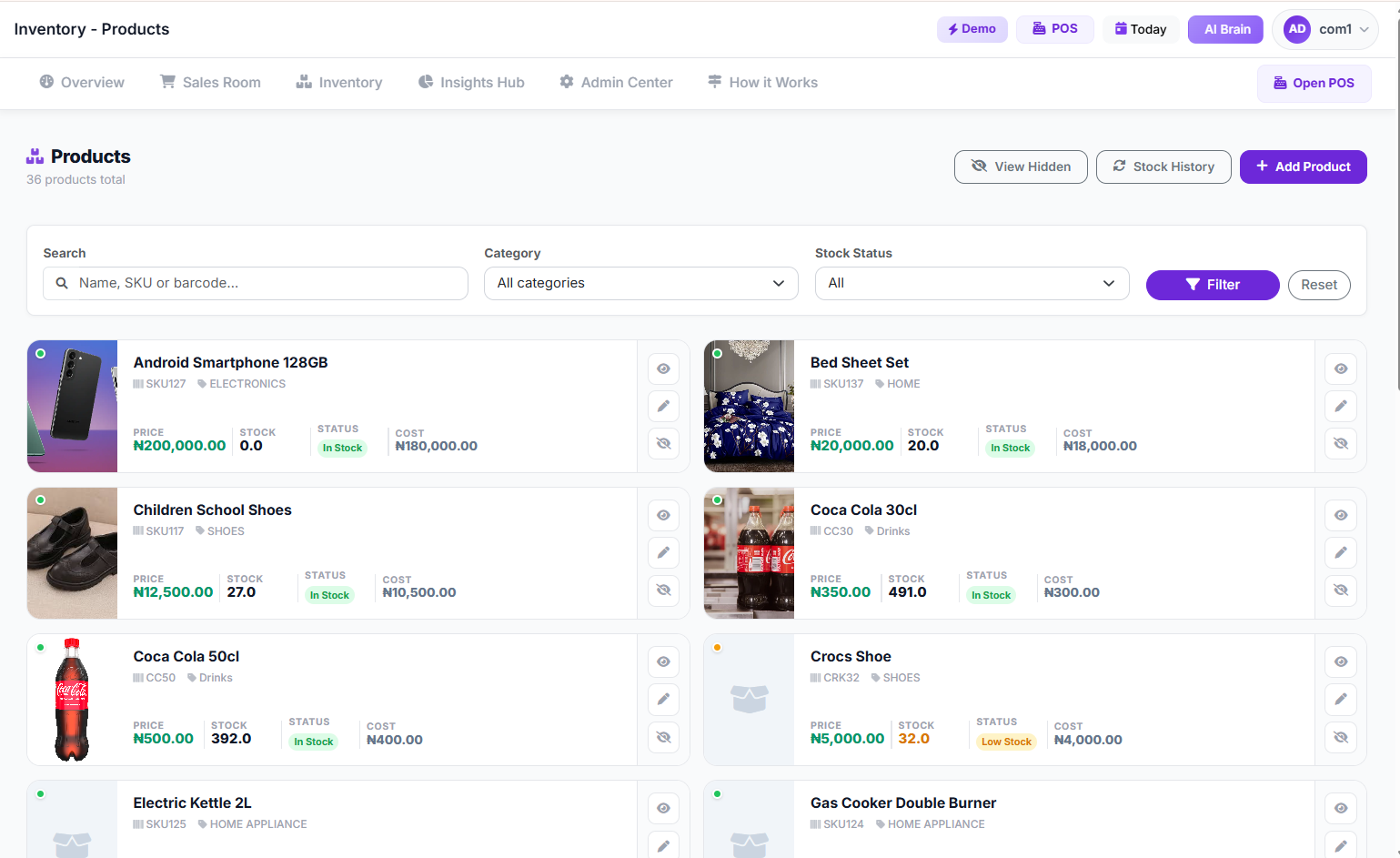
After a successful import, go to your product list and do a quick spot check. Search for 5 to 10 random products. Confirm the names, prices, and stock quantities look correct. If everything is good, your shop is ready to start selling.
How SwiftPOS Makes Bulk Product Import Effortless for Nigerian Businesses
Not all POS systems handle bulk import the same way. Some have clunky interfaces, strict file format requirements, or poor error reporting that makes the process frustrating. SwiftPOS was built with Nigerian retail realities in mind — including the fact that most shop owners are not IT professionals and need tools that just work.
Here is what makes SwiftPOS bulk import stand out:
Clean, Intuitive Import Interface
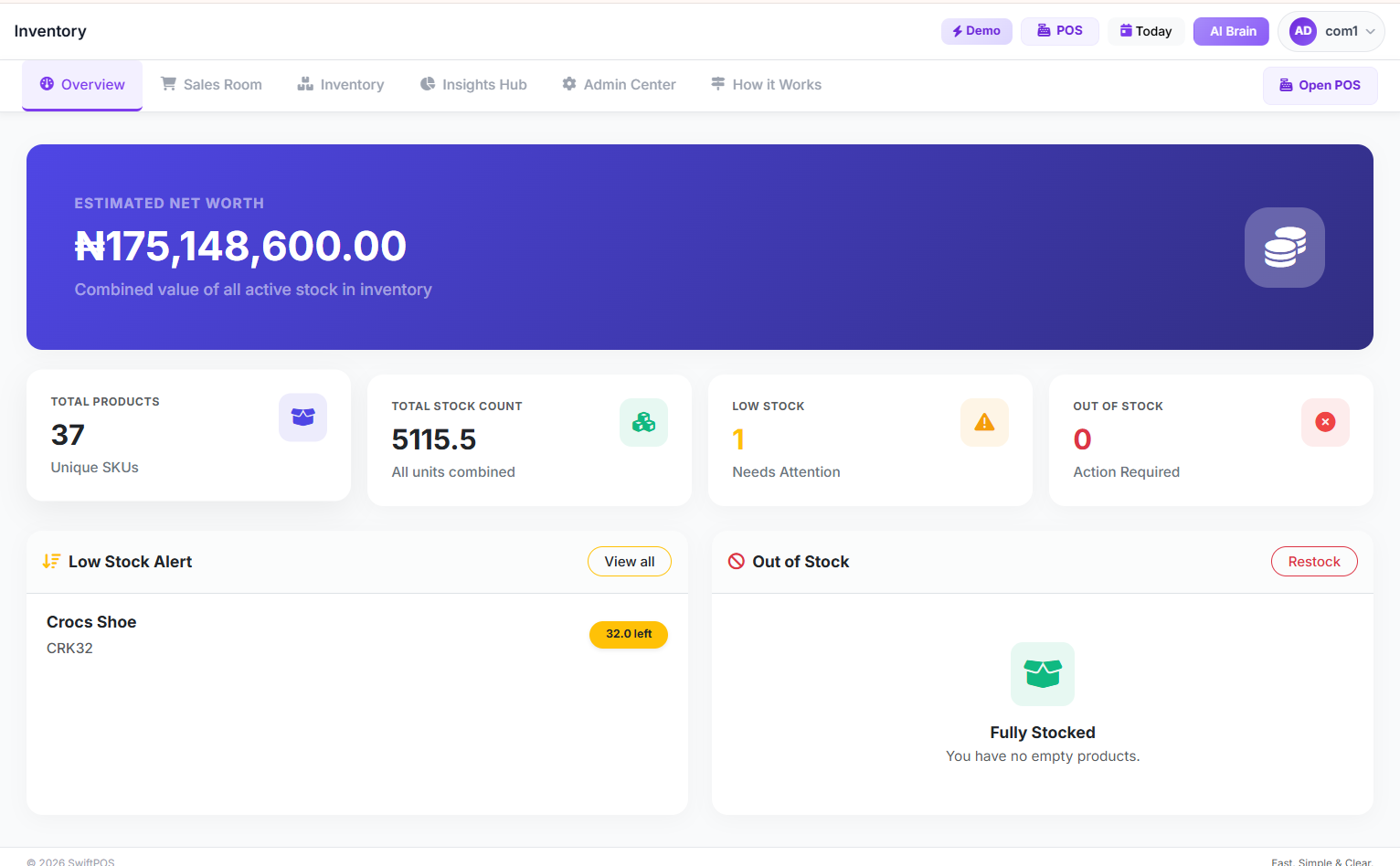
The SwiftPOS bulk import page is designed for clarity. You can download the template directly from the interface, upload your completed file, and get instant feedback on what succeeded and what needs fixing. No technical knowledge required.
Supports All Major Product Types
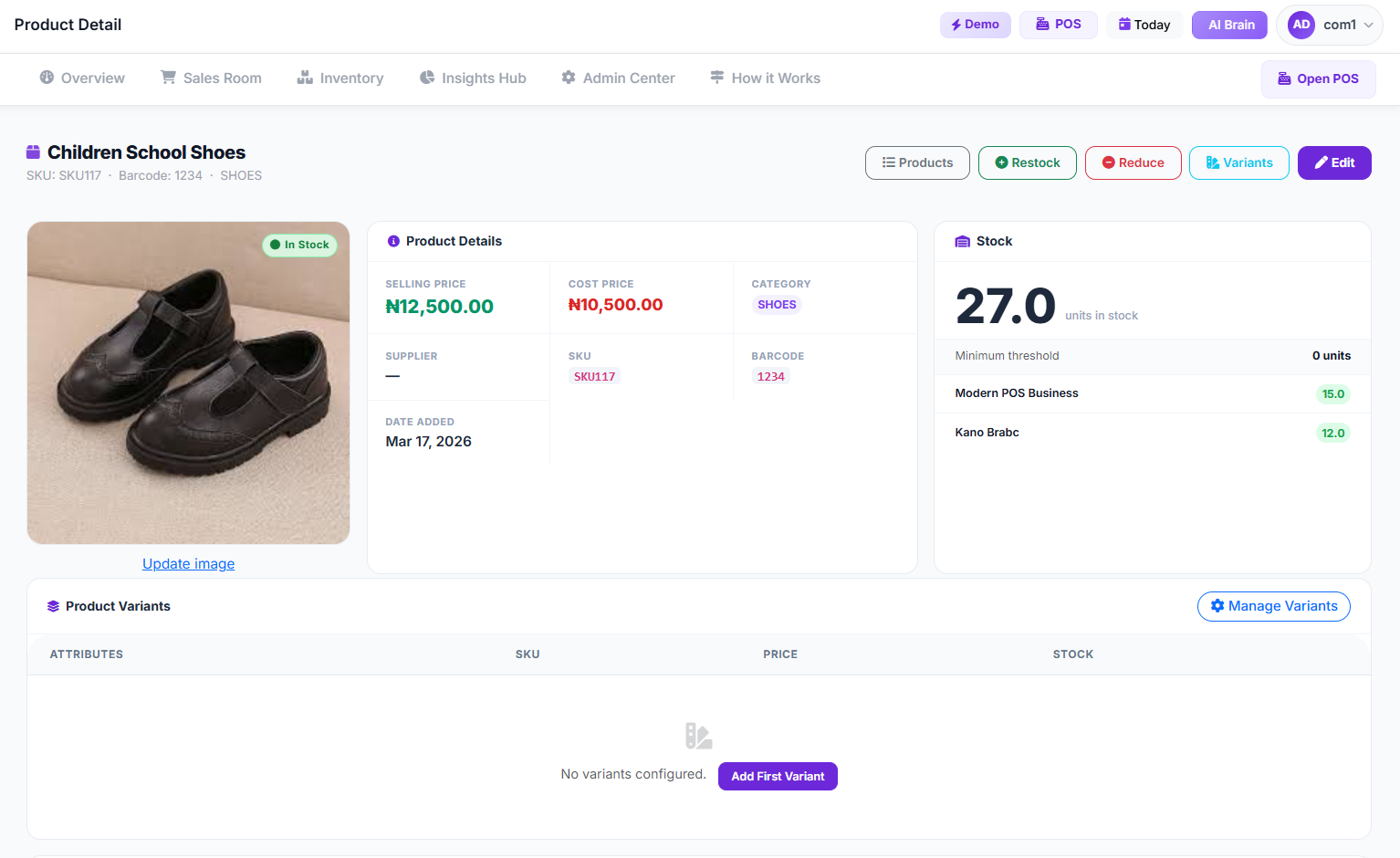
Whether you sell packaged goods, fresh produce, electronics, medications, or clothing — SwiftPOS bulk import handles diverse product catalogues. You can assign categories, set multiple price points, and include barcode data all in one upload.
Barcode-Ready Products
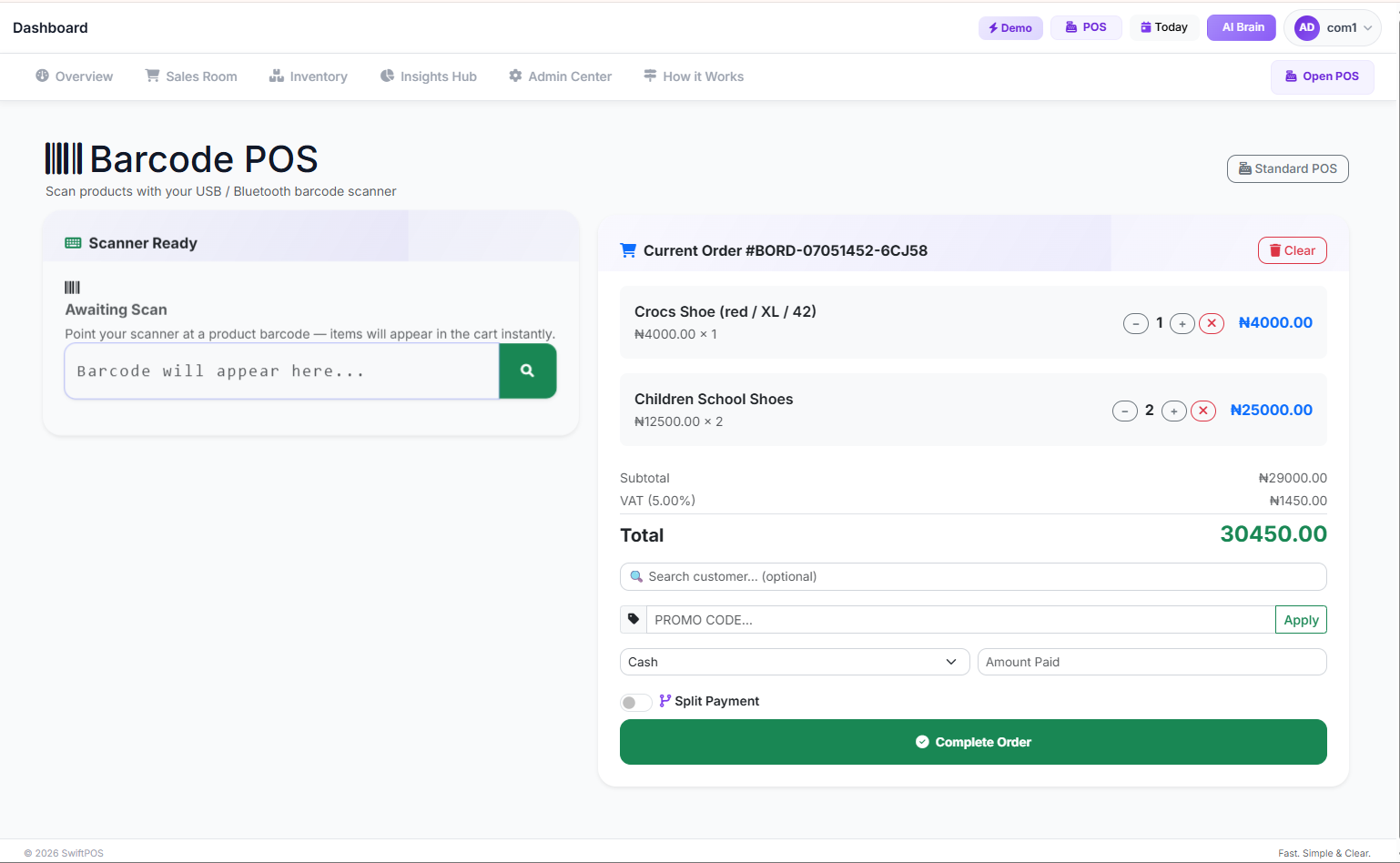
If you use a barcode scanner at your checkout, SwiftPOS links your imported barcodes to your products automatically. The moment a customer brings a product to the till, your cashier scans it and the correct product, price, and stock update happen instantly — no manual searching required.
Immediate Inventory Tracking After Import
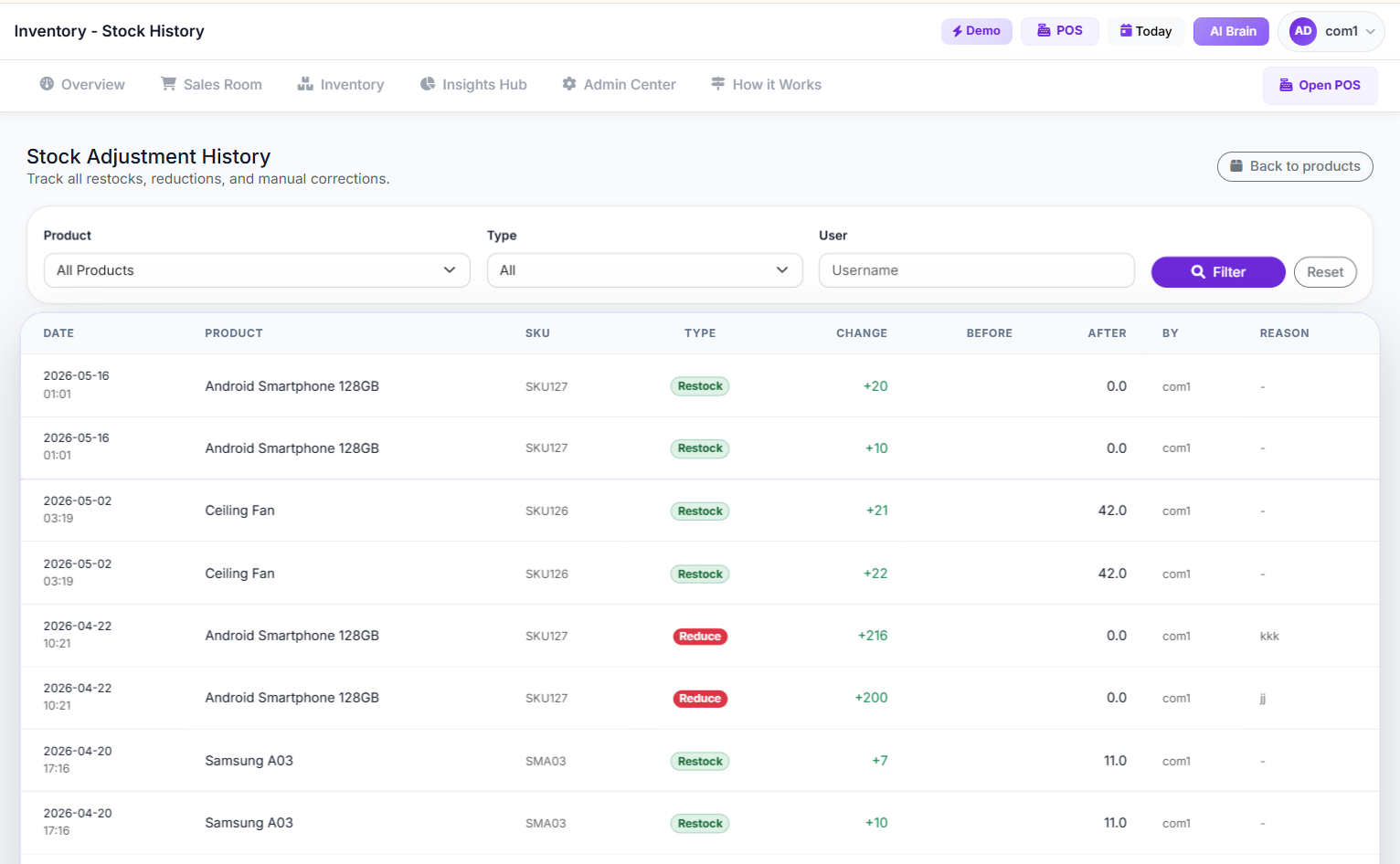
The moment your products are imported, SwiftPOS begins tracking their stock levels in real time. Every sale reduces inventory automatically. You get low stock alerts before you run out, and a full stock history showing every movement in or out of your store.
If you manage multiple branches — or plan to — the SwiftPOS Pro Plan lets you manage product catalogues and inventory across all locations from a single dashboard. You import once and manage everywhere.
Common Mistakes Nigerian Shop Owners Make During Bulk Import (And How to Avoid Them)
Even with a good system, bulk imports can go wrong if you are not careful. Here are the most common mistakes and how to avoid each one:
Mistake 1: Using the Wrong File Format
Most POS systems expect a .CSV file, not a .XLSX file (though some accept both). If your system rejects your file, save it as CSV from Excel or Google Sheets before re-uploading.
Mistake 2: Including Merged Cells or Formatting in Excel
Fancy formatting — merged cells, colored rows, multiple header rows — breaks CSV imports. Your data should be plain: one header row, one product per row, no decorations.
Mistake 3: Uploading Products Without Categories
If you skip the category column, all your products end up in one uncategorized pile. This makes it much harder to find products at the till and generate meaningful sales reports by category. Always organize first.
Mistake 4: Inconsistent Pricing
Entering a purchase price higher than your selling price for some products is a critical error. Your POS system will import it, but your P&L reports will show losses on those products from day one. Double-check your margins before importing.
Mistake 5: Not Backing Up Your File
Always keep a saved copy of your import spreadsheet. If something goes wrong — a corrupted upload, a system issue, or you want to re-import after a reset — your backup is your lifeline. Store it in Google Drive or email it to yourself.
Pro Tips for Nigerian Retailers Doing Their First Bulk Import
Having helped hundreds of Nigerian businesses get started on SwiftPOS, here are the power-user tips that make a big difference:
- Ask your supplier for a digital price list. Most distributors and wholesalers in Nigeria already have their product lists in Excel. Request it. You will save hours of typing and reduce errors dramatically.
- Import in batches by category. If you have 1,000+ products, import them in groups — Beverages first, then Dairy, then Toiletries. This makes it easier to spot errors in each batch.
- Set your reorder levels during import. If your POS supports it, add a minimum stock quantity column so the system can alert you when any product falls below that level. This saves you from stockouts before they happen. Learn more about preventing stockouts with automation here.
- Use consistent naming from day one. Decide on a naming convention before you start — "Brand + Product + Size" works well (e.g., "Ariel Powder 500g"). Stick to it for every product. This makes your search results and reports clean and professional.
- Check for duplicates after import. If you accidentally import the same product twice, you will end up with split inventory. Do a quick search for common products to confirm nothing was doubled.
What Happens After Your Products Are Imported?
Once your catalogue is live, your business operates in a completely different way. Here is what your daily operations look like when your POS has a properly set up product database:
- Every sale is recorded automatically — no manual writing, no end-of-day estimation
- Stock levels drop in real time as products are sold
- You see which products are selling fast and which are sitting idle
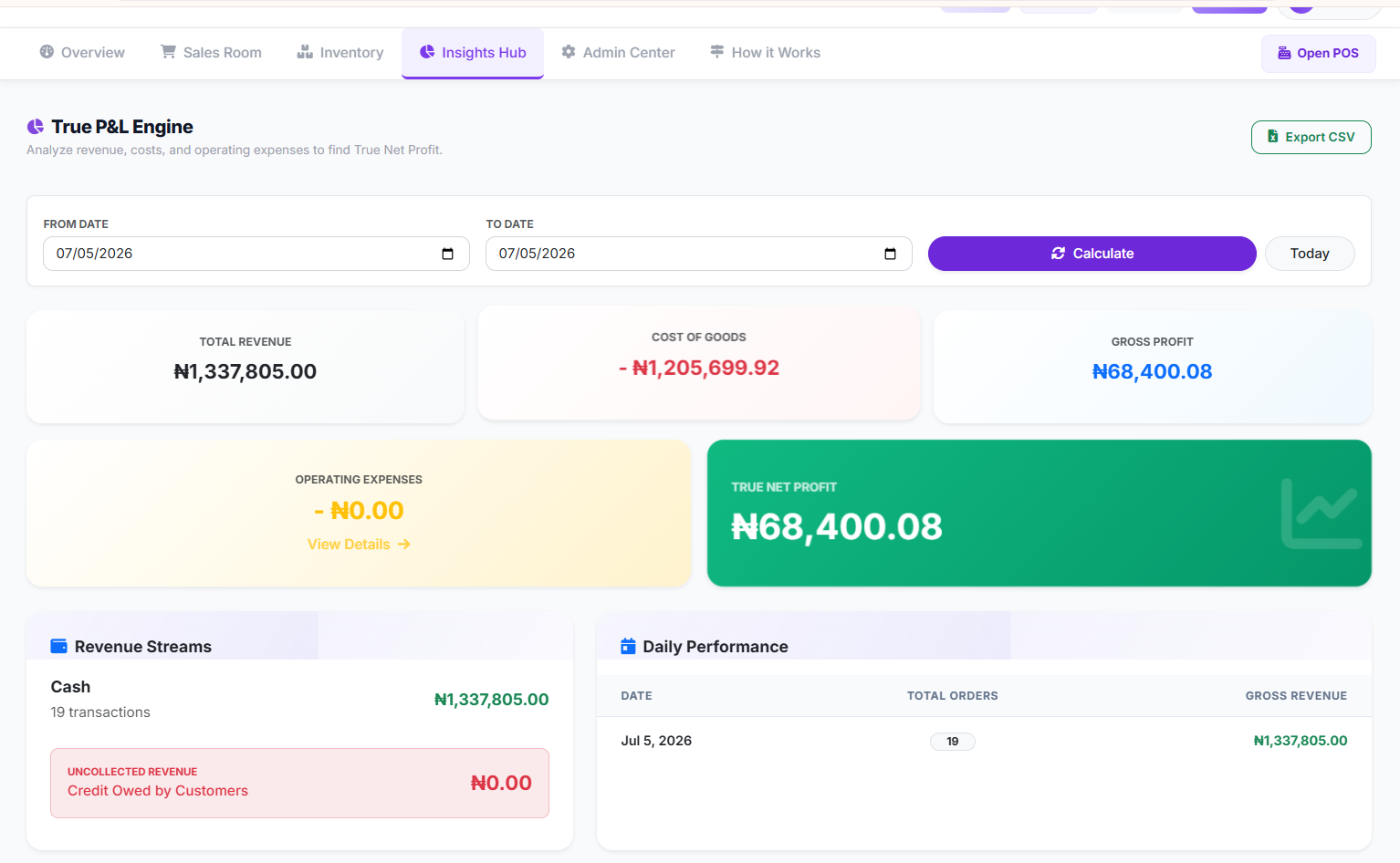
- Your P&L report shows real profit margins across your entire catalogue
- Low stock alerts notify you before you run out of popular items
- Staff cannot sell products that are not in the system, reducing ghost sales
All of this is possible because you took the time to set up your product catalogue correctly from the beginning. Bulk import is not just a convenience feature — it is the foundation of reliable retail management. If you are curious how the full system works together, read our complete guide on how SwiftPOS manages your retail business smarter.
SwiftPOS Plans That Include Bulk Product Import
Bulk import is available on the Standard and Pro plans of SwiftPOS — which is the right fit for any serious retail business managing more than 20 products. Here is a quick overview:
| Plan | Price | Bulk Import | Products / Categories |
|---|---|---|---|
| Starter | ₦3,000/month | ❌ Not included | 20 categories |
| Standard | ₦6,000/month | ✅ Included | 100 categories, 1000 products |
| Pro | ₦12,000/month | ✅ Included | Unlimited categories, unlimited products, multi-branch |
All plans come with 1 month free when you subscribe annually. For a supermarket, pharmacy, or any shop with a significant product range, the Standard plan is the minimum recommendation — and the Pro plan is ideal if you run or plan to expand to multiple branches.
Frequently Asked Questions About Bulk Product Import in Nigeria
What file format does SwiftPOS use for bulk product import?
SwiftPOS accepts CSV files for bulk product import. You can prepare your data in Microsoft Excel or Google Sheets and save it as a CSV before uploading. SwiftPOS provides a downloadable template to ensure your file uses the correct column structure.
How many products can I import at once in SwiftPOS?
On the Standard plan, you can manage up to 100 categories and import products across all of them. The Pro plan supports unlimited categories and unlimited products — making it suitable for large supermarkets, pharmacies, and multi-location retail businesses with extensive catalogues.
Does SwiftPOS help with bulk product import across multiple branches?
Yes. The SwiftPOS Pro Plan supports multi-branch management, which means you can maintain a shared product catalogue across all your locations. Stock levels are tracked independently per branch, but your master product list is centrally managed — so you import once and it applies everywhere.
What happens if I make a mistake in my bulk import file?
SwiftPOS will flag errors before completing the import. If a row has a missing required field or an invalid value, the system shows you which rows failed and why. You can fix your file and re-upload only the corrected products. Errors in one row do not block the successful rows from being imported.
Is SwiftPOS affordable for small shops in Nigeria that are just getting started?
Absolutely. The Starter Plan begins at just ₦3,000 per month — less than the cost of a few supplier phone calls. For shops that need bulk import, the Standard Plan at ₦6,000 per month is highly accessible, especially compared to the hours of manual work it replaces. Every plan also comes with 1 month free on annual subscription, reducing the cost further.
Can I update my product prices in bulk after the initial import?
Yes. If your supplier changes prices or you want to apply a price adjustment across multiple products, you can re-import an updated file. SwiftPOS allows you to update existing products through the bulk import process — matching products by their SKU or barcode to apply the changes without creating duplicates.
Final Word: Your Product Catalogue Is the Foundation of Everything
Every sale, every inventory alert, every profit report, every staff performance record in your POS system traces back to your product catalogue. If that foundation is shaky — incomplete, inconsistent, or manually entered one-by-one over three days — everything built on top of it will be unreliable.
Bulk product import is how serious retailers in Nigeria set that foundation right, fast. It is not a luxury feature. It is the smart, efficient, and professional way to launch or migrate your product database — and any POS system worth using in 2026 should make it simple.
If you are ready to stop wasting time on manual data entry and start managing your business from a clean, accurate product database, explore how SwiftPOS can help. You can also read our guide on top inventory management software for supermarkets and pharmacies in Nigeria to see how SwiftPOS compares.
Ready to Import Your Products and Start Selling Smarter?
SwiftPOS makes bulk product import fast, clean, and error-free — so you spend less time on setup and more time running your business.
View Pricing Plans →Or message us directly on WhatsApp: +2349164601810
🎁 Get 1 month free when you subscribe to any annual plan.

How to Know If Your Business Is Actually Profitable: A…
Oct 08, 2026
How to Stop Cash Leakage in Your Business: A Comprehen…
Oct 04, 2026
How to Start a Food Business with Low Capital: A Step-…
Oct 01, 2026