Inventory Management Software for Supermarkets in Nigeria: The Complete 2026 Guide
SwiftPOS Team
Published April 22, 2026
Why Most Nigerian Supermarkets Lose Money Without Knowing It
Imagine this: you close your shop on Friday evening with a full shelf. By Monday morning, three fast-moving products are out of stock — and you have no idea when they ran out or how many sales you missed. Sound familiar?
This is the daily reality for thousands of supermarket and retail shop owners across Nigeria who still rely on manual stock counting, paper records, and gut feeling to manage their inventory. The result? Stockouts that cost you customers. Overstocking that ties up your cash. Shrinkage you never catch until it's too late.
The solution is investing in the right inventory management software for supermarket Nigeria — a system that tracks every product movement automatically, alerts you when stock is low, and gives you the full picture of your business health in real time.
In this guide, you'll learn exactly why inventory management matters, what to look for in retail software, and how tools like SwiftPOS are helping Nigerian business owners take back control of their stock — and their profits.
Start your free SwiftPOS trial →
Why Inventory Management Matters More Than You Think
Inventory is the heart of every retail business. Whether you run a supermarket, provision store, pharmacy, or electronics shop, your stock is your money — sitting on shelves, waiting to be converted into profit. But without a system to manage it properly, that money quietly leaks away.
Here are the most common consequences of poor inventory management in Nigerian retail businesses:
- Stockouts: Running out of popular items means customers go elsewhere — and may not come back.
- Dead stock: Buying too much of slow-moving products locks up capital you could spend on better-selling goods.
- Staff theft and shrinkage: Without tracking, goods can walk out the door unnoticed. Research consistently shows that internal theft is one of the biggest sources of retail shrinkage globally — and Nigeria is no exception.
- Inaccurate records: When your stock records don't match reality, reordering becomes guesswork. You either order too early or too late.
- Lost profit visibility: If you don't know your stock value, you can't know your actual profit. Many shop owners feel busy and yet their accounts are nearly empty — inventory mismanagement is often the reason.
The fix is not complicated. But it does require moving from manual methods to a proper digital inventory management system.
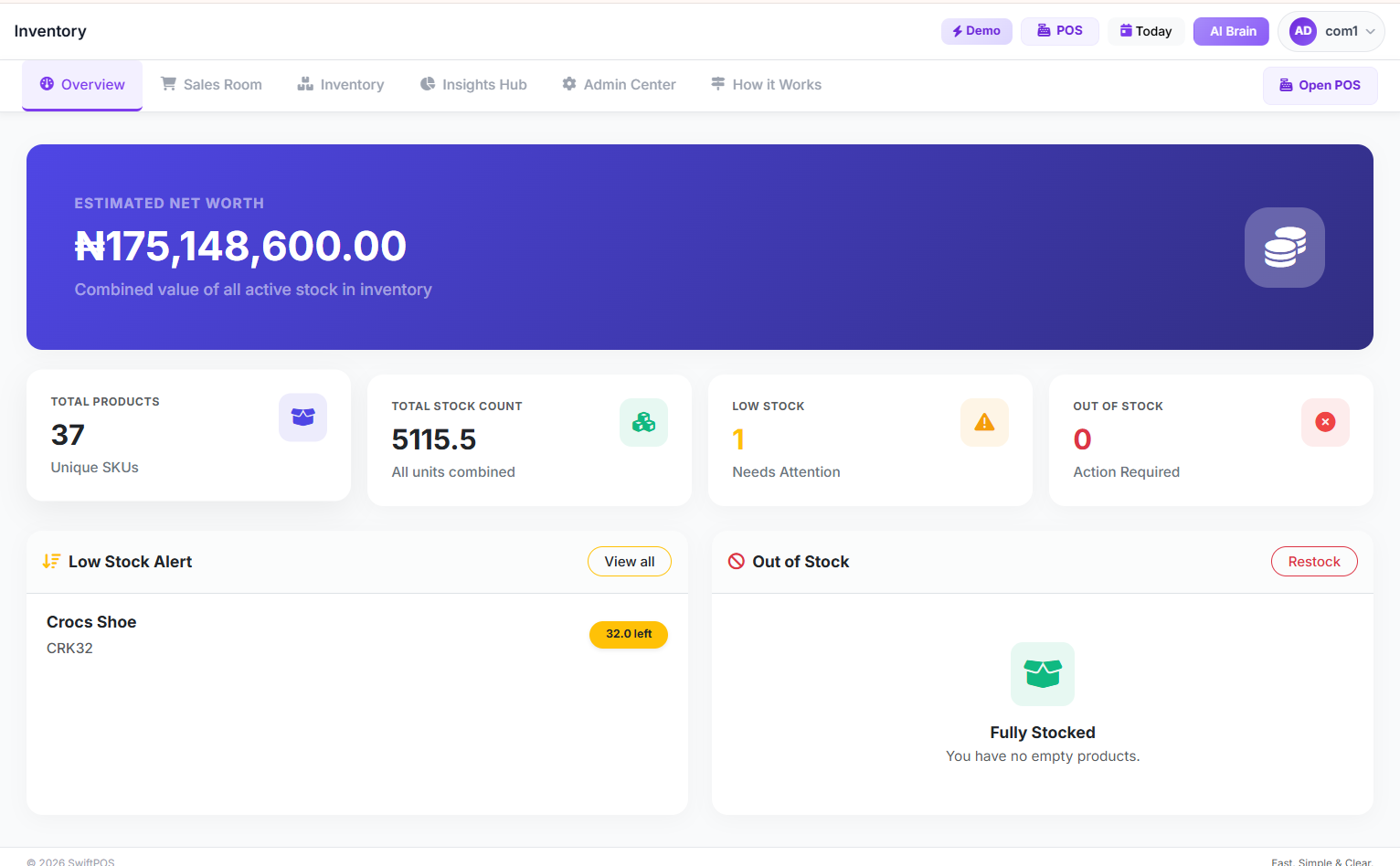
SwiftPOS Inventory Dashboard — see all your stock levels, product categories, and low-stock alerts in one place.
What Good Inventory Management Software Should Do for Your Supermarket
Before choosing any software, it helps to know what features actually matter for a Nigerian supermarket or retail business. Not all POS and inventory tools are built the same — and many are designed for markets very different from ours.
Here is what to look for when evaluating inventory management software for supermarkets in Nigeria:
1. Real-Time Stock Tracking
Every sale should automatically deduct from your stock count. Every received delivery should add to it. You should always know — at any moment — how many units of every product you have left, without counting shelves by hand.
2. Low Stock Alerts
The system should warn you before you run out of key products, not after. You should be able to set minimum stock thresholds and receive alerts when items are approaching that level.
3. Stock History and Movement Tracking
You need a clear record of where every unit went — sold to a customer, returned, transferred to another branch, or written off. This protects you against theft and helps you reconcile discrepancies.
4. Bulk Product Import
A supermarket carries hundreds or thousands of products. Entering them one by one is not practical. Good software should allow you to upload your entire product catalog from a spreadsheet in minutes.
5. Multi-Branch Support
If you operate more than one location, your software should let you see and manage inventory across all branches from a single dashboard.
6. Integration with Sales (POS)
Your inventory and your point-of-sale must work together. The moment a product is sold at the till, stock should update automatically. No manual syncing. No delays.
7. Reporting and Profit Visibility
Inventory data alone is not enough. You need reports that connect your stock to your actual profit — P&L reports, cost of goods sold, and margin analysis.
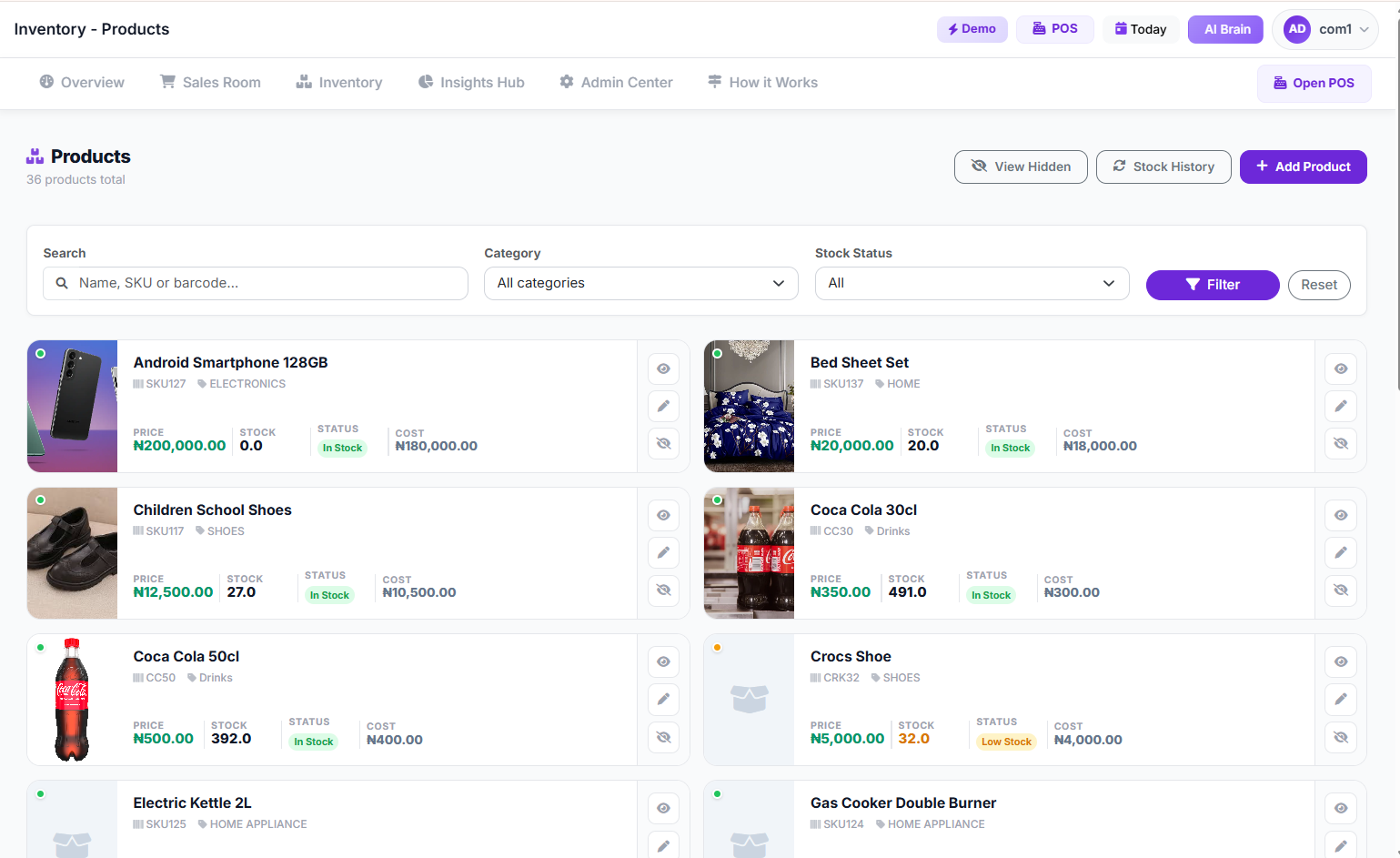
Manage your entire product catalog from one clean interface — with prices, categories, stock levels, and barcodes all in one place.
Step-by-Step: How to Set Up Inventory Management for Your Supermarket
If you are transitioning from a manual system to a digital one, here is a simple roadmap to get started:
Step 1: Audit Your Existing Stock
Before anything else, do a physical count of everything you currently have. This becomes your opening stock balance in the system. It might take a day or two depending on the size of your shop, but it is the critical foundation everything else builds on.
Step 2: Set Up Your Product Catalog
Enter all your products into the software with names, buying prices, selling prices, categories, and barcode numbers where applicable. If your software supports bulk import (like SwiftPOS does), you can upload hundreds of products at once from an Excel file and save hours of data entry.
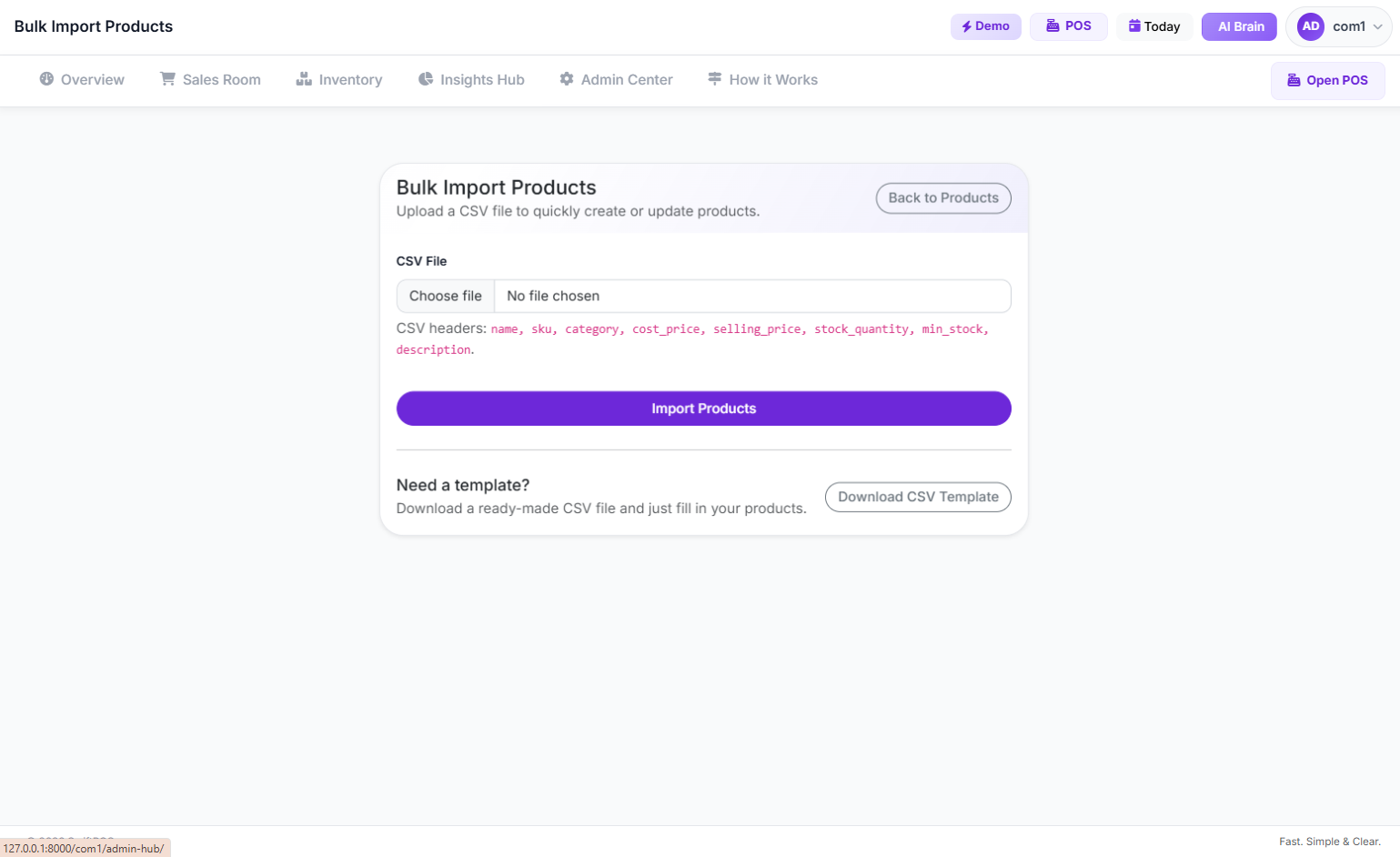
SwiftPOS Bulk Import — upload your entire product catalog in one go using a simple spreadsheet template.
Step 3: Set Minimum Stock Levels
For each product (especially fast-moving items), define the minimum quantity below which you want to be alerted. This prevents the surprise of empty shelves on a busy weekend.
Step 4: Connect Your POS Terminal
Every sale made at the till should automatically update your inventory. Make sure your POS and inventory system are fully integrated — not two separate tools you have to manually reconcile.
Step 5: Record Every Delivery
When new stock arrives from a supplier, record it immediately in the system. This keeps your stock count accurate and builds a reliable purchase history you can use for future ordering decisions.
Step 6: Review Stock Reports Weekly
Set a weekly habit of reviewing your inventory report. Look at what sold fastest, what barely moved, what is approaching its minimum threshold, and where discrepancies might exist. These insights drive smarter buying decisions.
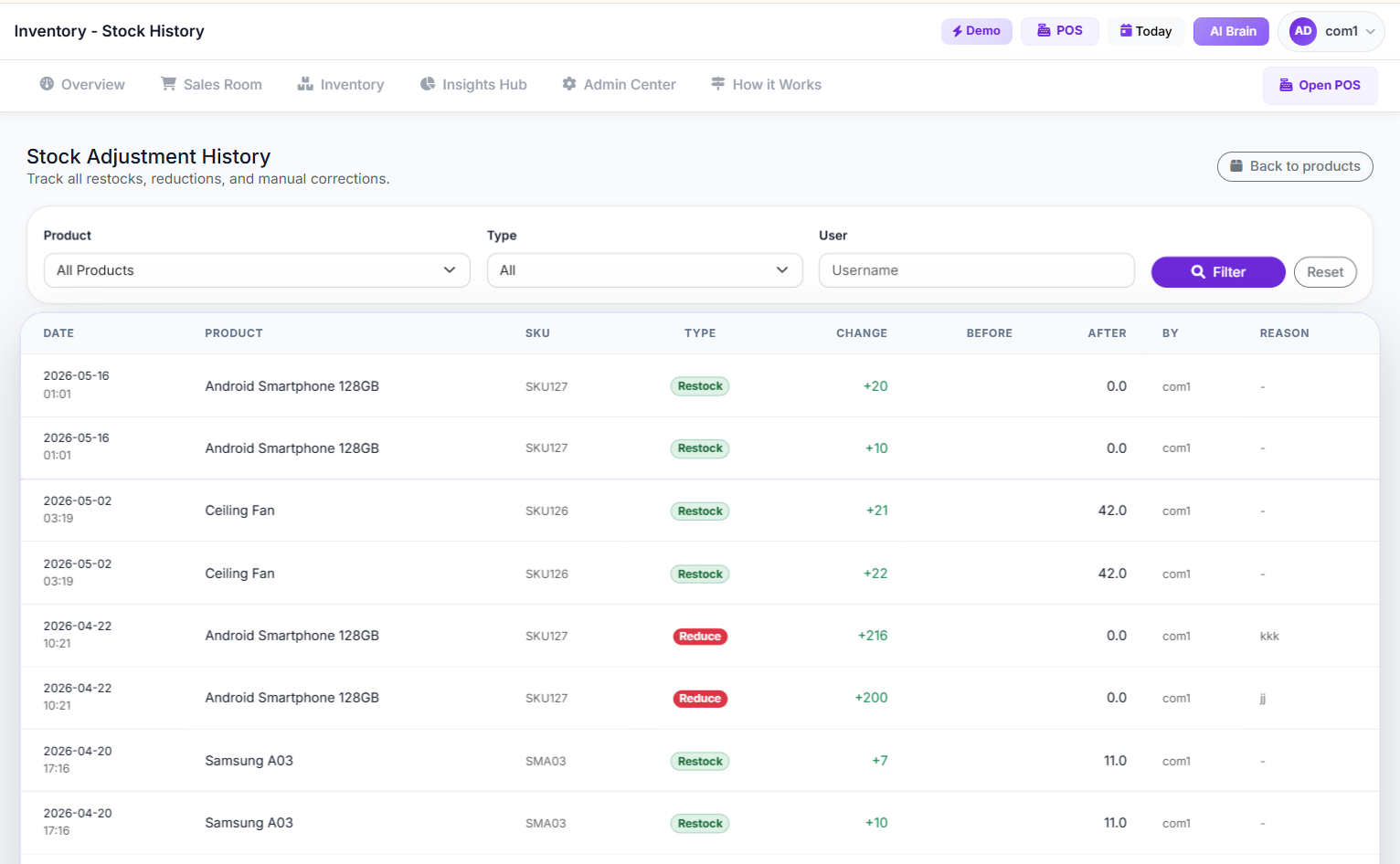
SwiftPOS Stock History — see a full, time-stamped record of every stock movement: sales, additions, adjustments, and transfers.
How SwiftPOS Makes Inventory Management Effortless for Nigerian Supermarkets
SwiftPOS is a cloud-based POS and retail management platform built specifically for businesses in Nigeria. Unlike generic software designed for other markets, SwiftPOS is built around the realities of Nigerian retail — including offline support for when internet connectivity drops, affordable pricing, and features tailored to shops that carry many products across multiple staff members.
Here is how SwiftPOS directly solves the inventory challenges that hurt most Nigerian supermarkets:
- Real-time inventory dashboard — See all your stock levels at a glance, including items flagged as low stock, from any device.
- Automatic stock deduction on every sale — The moment a product is sold at the POS terminal, the inventory count updates instantly. No manual work required.
- Bulk product import — Upload hundreds of products from a spreadsheet in minutes, not hours.
- Stock history tracking — Every stock movement is logged with a timestamp: who added it, when it was sold, and if any adjustments were made.
- Barcode POS support — Use a barcode scanner to speed up checkout and reduce human error at the till, while keeping inventory perfectly in sync.
- Low stock alerts — Set minimum thresholds and get notified before you run out of important products.
- P&L reporting — Connect your inventory data to real profit and loss reports so you always know your true margins.
- Multi-branch inventory control — Manage stock across all your shop locations from one central dashboard (available on the Pro plan).
- Suspicious activity detection — The system flags unusual patterns that could indicate internal theft or unauthorised stock removal.
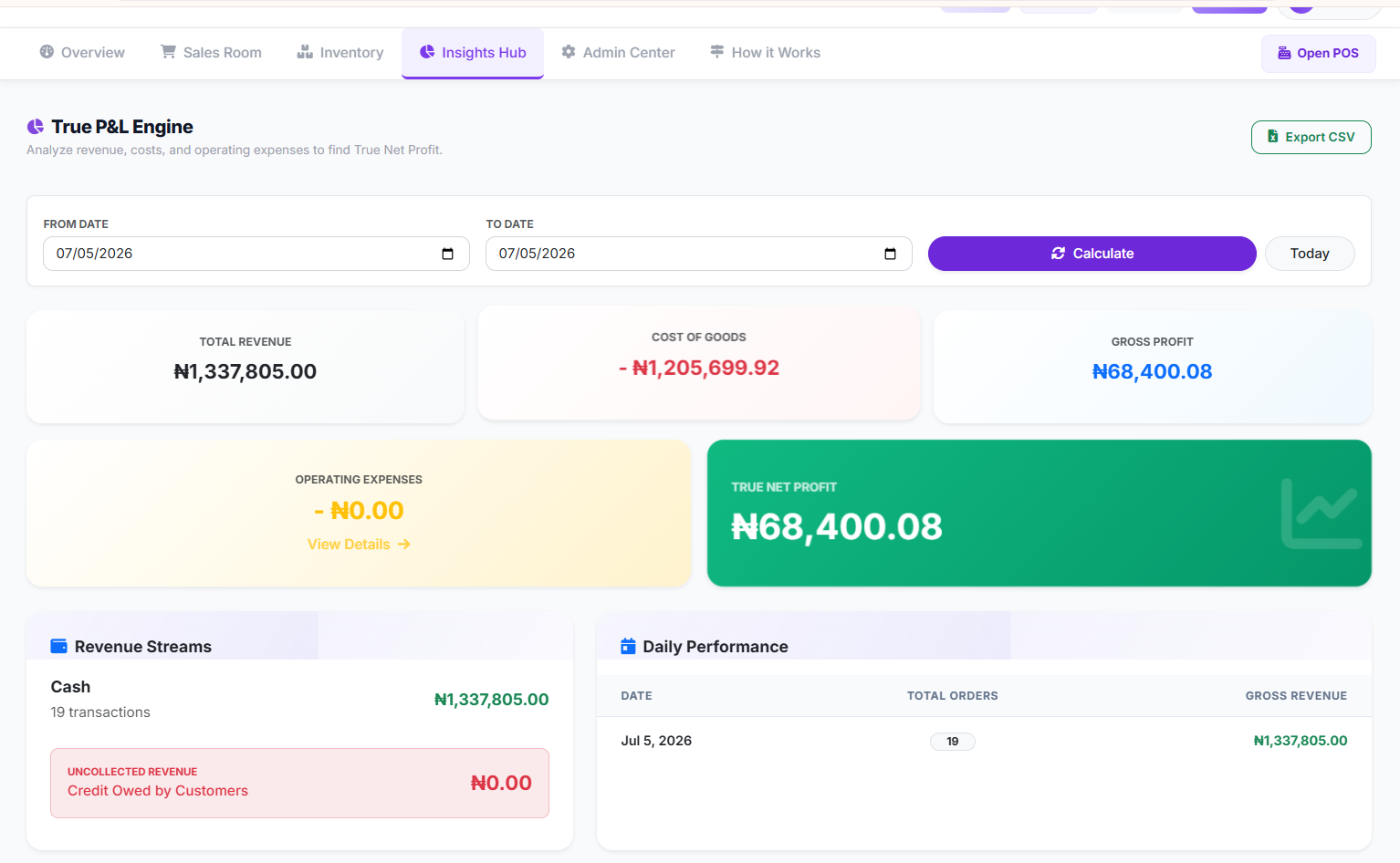
SwiftPOS P&L Report — see exactly how much you made, what your cost of goods was, and what your actual profit is for any period.
SwiftPOS is available on three plans designed to grow with your business:
- Starter — ₦3,000/month: Perfect for small shops starting out. Includes inventory management, basic sales reports, and up to 2 staff accounts.
- Standard — ₦6,000/month: For growing retailers. Adds barcode POS, bulk product import, full P&L reports, audit logs, and data export.
- Pro — ₦12,000/month: For multi-branch businesses. Includes unlimited orders, multi-branch support, unlimited categories, suspicious activity detection, and up to 15 staff accounts.
All plans include 1 month free when you subscribe annually. You can compare plans and get started at swiftpos.ng/pricing.
Pro Tips for Nigerian Supermarket Owners Using Inventory Software
Once your system is set up, these habits will help you get the most out of your investment:
- Do spot checks regularly. Even with software, a periodic physical count of high-value or fast-moving items helps you catch discrepancies early before they grow into bigger problems.
- Train your staff properly. The system only works if staff are recording deliveries, completing sales correctly, and not bypassing the POS. Make usage a non-negotiable part of daily operations.
- Use your data to negotiate better with suppliers. Your purchase history and stock movement reports are powerful tools when talking to suppliers. You know exactly how much you buy, how often, and at what prices — use that leverage.
- Review dead stock monthly. Items that haven't sold in 30 days are costing you shelf space and cash. Use your inventory reports to identify them and plan promotions or returns accordingly.
- Keep your product catalog clean. Duplicate entries, incorrect prices, and missing barcodes create errors that compound over time. Audit your product list quarterly.
Frequently Asked Questions
What is the best inventory management software for supermarkets in Nigeria?
The best software depends on your business size and needs. For Nigerian supermarkets specifically, look for a tool that works well offline, supports barcode scanning, provides real P&L reports, and is priced affordably in Naira. SwiftPOS is purpose-built for this market and covers all these requirements.
Does SwiftPOS help with inventory management for supermarkets?
Yes. SwiftPOS includes a full inventory management module that handles real-time stock tracking, low stock alerts, stock history, bulk product import, and automatic deduction of stock on every sale. It is one of the core pillars of the platform.
How long does it take to set up inventory management in SwiftPOS?
Most businesses can get fully set up within a day. If you have a large catalog, using the bulk import feature can significantly reduce setup time. The SwiftPOS team is also available via WhatsApp at +2349164601810 to assist with onboarding.
Can I manage inventory across multiple shop branches with SwiftPOS?
Yes. The SwiftPOS Pro plan includes full multi-branch support, allowing you to monitor and manage stock, sales, and staff across all your business locations from one central dashboard.
Is SwiftPOS suitable for small provision stores and mini-marts, not just large supermarkets?
Absolutely. The Starter plan at ₦3,000/month is designed for smaller shops with fewer products and staff. As your business grows, you can upgrade to Standard or Pro to unlock more features. SwiftPOS is built to scale with you.
What happens to my inventory data if the internet goes down?
SwiftPOS supports offline order processing. Sales and stock deductions are recorded locally and sync automatically once your connection is restored, so your inventory records stay accurate even during network disruptions — a common concern for businesses across Nigeria.
Stop Guessing. Start Managing Your Stock the Right Way.
Inventory is not just a back-office concern — it is directly tied to your revenue, your customer satisfaction, and your ability to grow. Every stockout is a missed sale. Every untracked loss is money leaving your business unnoticed. And every month without proper records is another month you can't truly measure your profit.
The good news is that getting control of your inventory does not have to be complicated or expensive. With the right inventory management software for your supermarket in Nigeria, you can automate the hard work, catch problems early, and finally see your business clearly.
SwiftPOS gives you all the tools you need — from real-time stock tracking and barcode POS to P&L reports and multi-branch control — in one affordable, Nigeria-ready platform.
Ready to take control of your inventory?
Explore SwiftPOS pricing plans at swiftpos.ng/pricing or message the team directly on WhatsApp at +2349164601810 to get started.
Remember: you get 1 month free when you subscribe annually on any plan.

How to Know If Your Business Is Actually Profitable: A…
Oct 08, 2026
How to Stop Cash Leakage in Your Business: A Comprehen…
Oct 04, 2026
How to Start a Food Business with Low Capital: A Step-…
Oct 01, 2026