
How to Set Up Staff Permissions in Your Business
Ever felt that knot in your stomach when you suspect something is off with your daily sales, but you just can't pinpoint it? You’re not alone. Many Nigerian business owners struggle to effectively manage their teams, leading to an estimated 63% of small businesses experiencing some form of internal theft or fraud, often due to a lack of proper staff permissions and inadequate business security. It’s a painful reality, isn't it?
Focused retail manager reviewing staff performance on aWhy Most People Get This Wrong from Day One
Here's the thing: most business owners, especially those moving past manual record-keeping, think setting up staff permissions is just about giving a cashier access to the till. That’s like giving someone a car key and expecting them to know how to drive a Formula 1 race car. It's a recipe for disaster.
The common mistake is a lack of clear understanding of what control truly means in a business context. You hire staff to help you grow, not to manage every single aspect of your operations. But without precise controls, you inadvertently open doors to mistakes, inefficiencies, and, yes, even deliberate losses. For example, in a small provision store in Ibadan, I once saw an owner lose about ₦85,000 in a month because their cashier could apply discounts without approval. It wasn't theft, just a series of "favors" for friends. Imagine that.
Many small businesses operate with a "trust-first" mentality, which is admirable, but trust without verification is simply naive in today's retail landscape. This is where a solid framework for employee access and clear staff permissions become absolutely non-negotiable. You need to protect your investment.
Before You Do Anything: The Foundation Work
Before you even think about assigning roles or clicking buttons, you need a strategy. This isn't just about software; it's about your entire retail management philosophy.
- Define Your Roles Clearly: What does each person in your business actually do? Write it down. A cashier's job is different from a store manager's, which is different from a stock keeper's. This might sound basic, but you’d be surprised how many businesses blur these lines, especially in smaller setups.
- Action Item: Create a simple organizational chart, even if it's just you and two staff members.
- Identify Sensitive Areas: What parts of your business, if mishandled, could cost you money? Think about:
- Applying discounts (can lead to revenue leaks)
- Voiding sales (potential for cash skimming)
- Adjusting inventory (can hide theft or mismanagement)
- Accessing sales reports (confidential financial data)
- Changing product prices (impacts profitability)
- Managing customer credit (risk of unrecovered debt)
- Action Item: List these areas and rank them by potential financial risk.
- Establish a Policy: Now, based on your roles and sensitive areas, create a written policy. This doesn't need to be a fancy legal document. A simple internal memo will do. It should state who can do what, and what requires approval. This policy is your guide for setting up staff permissions in any system you use.
- Common Shortcut That Backfires: Relying on verbal instructions. People forget. People misunderstand. A written policy removes ambiguity.
- Action Item: Draft a one-page "Employee Access & Responsibility" document.
- Budget for the Right Tools: You can't implement robust staff permissions with a pen and paper. You need technology. A basic accounting software might cost you ₦40,000 – ₦150,000 as a one-time purchase, but what you really need is a full-fledged POS and inventory system. A good cloud-based POS/Inventory Software with monthly subscriptions ranging from ₦5,000 to ₦25,000 will be essential. This isn't an expense; it's an investment in your business security and efficiency.
- Action Item: Research POS systems that offer granular staff permission controls.
The Step-by-Step Path (What Actually Works)
Now that your foundation is solid, let's talk about the practical steps to implement staff permissions effectively. This is where you move from theory to actual practice, ensuring your business operations are tight.
Step 1: Choose a System That Supports Granular Control
This is your most important decision. A basic cash register won't cut it. You need a system that allows you to define specific roles and permissions down to individual actions. For instance, can a cashier process a sale but not void it without a manager's PIN? Can a stock keeper update inventory but not see sales figures?
Many modern Point-of-Sale (POS) systems, especially cloud-based ones, offer this functionality. You want something that integrates sales, inventory, and staff management seamlessly.
<blockquote cite="https://swiftpos.ng/blog/how-to-set-staff-access-permissions-in-retail-software-in-nigeria-2026-guide/">
"Without proper staff permissions, a business is essentially running on hope, not strategy. You wouldn't leave your shop unlocked, so why leave your digital operations vulnerable?"
</blockquote>
Step 2: Create Roles and Assign Permissions
Once you have your system, the next step is to set up the roles you defined in your foundation work. Most retail management software will have default roles like "Admin," "Manager," and "Cashier," but you should be able to customize them.
For example, a "Cashier" role might have permissions for:
- Processing sales
- Accepting various payment methods (cash, POS, transfer)
- Printing receipts
- Applying discounts above a certain percentage
- Voiding completed transactions
- Accessing sensitive sales reports
- Modifying product prices or stock levels
- Granting customer credit
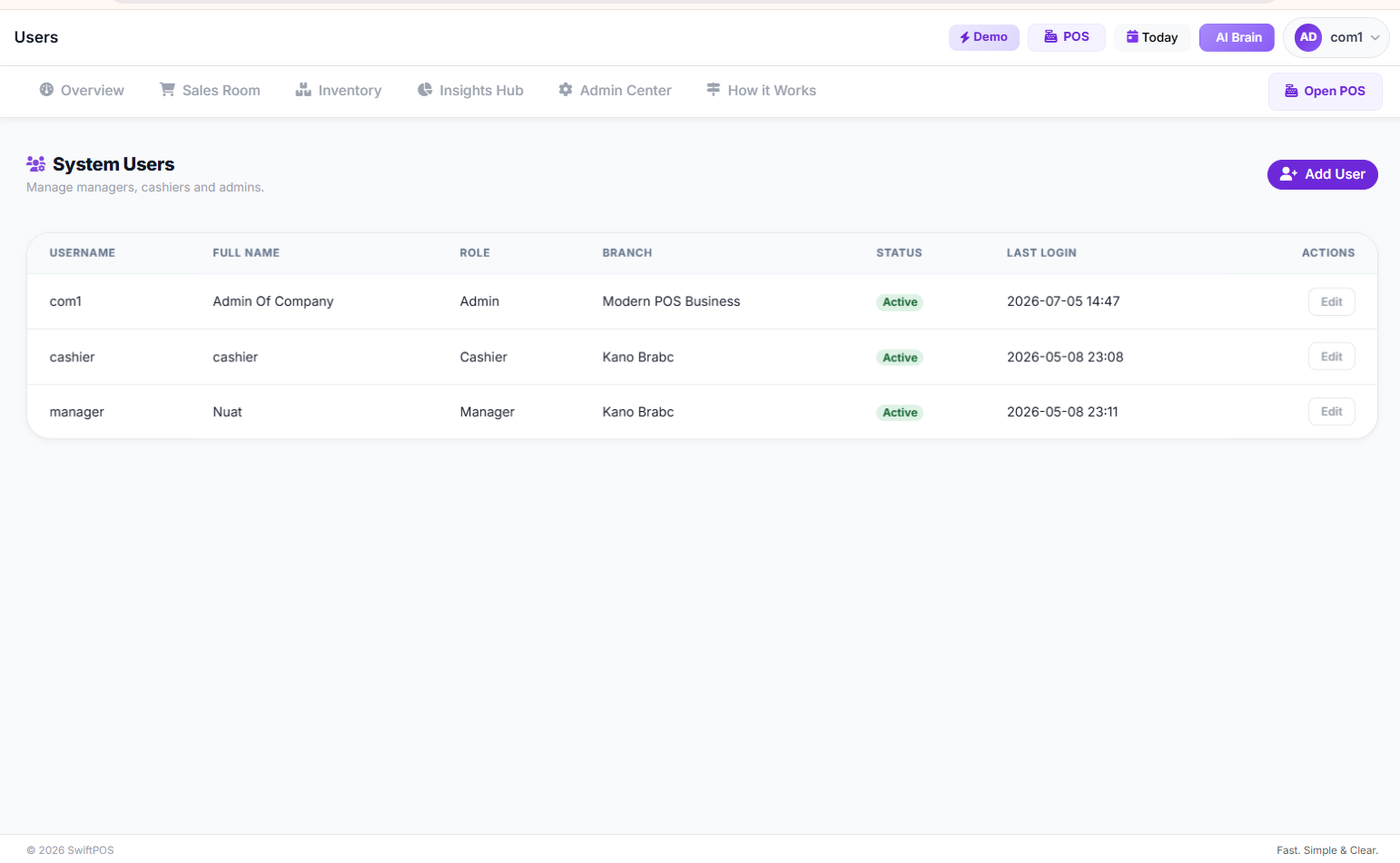 Staff User Management Page
This is where SwiftPOS NG shines. It allows you to manage staff and control what different staff can do. You can easily create roles like "Storekeeper," "Supervisor," or "Sales Assistant" and then assign very specific permissions to each. This ensures that every team member has exactly what they need to do their job, and nothing more.
Step 3: Implement Manager Approval for Sensitive Actions
This is a critical layer of business security. For actions that carry significant risk, like large discounts, voiding sales, or adjusting stock, the system should require a manager's PIN or password. This acts as a double-check, reducing the chances of errors or intentional misuse.
Imagine a busy Saturday at your electronics store in Computer Village. A customer wants a ₦5,000 discount on a smartphone. Your cashier can process the sale, but for that discount, they need to call the manager over to input their unique PIN. This simple step prevents your cashier from giving away too much profit, or worse, making unauthorized transactions.
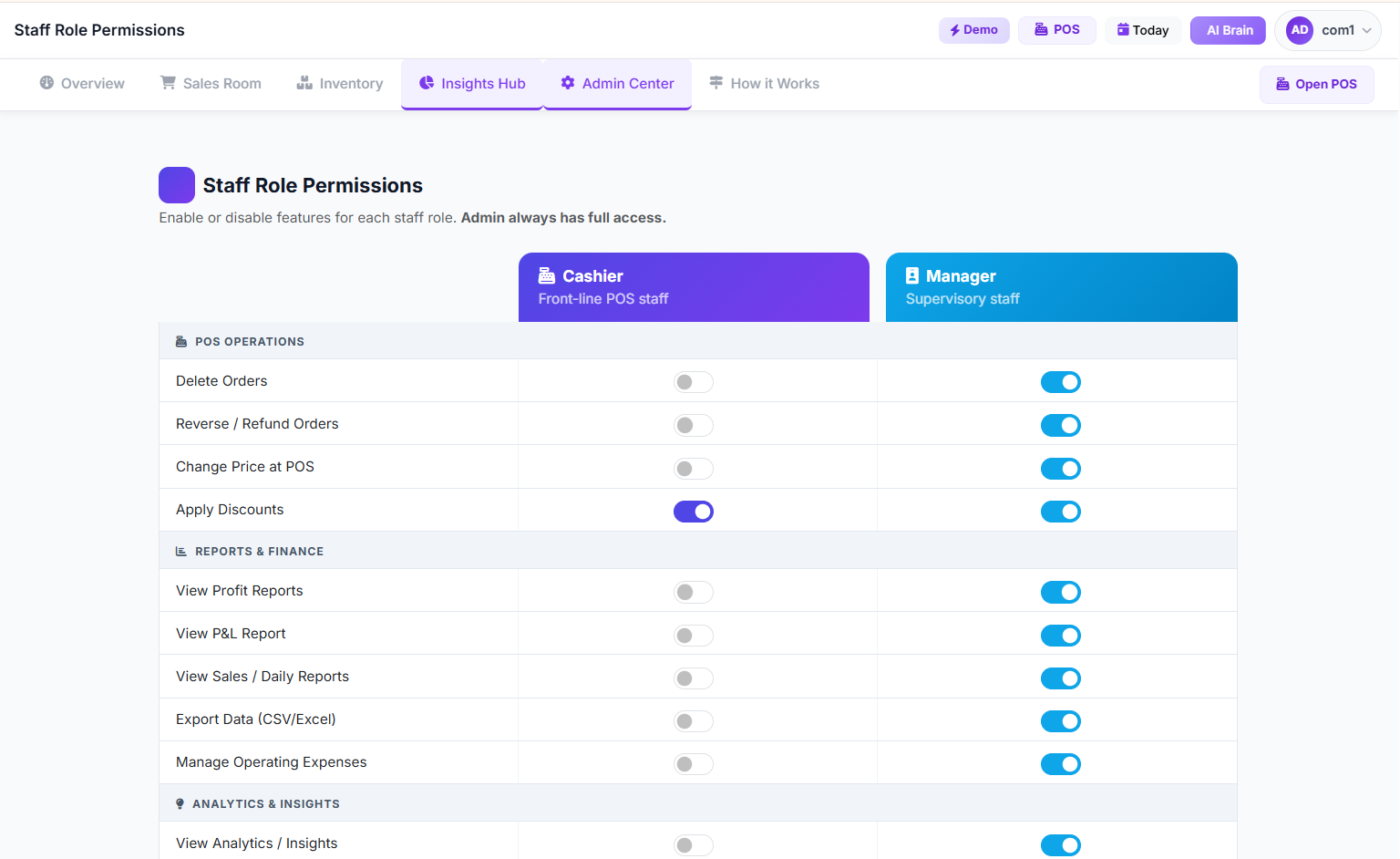 Staff Role Permissions Page
Step 4: Regularly Review Staff Activity and Audit Logs
Setting up permissions isn't a one-and-done task. You need to actively monitor. Most good retail management systems will have an audit log feature that tracks every significant action taken by each staff member. This means you can see:
- Who logged in and when
- Which sales were processed
- Any discounts applied
- Voided transactions
- Stock adjustments made
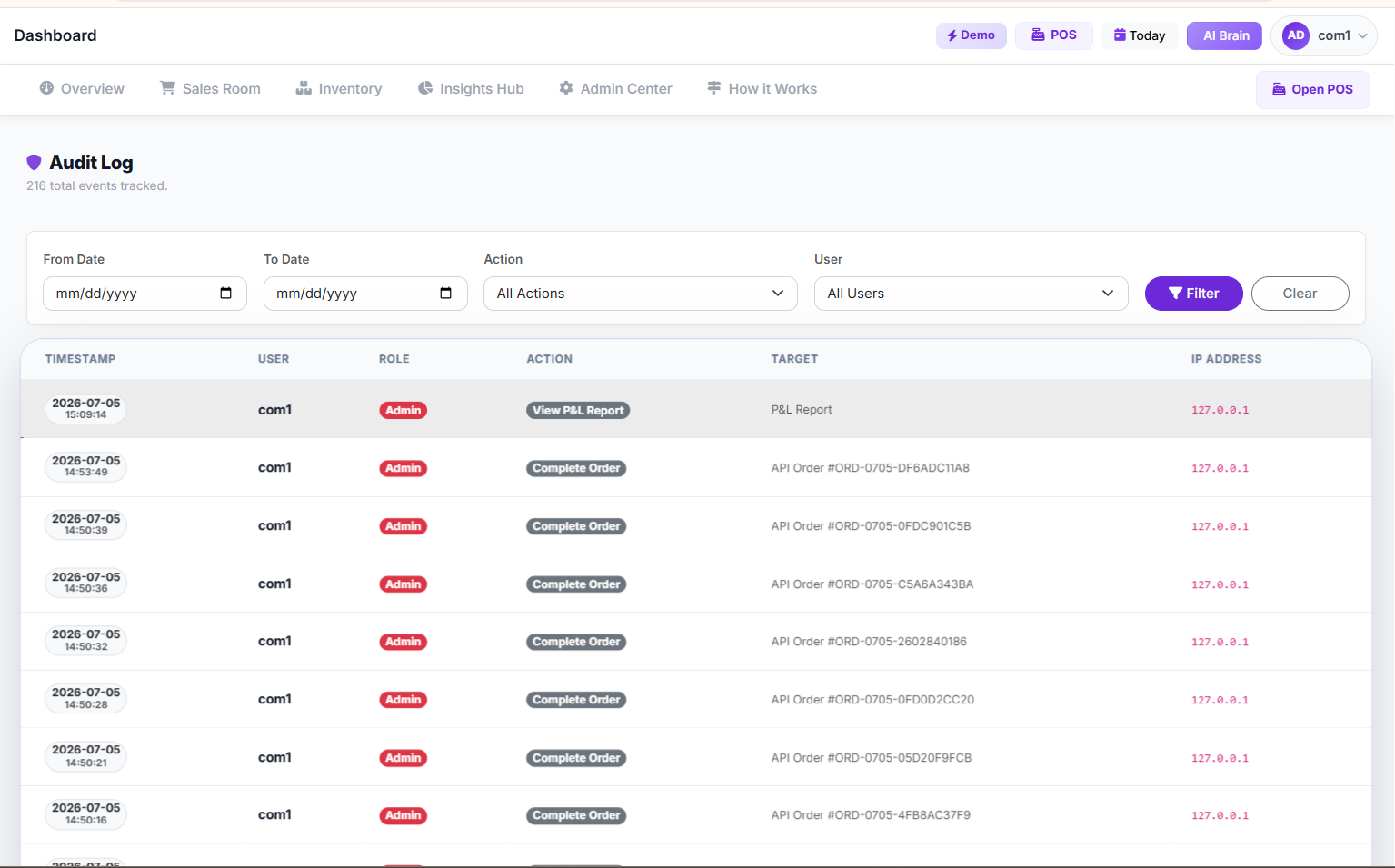 Audit Log Page
Step 5: Conduct Regular Training and Policy Refreshers
Technology changes, and so do people. Your staff need to understand why these permissions are in place, not just how to use the system. Regular training sessions, even short ones, can reinforce your policies and keep everyone on the same page regarding employee access.
This also provides an opportunity for staff to ask questions or report any system issues they encounter. A well-informed team is your first line of defense against operational glitches and security breaches.
The Numbers That Will Make or Break You
Let's talk money, because that's why we're in business, right? Implementing proper staff permissions isn't just about peace of mind; it has a direct impact on your bottom line.
Consider the potential costs if you don't get this right:
- Losses from unauthorized discounts/voids: In a medium-sized supermarket in Lagos, I've seen this amount to ₦50,000 – ₦150,000 per month. That's money directly out of your profit.
- Inventory shrinkage: When stock isn't properly tracked or adjusted, you could be losing ₦30,000 – ₦100,000 worth of goods monthly, simply disappearing due to poor controls. Learn more about inventory management mistakes crushing your profits.
- Cost of investigating fraud: If you suspect foul play, investigating can take valuable time away from running your business, potentially costing you ₦20,000 – ₦100,000 in lost productivity or even external consultation fees.
- Cloud-based POS/Inventory Software: As mentioned, ₦5,000 - ₦25,000 monthly. This is your core tool for setting up staff permissions and managing retail operations.
- IT Support/Setup (one-time): If you need help integrating, budget ₦20,000 - ₦100,000.
- Training on New Systems (per staff member): ₦5,000 - ₦15,000. This can often be done in-house with good software tutorials.
- Monthly Internet Data: ₦10,000 - ₦30,000 for reliable connectivity, which is crucial for cloud systems.
Growth After Launch: The Next 90 Days
You've set up your system, defined your roles, and trained your team. What next? The first 90 days after implementing new staff permissions are crucial for solidifying your processes and seeing tangible results.
Day 1-30: Monitor and Adjust.
Don't be afraid to tweak permissions. You might find a cashier needs a specific permission you initially overlooked, or that a manager needs less access to certain areas. Pay close attention to your audit logs and
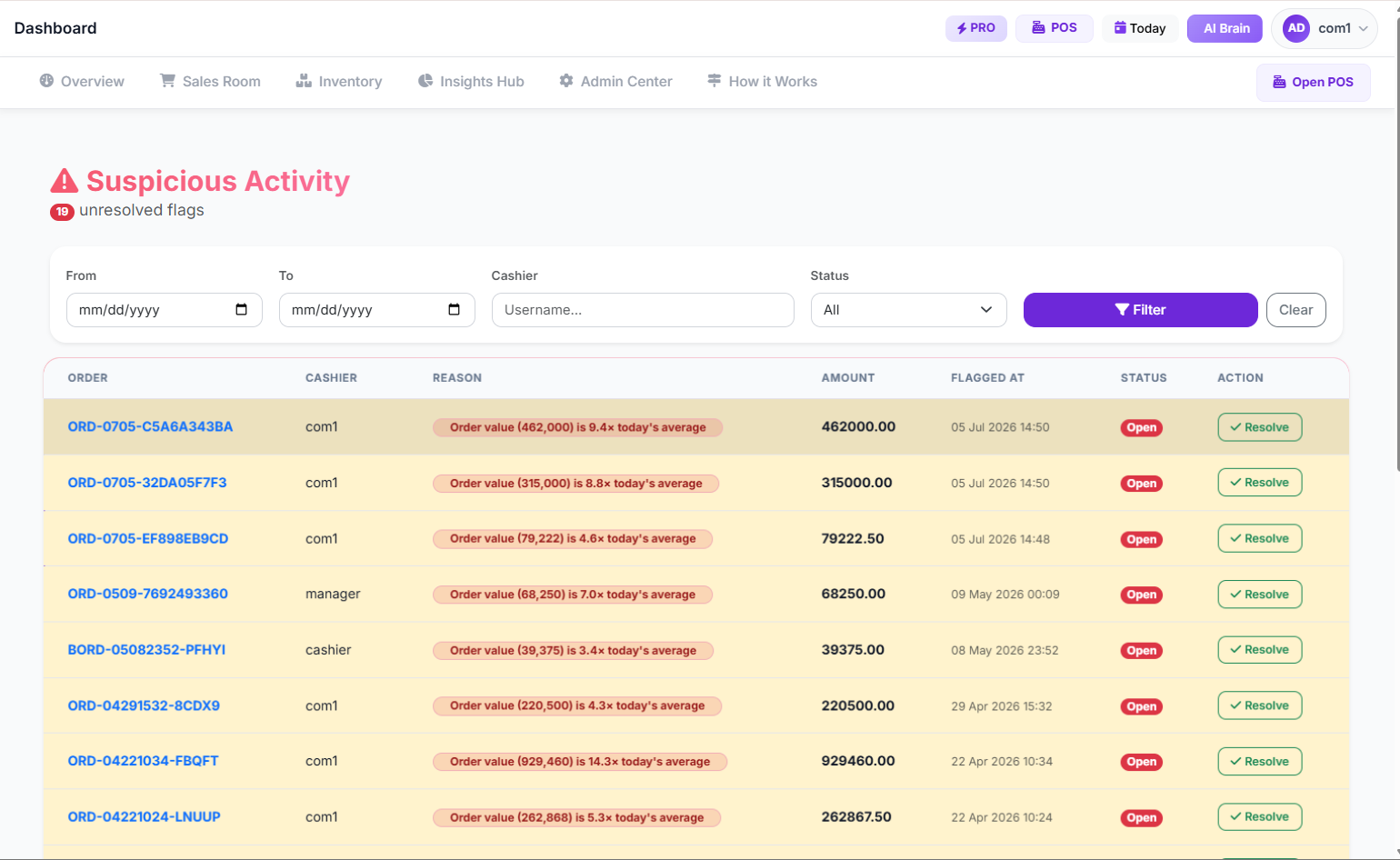 suspicious activity page
Day 31-60: Review Performance and Identify Trends.
Use the reporting features of your POS system. Look at individual staff performance. Are sales up? Are discounts down? Is inventory more accurate? SwiftPOS NG offers powerful
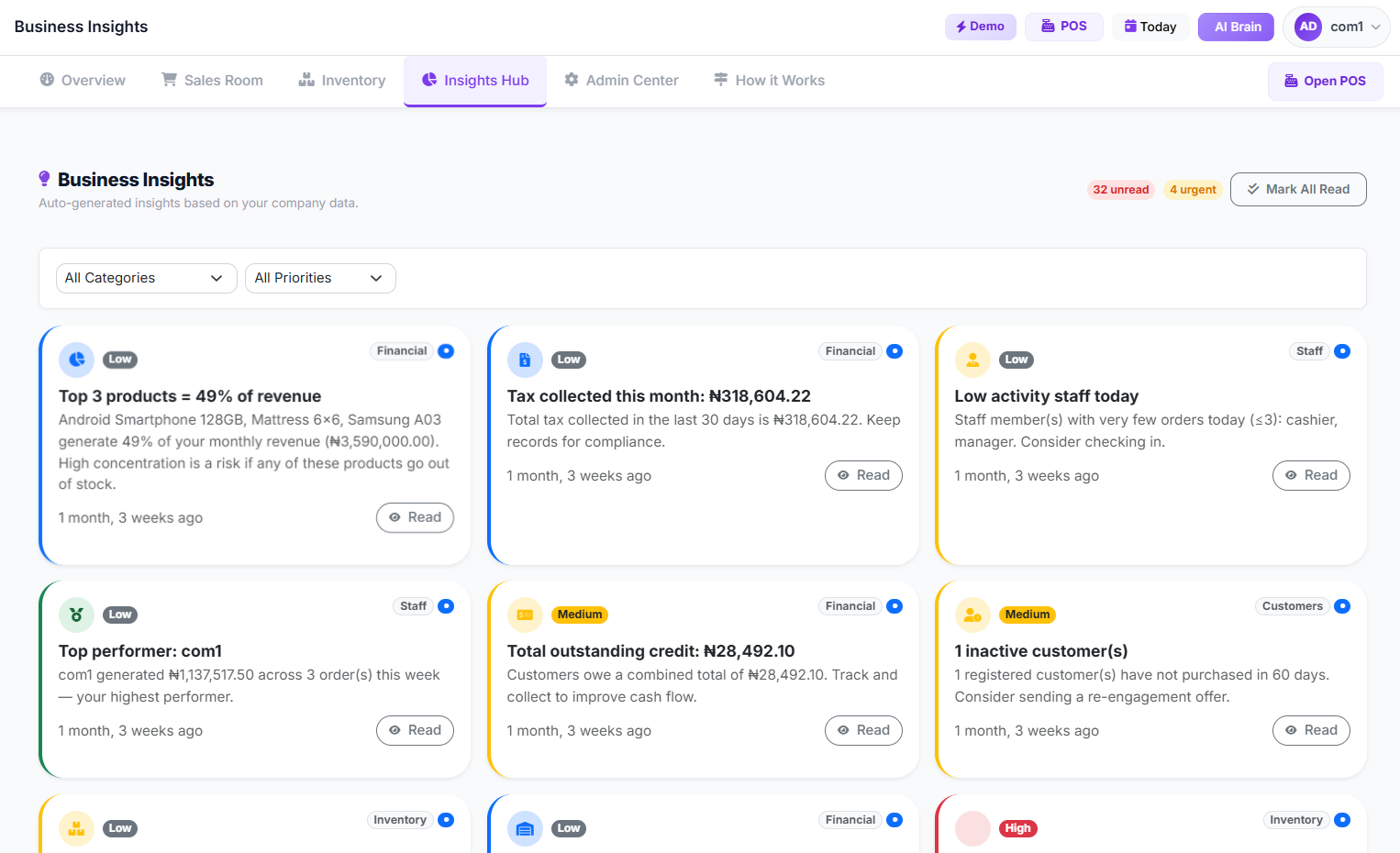 business insights
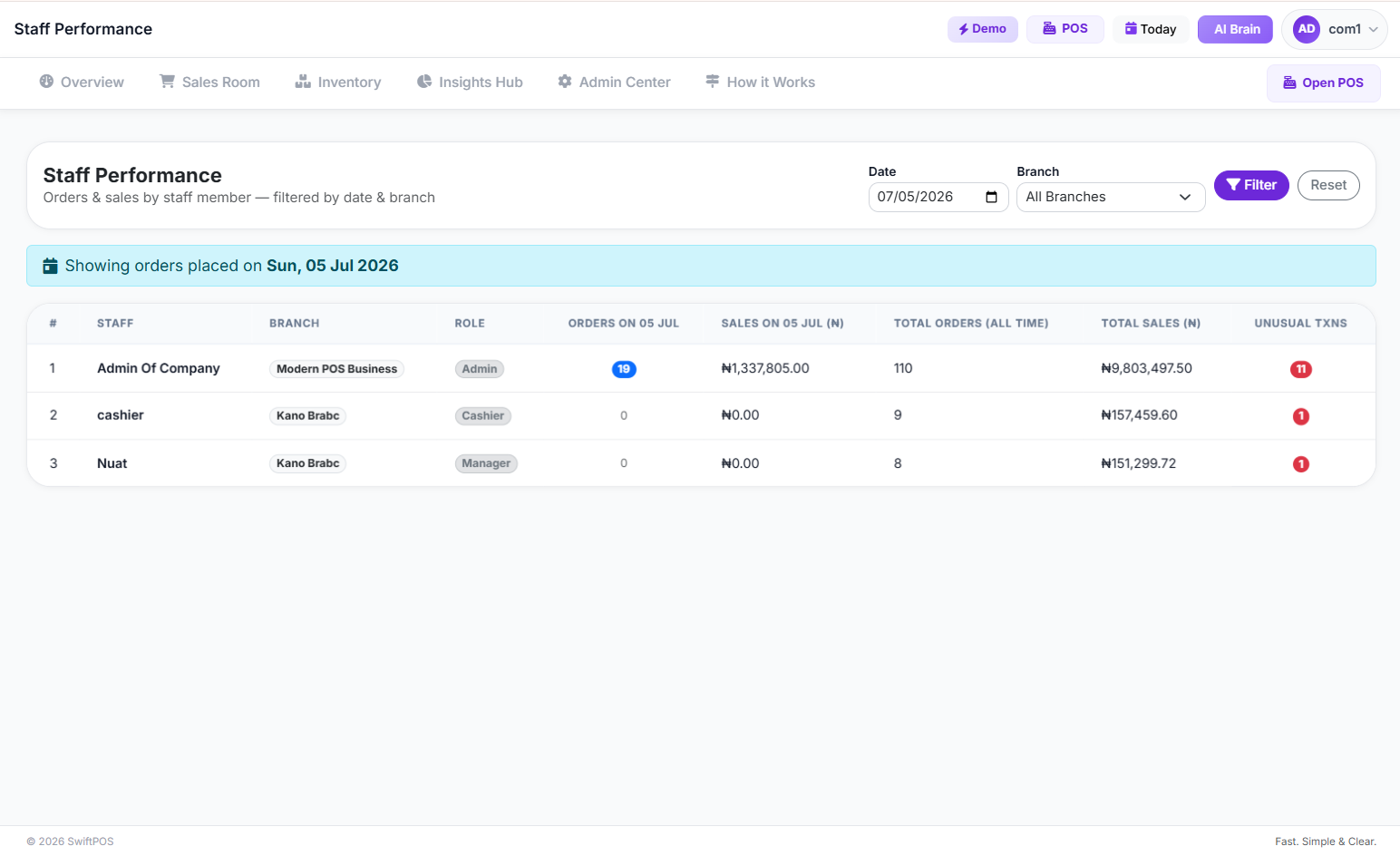 staff performance pages
Day 61-90: Refine and Scale.
By now, your team should be comfortable with the new system. This is the time to look at how you can further optimize. Can you introduce self-checkout kiosks to free up cashiers? Can you expand to another branch, knowing your staff permission framework is solid? The beauty of a well-structured system is that it makes scaling much easier. You’ve built a strong foundation for future growth.
 Clean modern retail store interior with subtle digital
FAQ: Answers to What You're Actually Googling
Q1: How do I handle staff permissions for multiple branches?
This is a common concern for growing businesses. The key is to use a cloud-based retail management system that supports multi-branch operations. With such a system, you can set up global roles (e.g., "Branch Manager," "Head Office Administrator") and then assign specific permissions that apply across all locations. You can also have location-specific roles. For instance, a "Cashier - Surulere Branch" might have different permissions than a "Cashier - Ikeja Branch" if your operations differ. SwiftPOS NG is designed for multi-branch businesses, allowing you to manage staff and inventory across all your locations from a central dashboard.
Q2: What if my internet goes down? Can my staff still operate the POS with their permissions?
This is a critical question for any Nigerian business. Many modern cloud POS systems, including SwiftPOS NG, offer offline capabilities. This means that core POS functions, like processing sales and applying basic permissions, can continue even without an internet connection. Once connectivity is restored, all data automatically syncs. It's essential to confirm this feature when choosing a system, as it's vital for uninterrupted operations. You can learn more about this in our article: Can Your POS System Work Without Internet?
Q3: What's the biggest mistake people make when setting up staff permissions?
Honestly, the biggest mistake is over-permissioning. Owners often give staff more access than they actually need "just in case." This creates unnecessary security risks. Always follow the principle of least privilege: give each staff member only the permissions required to perform their specific job functions, and nothing more. If a cashier doesn't need to see your profit and loss statements, they shouldn't have access to them. It's that simple.
Q4: How often should I review my staff permissions?
You should review your staff permissions at least once a year, or whenever there's a significant change in your business structure, staff roles, or if an employee leaves. It’s also a good idea to do a quick spot-check every quarter, especially for critical roles. This ensures that permissions remain relevant and no unauthorized access persists.
Q5: Can staff permissions help with preventing theft?
Absolutely. While no system can entirely eliminate theft, robust staff permissions significantly reduce opportunities for internal theft and fraud. By restricting access to sensitive actions like voiding sales, issuing refunds, or making stock adjustments without approval, you create layers of accountability. When combined with audit logs and regular monitoring, it acts as a strong deterrent and helps you quickly identify suspicious activity. This is a core component of overall [business security].
Ready? Here's Where to Start
You've learned a lot today about how to set up staff permissions in your business, and why it's so important for your retail management. It's not just about rules; it's about protecting your hard-earned profit and building a more efficient, secure operation.
If you're still using manual methods or basic spreadsheets, it's time to embrace a system that empowers you to control your business, not just react to it. SwiftPOS NG offers a comprehensive solution for Nigerian retailers, designed to help you manage sales, inventory, customers, and crucially, your staff with precision.
Don't let preventable losses eat into your margins. Take the first step towards better control and greater profitability today. Explore our features and see how SwiftPOS NG can transform your business. You can even try it out with a 14-day free trial.
Written by SwiftPOS Team
Practical guides from the retail specialists at Nura Mustapha Technologies Limited, for modern Nigerian merchants.