Nigerian Retailers: How to Stop Losing Money with a POS System
SwiftPOS Team
Published July 23, 2026
Every year, Nigerian retailers lose an estimated ₦1.2 trillion due to inefficiencies, inventory shrinkage, and undocumented sales. For small and medium-sized businesses still relying on manual ledgers or basic spreadsheets, these losses aren't just figures; they're the difference between thriving and merely surviving. The good news is that a significant portion of this drain can be plugged with the right technology.
The Nigerian Retail Landscape: A Call for Efficiency in 2026
The Nigerian retail sector is dynamic, characterized by rapid growth alongside persistent challenges. In 2026, market analysts project continued expansion, with a growing middle class and increasing digital adoption driving consumer spending. However, this growth often comes with increased competition and operational complexities. Businesses frequently grapple with erratic supply chains, fluctuating economic conditions, and the ever-present challenge of managing cash flow effectively. According to a 2025 report by the National Bureau of Statistics, over 60% of small businesses in Nigeria cite inventory management and sales reconciliation as major pain points leading to financial losses. Furthermore, the shift towards digital payments, while beneficial, requires robust systems to track and integrate various transaction types seamlessly. Retailers need tools that not only process sales but also provide clear visibility into every aspect of their operations to prevent profit erosion.
Descriptive Alt TextWhat You Need Before You Start
Before diving into implementing a POS system, ensure you have these foundational elements in place:
- A Clear Understanding of Your Business Processes: Document your current sales flow, inventory tracking methods, and customer management strategies. This helps identify specific areas where a POS system can bring the most value.
- Reliable Internet Connection: Most modern POS systems are cloud-based, requiring a stable internet connection for real-time data synchronization and access.
- Basic Hardware: While many systems are accessible via web browser, consider a tablet, smartphone, or computer for the POS terminal, and potentially a receipt printer and barcode scanner to enhance efficiency.
- Defined Product Catalog: Have a comprehensive list of all your products with accurate pricing, SKUs, and any variant details ready.
- Budget Allocation: Understand the costs involved, including subscription fees, hardware (if needed), and potential training.
- Dedicated Staff: Identify key personnel who will be responsible for learning and utilizing the new system.
Step-by-Step: Implementing a POS System to Boost Profitability
Adopting a Point-of-Sale (POS) system can transform your retail business, moving it from manual inefficiencies to streamlined, data-driven operations. Follow these steps to ensure a successful implementation that directly impacts your bottom line.
Step 1: Evaluate Your Business Needs and Choose the Right System
Before selecting a POS system, conduct a thorough assessment of your specific business requirements. Are you a small mini-mart primarily focused on quick sales and basic inventory, or a multi-branch pharmacy needing robust stock transfers and expiry date tracking? Consider features like inventory management, sales reporting, customer relationship management (CRM), employee management, and multi-branch capabilities.
Look for a system that offers flexibility and scalability. For Nigerian retailers, local support and an understanding of the unique market dynamics are crucial. The right system should integrate seamlessly with your existing operations, whether you handle cash, bank transfers, or mobile money payments. Don't just pick the cheapest option; choose one that aligns with your long-term growth objectives and provides comprehensive features. Many providers offer a range of features to cater to different business sizes and needs, which you can explore on their features page.
Step 2: Set Up Your Product Inventory
Accurate inventory is the backbone of any profitable retail business. Begin by meticulously entering all your products into the POS system. This includes product names, SKUs, categories, prices, cost of goods sold (COGS), current stock levels, and minimum stock alerts. If you have products with variants (e.g., different sizes or colors), ensure the system supports tracking these individually.
For businesses with a large number of products, look for systems that allow bulk import via Excel templates, significantly saving time and reducing data entry errors. Generating and printing your own barcodes for products that lack them can also dramatically speed up checkout processes and inventory counts.
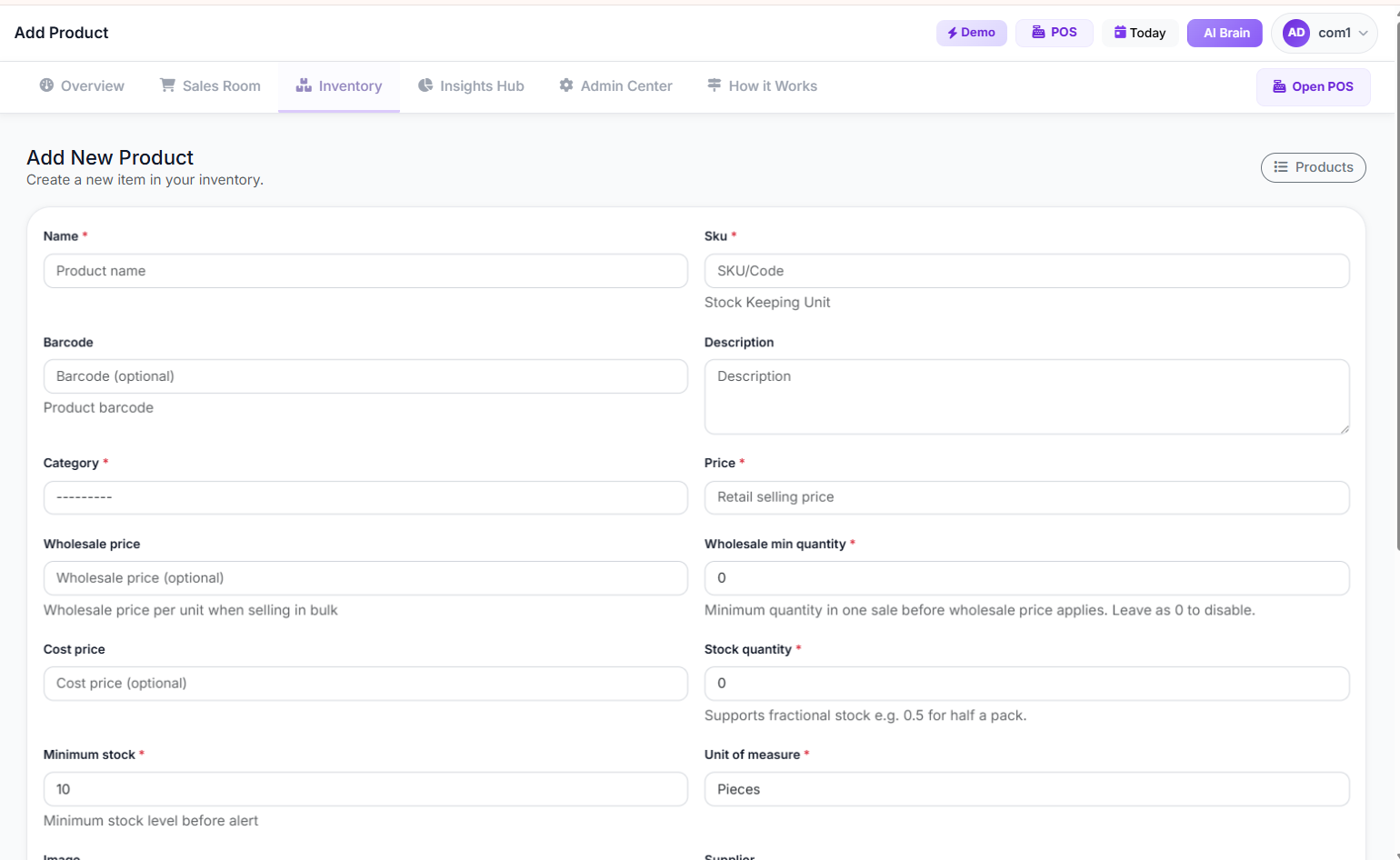 Add/Edit Product Page
Step 3: Configure Sales and Payment Options
Customize your POS terminal to reflect your payment preferences. This involves setting up accepted payment methods such as cash, bank transfer, POS/ATM card, and mobile money. If you offer credit sales to loyal customers, ensure the system can track outstanding balances and facilitate partial or full payments against these credits.
Consider whether you need features like discount application at checkout, promo code validation, or even split payments where a customer can pay using two different methods for a single transaction. These functionalities enhance customer experience and streamline your sales process.
Step 4: Train Your Staff
A POS system is only as effective as the people using it. Comprehensive training for all staff members, from cashiers to managers, is essential. Focus on practical, hands-on training sessions covering daily operations: processing sales, handling returns, managing customer data, and performing end-of-day reconciliation.
Emphasize the benefits of the system, such as faster checkout times, reduced errors, and access to sales data, to encourage adoption. Many POS providers offer tutorials and support resources to aid in staff training, which can be found on their tutorials page.
 Descriptive Alt Text
Step 5: Implement Inventory Control and Management
Beyond initial setup, continuous inventory management is crucial for profitability. Regularly update stock levels as new goods arrive and sales occur. Utilize features for stock adjustments (e.g., for damaged goods or returns) and conduct periodic stock counts to reconcile physical inventory with system records.
For businesses with multiple locations, inter-branch stock transfers become vital. A robust POS system allows you to track stock movements between branches, preventing stockouts in one location while another has an excess. This minimizes wasted capital tied up in stagnant inventory and ensures products are available where demand is highest.
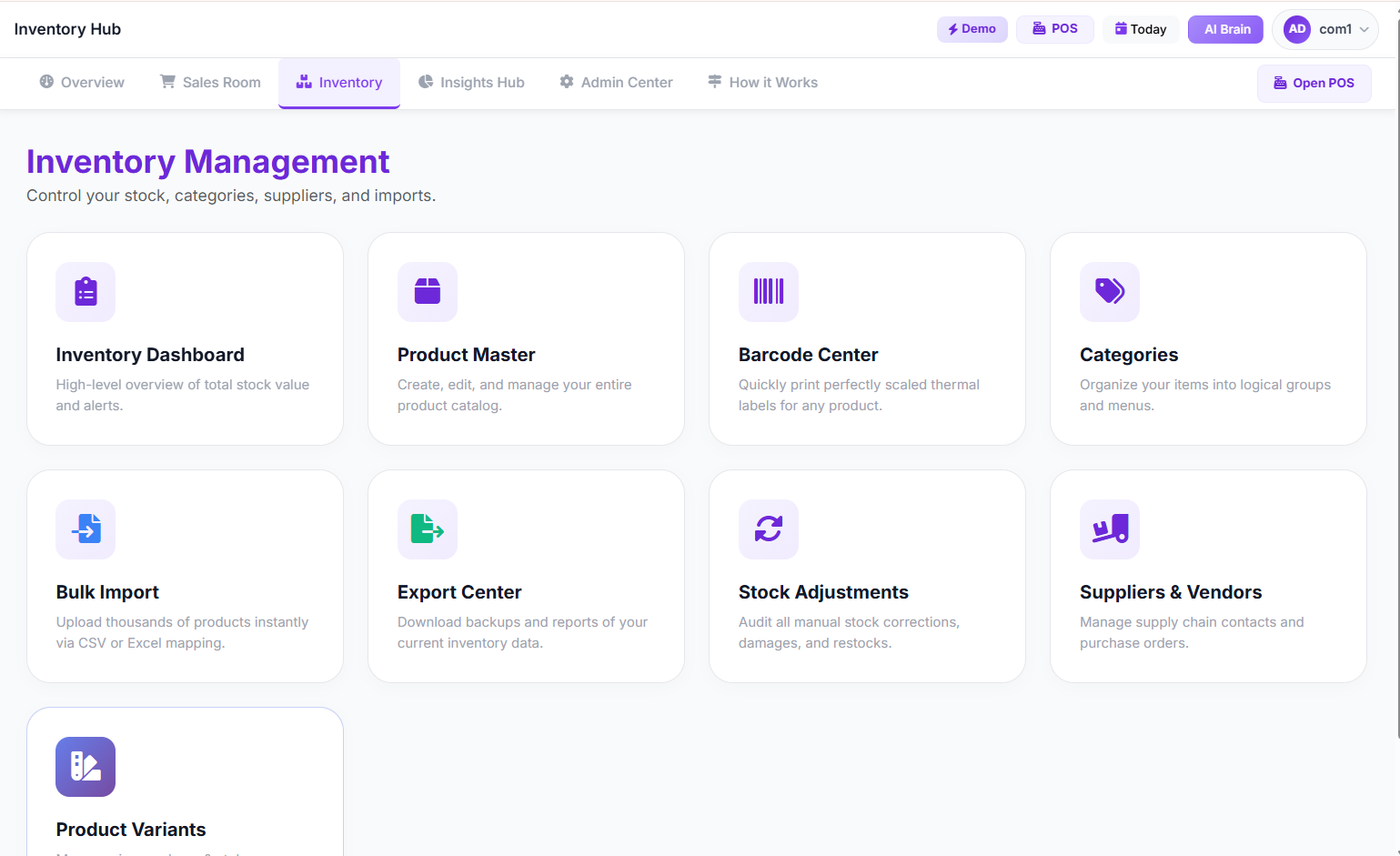 Inventory Hub
Step 6: Leverage Reporting and Analytics for Insights
This is where a POS system truly helps you stop losing money. Move beyond just recording sales; use the system's reporting capabilities to understand your business performance. Generate daily sales reports, analyze sales by item, track profit and loss, and monitor staff performance.
Look for systems that offer AI-powered insights, automatically highlighting trends, potential issues like slow-moving inventory, or opportunities for growth. These insights can inform pricing strategies, purchasing decisions, and marketing efforts, directly impacting your profitability. For example, SwiftPOS NG provides an AI Insights Dashboard that delivers actionable recommendations based on your operational data.
Common Mistakes to Avoid
- Underestimating Training Needs: Insufficient staff training leads to errors, slow operations, and staff frustration, negating the benefits of the system.
- Ignoring Data Entry Accuracy: "Garbage in, garbage out." Incorrect product data, pricing, or stock levels will lead to inaccurate reports and poor decision-making.
- Failing to Utilize Reporting Features: Many businesses use POS systems merely for transactions and miss out on the powerful analytics that can identify losses and drive growth.
- Neglecting Regular Stock Reconciliation: Without periodic physical counts and reconciliation against POS records, inventory shrinkage due to theft or errors goes undetected.
- Choosing an Overly Complex or Under-featured System: An overly complex system can overwhelm staff, while one lacking essential features will quickly become a bottleneck. Match the system to your actual business needs.
- Ignoring Security Features: Not utilizing PIN verification for sensitive operations or failing to manage user permissions can lead to internal fraud and unauthorized actions.
How to Track and Grow After Launch
After successfully implementing your POS system, the journey shifts to continuous monitoring and strategic growth.
Key Performance Indicators (KPIs) to Watch:
- Daily/Weekly/Monthly Sales Revenue: Track gross sales and net sales (after returns/discounts).
- Average Transaction Value (ATV): This indicates how much customers spend per visit. Look for ways to increase it through upselling or cross-selling.
- Gross Profit Margin: Understand the profitability of each product and your overall business. The Profit and Loss Report is crucial here.
- Inventory Turnover Rate: How quickly you sell your inventory. A low rate might indicate overstocking or slow-moving items.
- Stockout Rate: The percentage of times an item is out of stock when a customer wants to buy it. High rates mean lost sales.
- Shrinkage Rate: The percentage of inventory lost due to theft, damage, or administrative errors. This is directly impacted by good inventory management.
- Customer Retention Rate: How many customers return to your store. A good POS system helps track customer history and preferences.
- Staff Performance Metrics: Track sales per employee, average transaction value per employee, and number of transactions.
- Optimize Inventory: Use stock forecast reports to predict demand and automate reorder alerts, ensuring you always have popular items and avoid overstocking slow-movers.
- Personalize Customer Experience: Leverage customer data to offer targeted promotions or loyalty programs. For instance, you can use customer purchase history to suggest relevant products.
- Strategic Pricing: Analyze sales by item and profit margins to adjust pricing for maximum profitability without deterring customers.
- Identify Best-Selling Products: Focus your marketing efforts and stock more of what sells best.
- Reduce Losses from Returns/Voids: Monitor suspicious activity reports to identify patterns of fraud or error.
- Expand to Multiple Branches: If your POS system supports multi-branch management, use its centralized control to standardize operations and track performance across all locations seamlessly. SwiftPOS NG, for example, offers comprehensive multi-branch features, allowing you to manage stock, sales, and staff across all your outlets from a single dashboard.
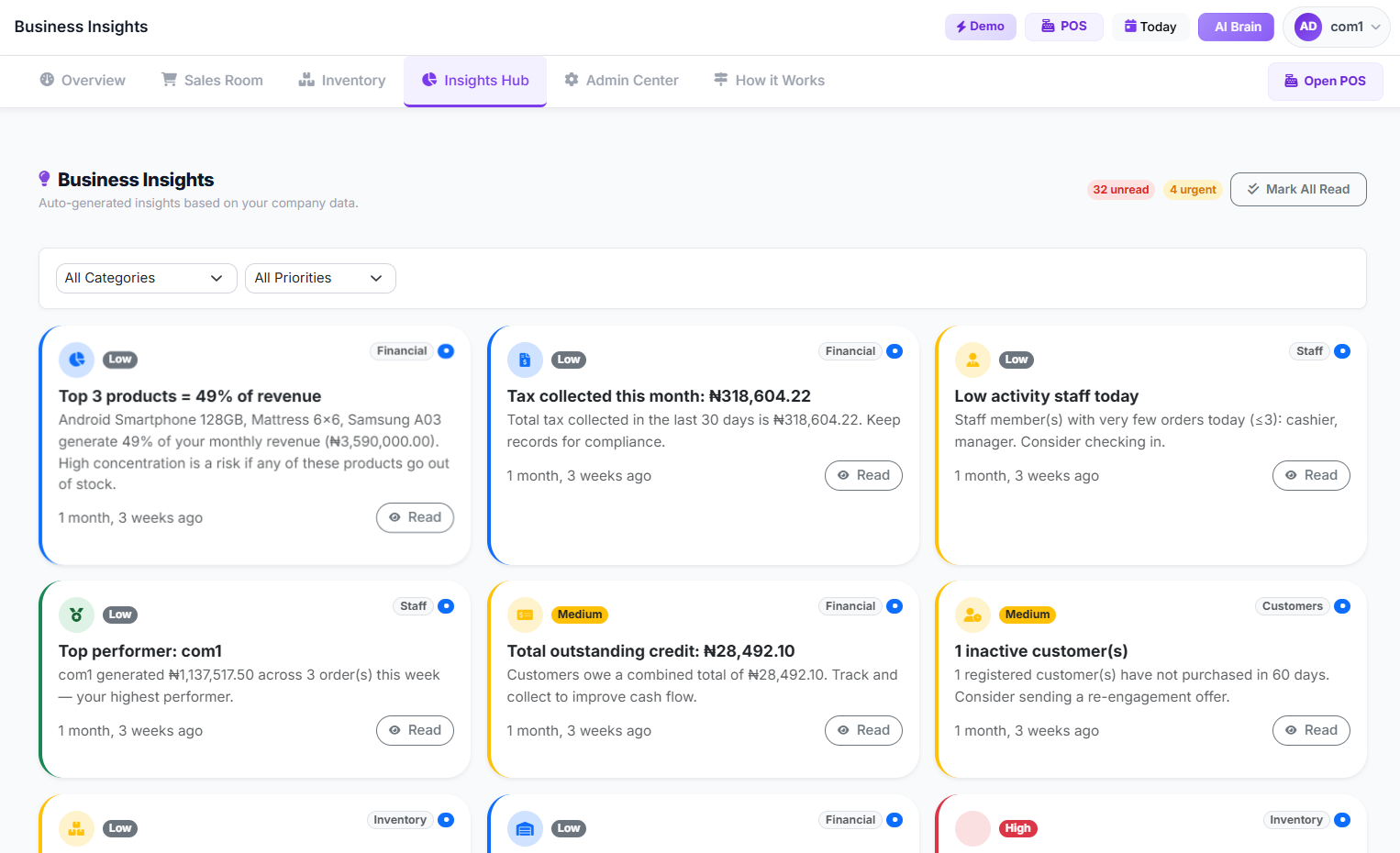 Business Insights Page
By consistently reviewing these metrics and applying insights from your POS system, you can make informed decisions that drive sustainable growth and significantly improve your profitability.
Frequently Asked Questions
What is a POS system and why do Nigerian retailers need it?
A Point-of-Sale (POS) system is a combination of hardware and software used to process transactions, manage inventory, and track sales. Nigerian retailers need it to move beyond manual, error-prone methods, gain real-time insights into their business, prevent losses from theft and waste, and improve overall operational efficiency and customer service. It centralizes critical business data, streamlining everything from sales to inventory.
Can a POS system work without a constant internet connection in Nigeria?
While most modern POS systems are cloud-based and function best with a stable internet connection, many offer offline capabilities. This means they can record transactions even when the internet is down and then sync the data once connectivity is restored. It's crucial to check for this feature when choosing a system to ensure uninterrupted operations, especially in areas with unreliable internet.
How much does a POS system cost for a small business in Nigeria?
The cost varies widely depending on the features, provider, and hardware required. Many cloud-based POS systems operate on a subscription model, with monthly or annual fees that scale with your business size and chosen features. Some providers, like SwiftPOS NG, offer flexible pricing plans to suit different budgets and business needs, often including a free trial period.
Will a POS system help me manage inventory effectively and prevent stockouts?
Absolutely. A good POS system tracks every item sold, allowing for real-time inventory updates. It can set minimum stock thresholds, generate automated reorder alerts, and provide stock forecasts based on sales trends. This helps you maintain optimal stock levels, reduce carrying costs, and prevent the loss of sales due to stockouts. You can also track stock adjustments (e.g., for damaged goods) and conduct comprehensive stock audits.
How secure is my business data on a cloud-based POS system?
Reputable cloud-based POS systems employ robust security measures, including data encryption, secure servers, regular backups, and user access controls. They often comply with international data security standards. Always ensure your chosen provider has strong security protocols and offers features like two-factor authentication (2FA) and audit logs to protect your sensitive business information.
Can a POS system help detect employee theft or errors?
Yes, a comprehensive POS system includes features like audit logs that track every action performed by staff, from sales and voids to discounts and stock adjustments. Many systems also have suspicious activity monitoring, flagging unusual transactions or patterns that could indicate theft or errors, such as frequent refunds or excessive discounts. This transparency helps maintain accountability and minimize internal losses.
 Descriptive Alt Text
Ready to Transform Your Retail Business?
The time to stop losing money to inefficiencies and start maximizing your profits is now. By implementing a modern POS system, Nigerian retailers can gain unparalleled control, insight, and efficiency. Explore how a robust solution can empower your business to thrive in today's competitive market. Get started today by visiting the Main SwiftPOS App For Companies or learn more about the benefits of a modern POS system.
Contact Details: 2349164601810 (WhatsApp)