Retail Inventory Management: Step-by-Step Guide to Efficient Stock Adjustments
SwiftPOS Team
Published August 08, 2026

Every year, Nigerian retailers lose billions of Naira due to inventory discrepancies – products vanishing, expiring, or simply being miscounted. This silent drain on profits can be the difference between a thriving business and one struggling to stay afloat. Without precise stock control, your balance sheets are guesswork, and your business decisions are blind.
The Criticality of Accurate Stock in 2026
In 2026, the retail landscape in Nigeria is more competitive than ever. Customers expect product availability, and businesses face increasing pressure from rising operational costs. According to a recent report by PwC, inventory management remains a top challenge for small and medium-sized enterprises (SMEs) in emerging markets, with discrepancies often exceeding 10% of total stock value annually. This isn't just about lost items; it impacts cash flow, customer satisfaction, and your ability to forecast demand accurately. Manual inventory systems, often relying on paper ledgers or basic spreadsheets, are simply insufficient to meet the demands of modern retail. They are prone to human error, time-consuming, and offer little to no real-time visibility into stock levels, making efficient stock adjustments nearly impossible.
Professional shot of a retail store owner looking stressed while reviewing cluttered paper inventory recordsWhat You Need Before You Start
Before diving into efficient stock adjustments, ensure you have these foundational elements in place:
- A Clear Inventory Policy: Document procedures for receiving goods, making sales, handling returns, and performing counts.
- Dedicated Personnel: Assign specific staff members responsibility for inventory tasks and provide adequate training.
- Standardized Product Identification: Use unique SKUs and barcodes for every product to prevent confusion.
- Physical Organization: Ensure your store and stockroom are well-organized, with clear labeling and designated storage areas.
- Basic Counting Tools: Clipboards, pens, and potentially a barcode scanner if you're upgrading from manual methods.
Step-by-Step: Efficient Retail Stock Adjustments
Mastering stock adjustments is a continuous process that ensures your physical inventory matches your recorded inventory. Follow these steps to implement a robust system.
Step 1: Schedule Regular Inventory Counts
Consistent counting is the bedrock of accurate inventory. Depending on your business size and product volume, you might opt for different counting methods.
- Annual Physical Inventory: A complete count of all items in your store, typically done once a year. While comprehensive, it's disruptive and prone to errors if not meticulously planned.
- Cycle Counting: A more frequent, less disruptive method where small sections of inventory are counted daily or weekly. This allows for continuous verification and quicker identification of discrepancies. For instance, a pharmacy might cycle count high-value prescription drugs more frequently than over-the-counter pain relievers.
- Spot Checks: Quick, impromptu counts of specific items or categories to investigate suspected discrepancies or verify stock levels before a large order.
Step 2: Identify and Document Discrepancies
During your inventory count, you will inevitably find differences between what your records say you have and what you actually have on hand. It's crucial to meticulously document these discrepancies.
For each item, record:
- The SKU and Product Name.
- The Recorded Quantity (from your system).
- The Physical Quantity (what you actually counted).
- The Variance (Physical Quantity - Recorded Quantity).
- The Reason for Adjustment (e.g., damaged, lost, stolen, received but not recorded, sold but not deducted). This is critical for root cause analysis.
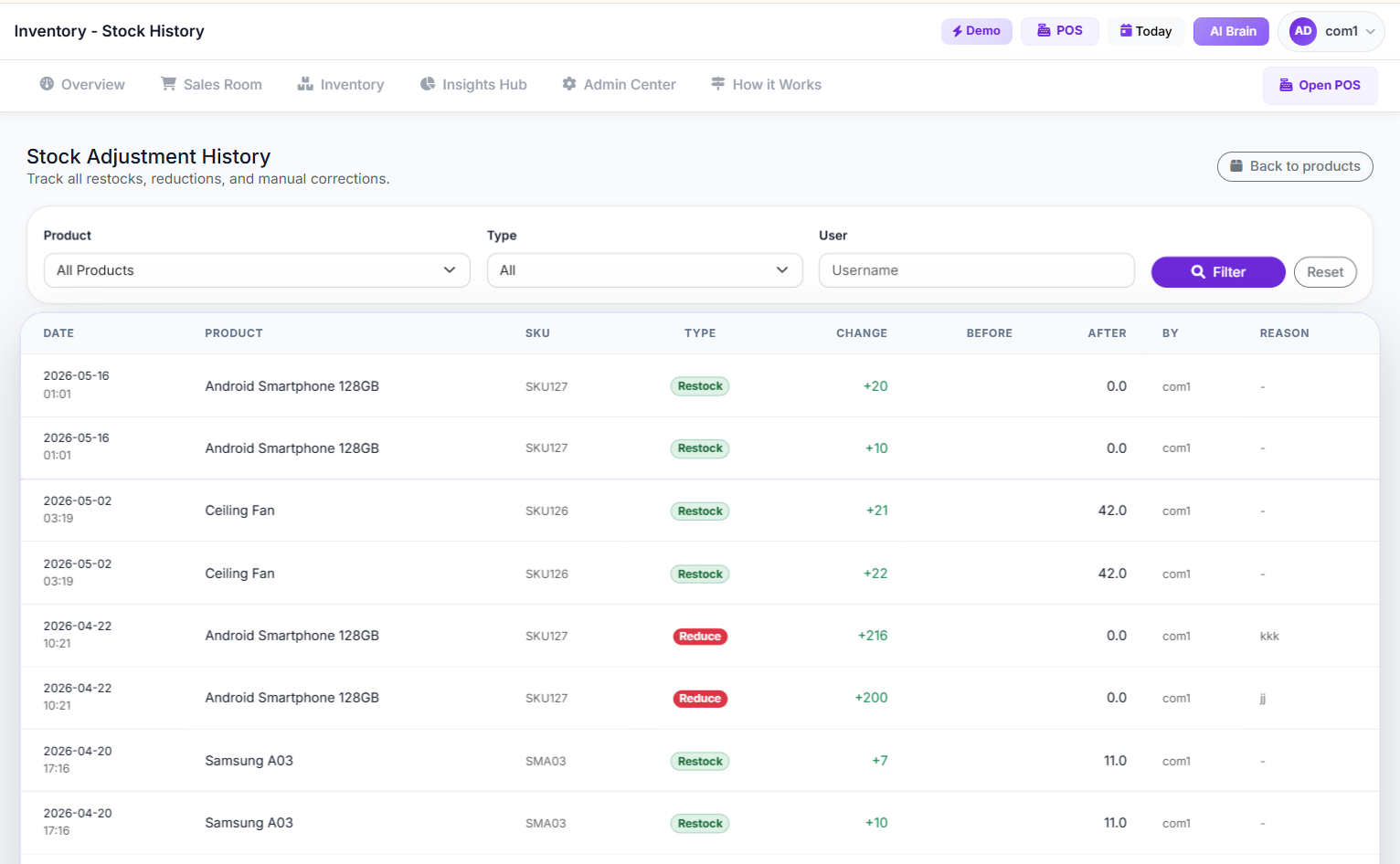 Screenshot of the SwiftPOS Stock Adjustment History page, showing a list of past adjustments with details like product, quantity, reason, and date
Step 3: Investigate Root Causes
Simply adjusting numbers without understanding why discrepancies occurred is a missed opportunity. This step is about detective work.
- Lost/Stolen Items: Could it be theft (internal or external)? Review security footage, assess store layout, or speak with staff.
- Damaged Goods: Are products being handled improperly during receiving or display? Is packaging adequate?
- Receiving Errors: Were goods counted incorrectly when they arrived? Was the supplier invoice accurate?
- Sales Errors: Were items scanned twice, or not at all? Were returns processed correctly?
- Data Entry Mistakes: If using manual systems, human error during recording is a common culprit.
Step 4: Implement the Adjustment in Your System
Once you've identified the discrepancy and ideally, its cause, the next step is to update your inventory records. This is where a robust inventory management system becomes invaluable.
Manually updating stock in spreadsheets can be tedious and introduce new errors. A good system will allow you to quickly and accurately adjust stock levels. With a platform like SwiftPOS NG, you can go to the product detail page and initiate a stock adjustment directly.
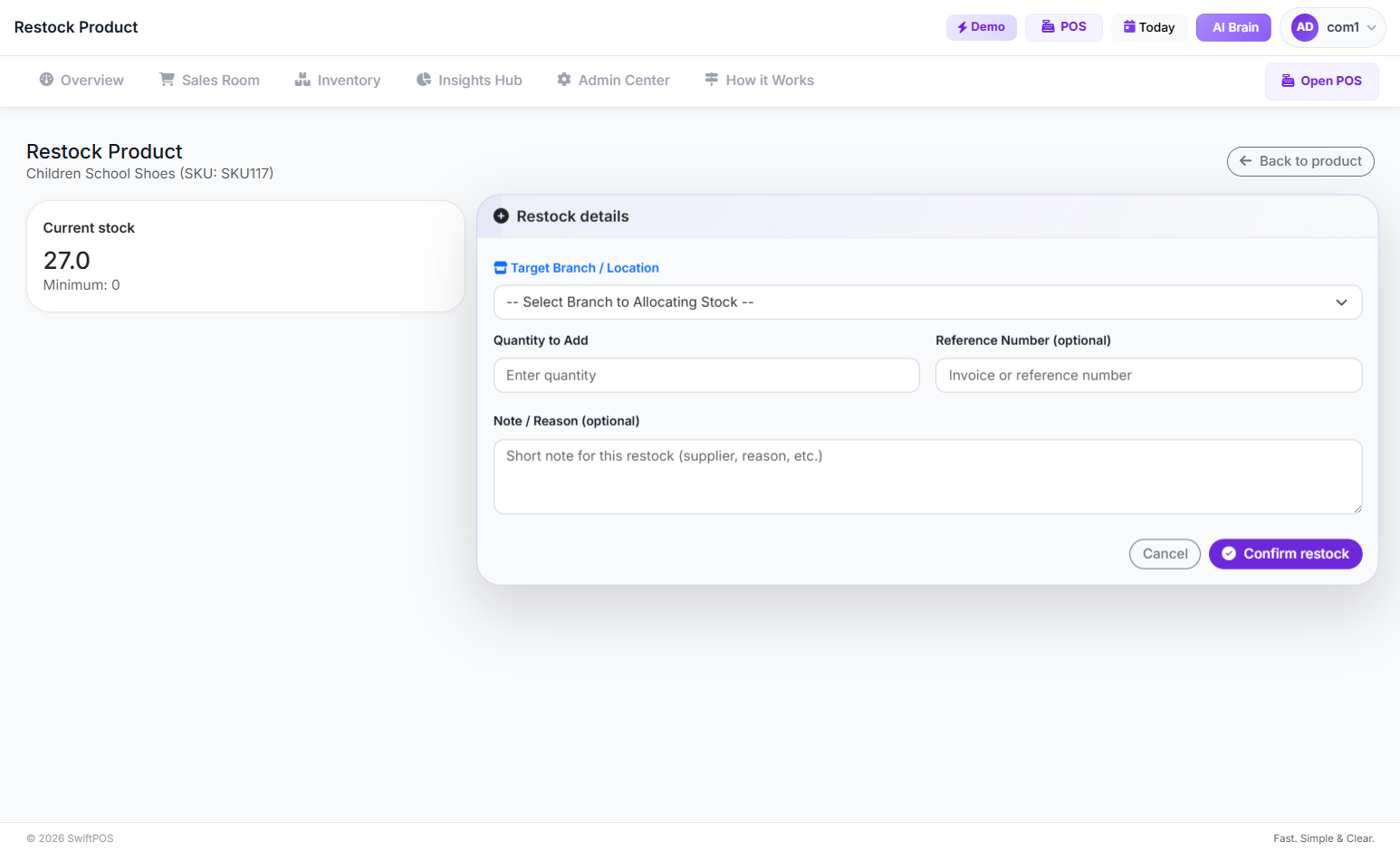 Screenshot of the SwiftPOS Add product Stock page, showing fields to enter product details, quantity, cost, and supplier
You would select whether you are "restocking" (adding inventory) or "reducing stock" (removing inventory) and provide a reason for the change. This ensures that every adjustment is logged, creating an audit trail that is essential for accountability and future analysis. This digital record-keeping is a core benefit outlined on the SwiftPOS features page, ensuring your data integrity.
Step 5: Review and Analyze Adjustment Data
After making adjustments, don't just forget about them. Regularly review your stock adjustment history.
- Look for patterns: Are certain products always short? Are specific staff members associated with frequent errors?
- Track reasons: Which reasons for adjustment (damage, theft, receiving error) are most common?
- Quantify losses: Understand the monetary impact of these adjustments.
Step 6: Implement Corrective Actions
Based on your analysis in Step 5, put concrete actions in place to prevent future discrepancies.
- Training: If staff are making scanning errors, provide additional training on POS operations.
- Process Improvement: If receiving errors are common, implement a double-check system for incoming goods.
- Security Upgrades: If theft is an issue, consider enhanced surveillance or stricter access controls.
- Supplier Communication: If supplier errors are frequent, communicate your findings and seek solutions.
 Professional shot of a diverse team of retail staff conducting an organized inventory count in a well-lit stockroom
Common Mistakes to Avoid
Even with a clear process, pitfalls can derail your efforts. Be mindful of these common errors:
- Infrequent Counting: Relying solely on annual counts leaves too much room for error and makes it harder to pinpoint when and why discrepancies occurred.
- Lack of Staff Training: Untrained staff are more likely to make errors in receiving, selling, or counting, leading to inaccurate inventory.
- Poor Physical Organization: A messy stockroom makes accurate counting almost impossible and increases the likelihood of lost or misplaced items.
- Not Leveraging Technology: Manual systems are slow, error-prone, and lack the real-time insights that modern retail demands.
> "Effective inventory management isn't just about knowing what you have; it's about understanding what you should have, why there's a difference, and what you're doing to fix it. It's a continuous pursuit of accuracy that directly impacts profitability."
How to Track and Grow After Launch
Once you've implemented a systematic approach to stock adjustments, tracking your progress and leveraging insights for growth becomes the next frontier.
- Key Performance Indicators (KPIs): Monitor metrics like inventory accuracy rate (physical count vs. system count), shrinkage rate (percentage of inventory lost due to theft, damage, or error), and inventory turnover ratio. These KPIs provide a clear picture of your inventory health.
- Sales and Inventory Reports: Regularly review reports on your fastest-moving and slowest-moving products. This helps you optimize ordering, reduce holding costs, and prevent stockouts or overstocking. SwiftPOS NG provides detailed sales by item reports and an inventory dashboard that can help you visualize these trends and make informed decisions.
- AI-Powered Insights: Modern systems go beyond basic reporting. An AI-powered insights dashboard can proactively alert you to potential issues, such as unusual sales patterns or predicted stockouts, allowing you to take action before problems escalate. This proactive approach is detailed in the benefits of using an advanced POS system.
- Supplier Performance: Track how accurately and punctually your suppliers deliver. Frequent discrepancies on their end can directly impact your inventory accuracy.
- Customer Feedback: Pay attention to customer complaints about product unavailability. This often signals underlying inventory issues.
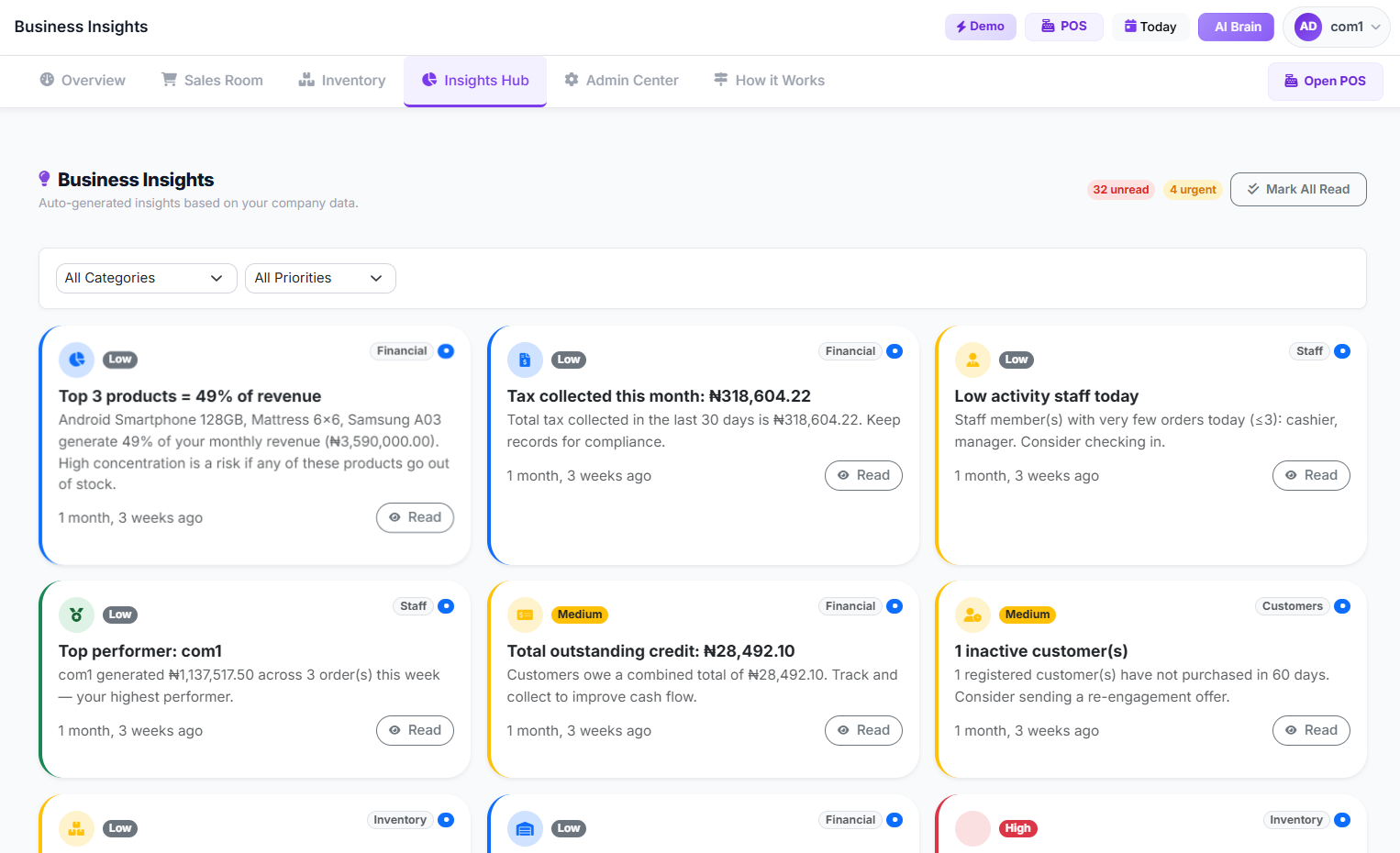 Screenshot of the SwiftPOS Business Insights Page, showing various charts and data points related to sales, inventory, and customer behavior, with AI-generated recommendations
Frequently Asked Questions
Q1: How often should I perform stock adjustments?
A1: The frequency depends on your business. High-value or fast-moving items might require daily or weekly cycle counts, while slower-moving items could be checked monthly or quarterly. The goal is to find a balance that maintains accuracy without disrupting operations too much. Regular, smaller adjustments are generally better than large, infrequent ones.
Q2: What's the difference between a stock adjustment and a return?
A2: A stock adjustment typically corrects discrepancies between recorded and physical inventory due to factors like damage, loss, or counting errors. A return, on the other hand, involves a customer bringing back a purchased item, which then needs to be re-entered into inventory (or marked as damaged if unsellable). While both affect stock levels, their causes and associated processes differ.
Q3: Can inventory management software really help with stock adjustments?
A3: Absolutely. Inventory management software automates much of the tracking, reduces manual data entry errors, provides real-time stock levels, and creates a clear audit trail for all adjustments. Features like barcode scanning, automated stock alerts, and detailed reporting significantly streamline the entire process, making adjustments faster and more accurate.
Q4: How can I minimize inventory shrinkage?
A4: Minimizing shrinkage involves a multi-faceted approach:
- Implement strong security measures: CCTV, secure storage, and staff training on loss prevention.
- Conduct regular, unannounced stock counts: This acts as a deterrent and helps catch issues early.
- Improve receiving processes: Ensure all incoming goods are accurately counted and verified against purchase orders.
- Train staff thoroughly: Proper handling of goods, accurate scanning at POS, and correct processing of returns.
- Use technology: Systems that track inventory movements and flag suspicious activities can be very effective.
Q5: What if I have multiple branches? How do I manage stock adjustments across them?
A5: For businesses with multiple branches, a centralized inventory management system is crucial. Such a system allows you to track stock levels at each branch independently, facilitate inter-branch transfers, and perform adjustments that are specific to each location. This ensures that your overall inventory picture remains accurate across your entire operation.
Ready to Streamline Your Inventory Management?
Accurate stock adjustments are not just about correcting numbers; they're about gaining control, preventing losses, and making smarter business decisions. If you're tired of manual errors and lost profits, explore how a modern POS and inventory management system can transform your retail operations. Visit our pricing page at swiftpos.ng/pricing/ to see how SwiftPOS NG can simplify your inventory, boost your efficiency, and provide the insights you need to thrive.
Contact Details:
WhatsApp: +2349164601810

Assisted Self-Checkout for Retailers: How It Works & W…
Sep 20, 2026
10 Reasons Nigerian Retailers Lose Money (and How to F…
Sep 19, 2026
Why Your Business Makes Sales But Has No Cash (Profita…
Sep 17, 2026