Assisted Self-Checkout for Retailers: How It Works & Why You Need It
SwiftPOS Team
Published September 20, 2026
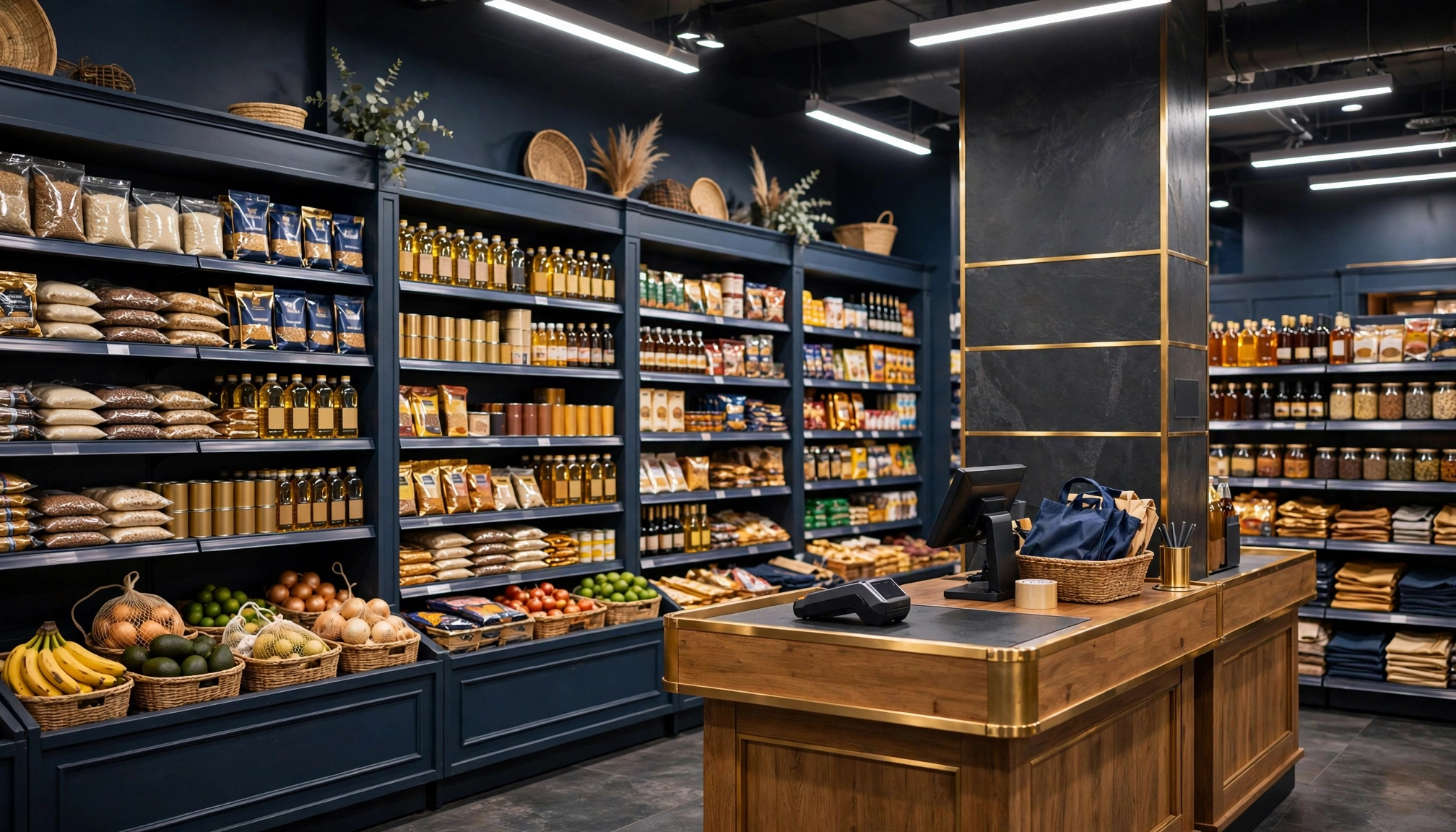
Long queues at checkout are a retailer's nightmare and a customer's frustration. They don't just slow down sales; they actively drive customers away, especially in a bustling market like Nigeria. Imagine losing a customer simply because the wait was too long.
Busy retail store with customers at checkoutThe Evolving Retail Landscape in 2026
The Nigerian retail sector is dynamic, with customers increasingly demanding speed and convenience. In 2026, businesses that fail to adapt risk being left behind. While fully automated self-checkout systems might seem futuristic or too expensive for many Nigerian businesses, a more practical and affordable solution is gaining traction: assisted self-checkout. This model perfectly balances customer autonomy with the essential human touch and security that Nigerian retailers value.
Consider the rising operational costs. A basic POS system for a small shop can range from ₦150,000 to ₦500,000, while a more robust setup for a medium-sized supermarket might cost between ₦750,000 and ₦2,500,000. Advanced self-checkout kiosks can start from ₦3,000,000 for a few units. Beyond hardware, monthly software subscriptions can be ₦15,000 - ₦40,000 for basic features, or ₦50,000 - ₦150,000 for advanced retail management. Installation fees vary from ₦80,000 to ₦750,000 depending on complexity. These figures highlight the need for solutions that offer real value and efficiency without breaking the bank. Businesses are looking for ways to optimize staff deployment, reduce transaction times, and enhance customer experience without sacrificing control over their finances or inventory. Understanding these financial realities is crucial for any business considering new technology, as detailed in our guide on POS System ROI: Calculating True Value for Nigerian Retailers.
What You Need Before You Start
Implementing an assisted self-checkout system doesn't require a complete overhaul, but a few prerequisites will ensure a smooth transition:
- Reliable Internet Connectivity: While some systems can operate offline, a stable internet connection (fiber or 4G) costing around ₦10,000 - ₦30,000/month is essential for data synchronization and cloud-based features.
- Barcode System: Your products must have scannable barcodes. If not, you'll need a system to generate and print them.
- Dedicated Space: Even an assisted self-checkout requires a designated area for the kiosk(s) and a clear path to the cashier for payment.
- Trained Staff: Your staff will need to understand how the system works to assist customers and handle payments efficiently.
- Initial Capital: While more affordable than fully automated systems, there will still be costs for hardware (tablet/kiosk, scanner) and software subscriptions.
Step-by-Step: Implementing Assisted Self-Checkout in Your Retail Store
Assisted self-checkout offers a middle ground between traditional cashier lanes and fully automated systems. It empowers customers to scan their items, while a cashier retains oversight for payment collection, ensuring security and customer support. Here's how to integrate this retail checkout solution into your operations:
Step 1: Understand the Assisted Self-Checkout Model
Unlike fully automated self-checkout kiosks where customers scan and pay entirely on their own, the assisted model means customers scan their items at a dedicated station, then proceed to a cashier for payment. This approach significantly reduces cashier workload by offloading the scanning process, but keeps a human in the loop for security, age-restricted purchases, and handling complex payment issues. It's an ideal retail checkout solution for Nigerian businesses that want to improve efficiency without losing personal interaction or control.
Step 2: Set Up Your Self-Checkout Kiosk Hardware
You'll need a dedicated station. This could be a tablet or a small computer with a monitor, connected to a barcode scanner. For speed and accuracy, a reliable barcode scanner is crucial. Consider the layout of your store; the self checkout system should be easily accessible but also within sight of a cashier for assistance. The cost for a basic setup could be anywhere from ₦150,000 for a simple tablet-based system to ₦500,000 for a more robust dedicated kiosk. Ensuring your hardware is compatible with your chosen POS software is key. For more on hardware choices, check out our guide on Best Cloud POS Hardware for Retail Shops in 2026.
Step 3: Configure Your Software for Self-Checkout
This is where the magic happens. Your Point-of-Sale (POS) software needs to support an assisted self-checkout mode. With a system like SwiftPOS, you can easily enable and configure the self-checkout feature.
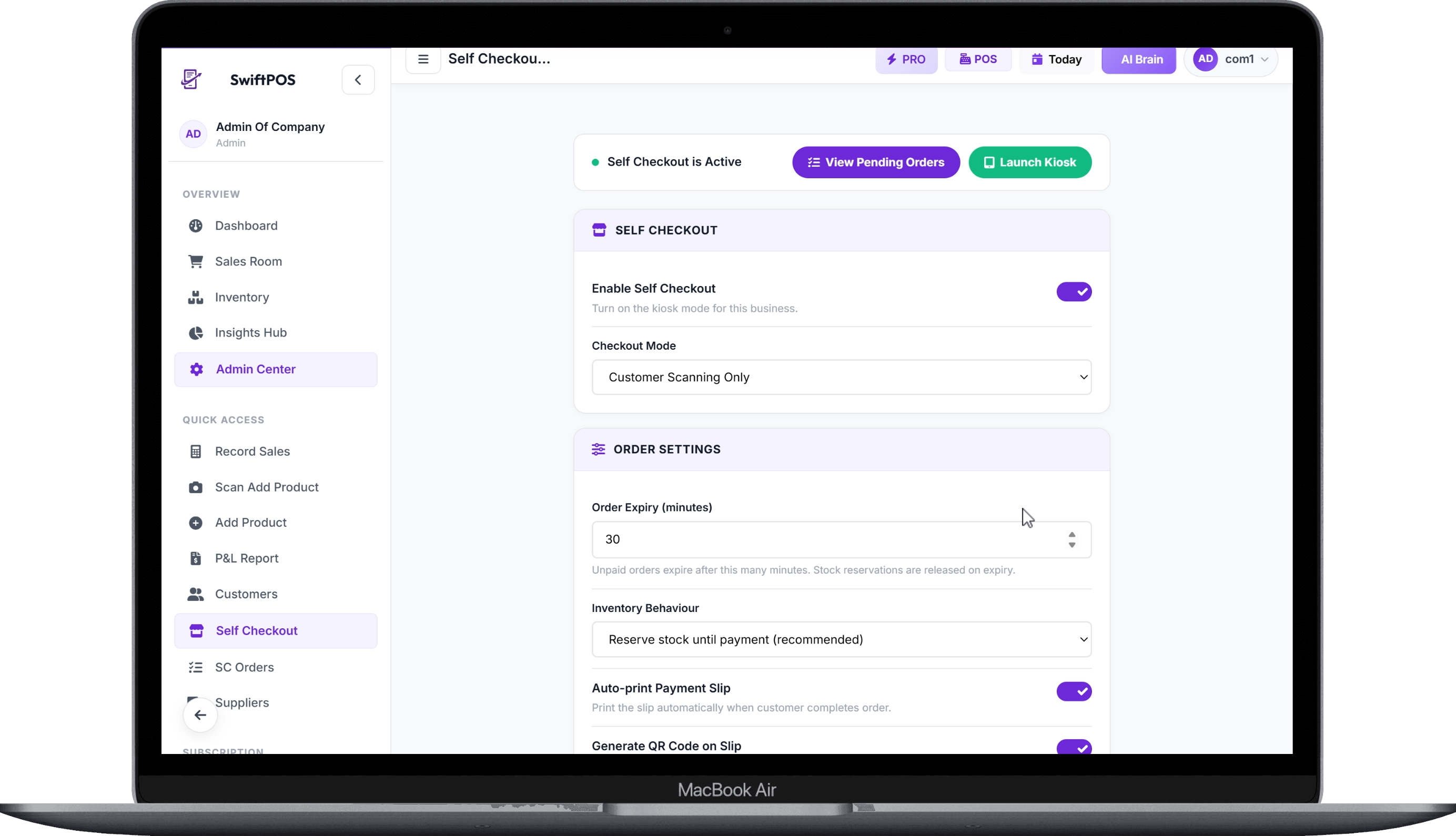 Self Checkout Settings Page - Enable
You'll define settings such as:
- Checkout Mode: Select "Customer Scan + Cashier Collects Payment."
- Order Expiry: Set how long an unpaid order remains valid (e.g., 30 minutes) before it automatically expires and stock is released.
- Inventory Handling: Decide if stock is reserved when the customer finishes scanning or only deducted after payment is confirmed by the cashier.
- Payment Slip & QR Codes: Enable automatic printing of payment slips and QR code generation for faster cashier lookup.
- Kiosk Exit PIN: Set a PIN to prevent unauthorized access to the system's backend from the kiosk.
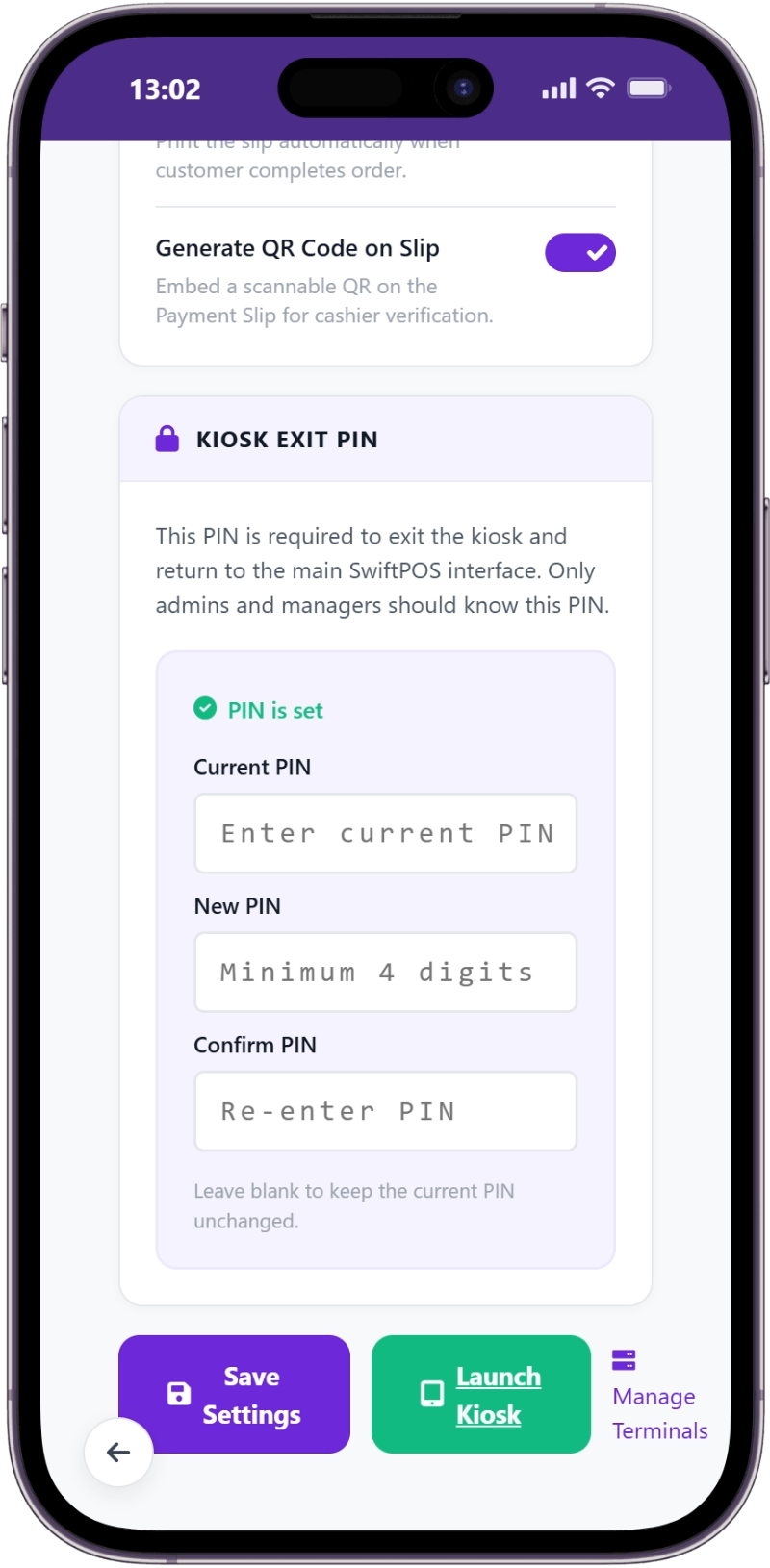 Self Checkout Settings Page - PIN Setup Section
This setup ensures that the self checkout system operates exactly as you intend, maintaining inventory accuracy and security.
Step 4: Guide Customers Through the Scanning Process
Once configured, the self-checkout kiosk will greet your customers. The process is intuitive:
- Welcome Screen: Customers see a clear welcome message and instructions to "Start Scanning."
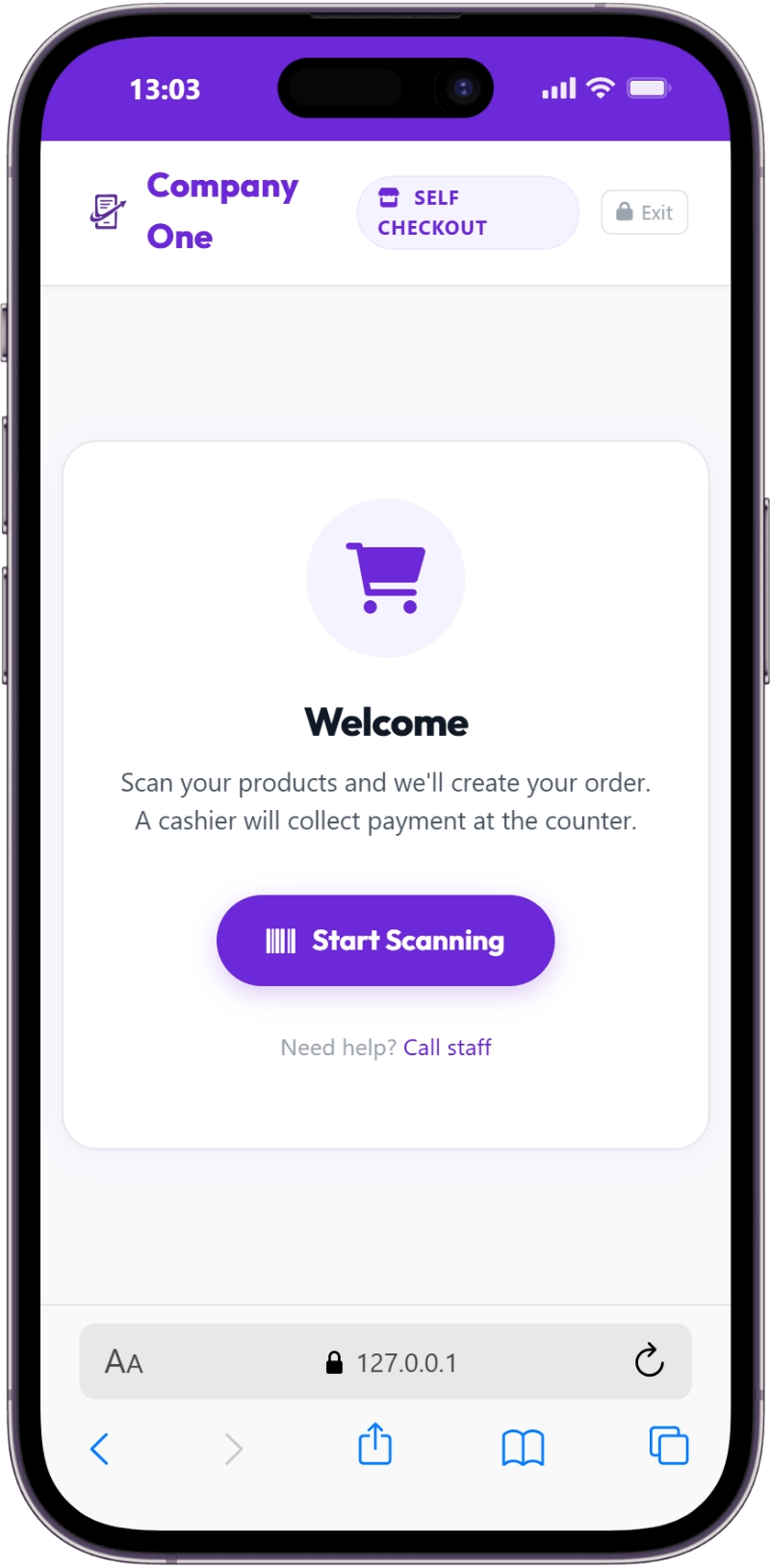 Self Checkout Customer Section - Step 1 - Welcome Screen and "Start Scanning" Button
- Product Scanning: Customers use the attached barcode scanner to scan each item. The system displays the product name, price, quantity, and running total. If a product is scanned multiple times, its quantity automatically updates.
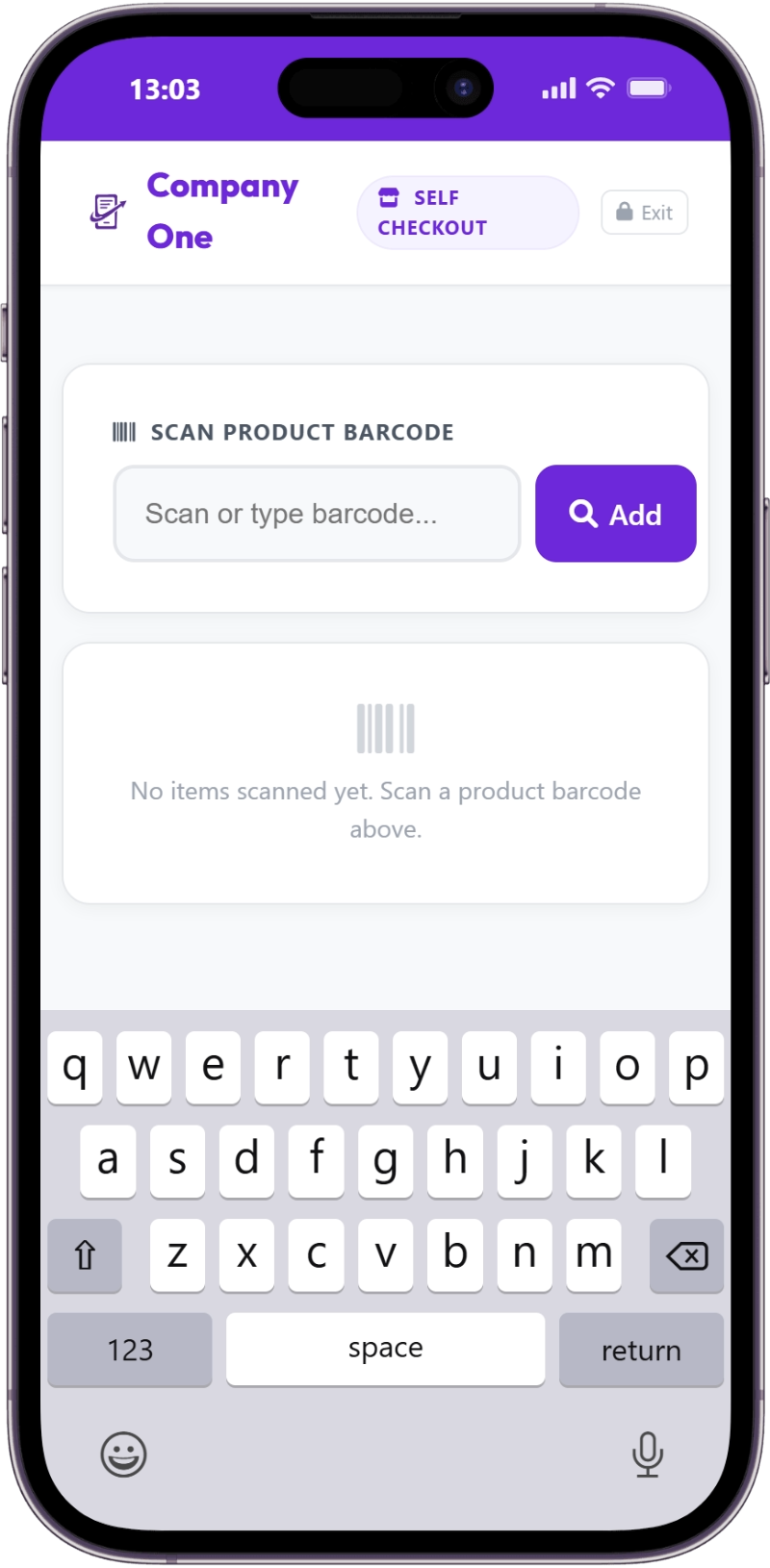 Self Checkout Customer Section - Step 2 - Scan the Items
- Cart Review: Before finalizing, customers can review their entire cart, adjust quantities, remove items, or add more products.
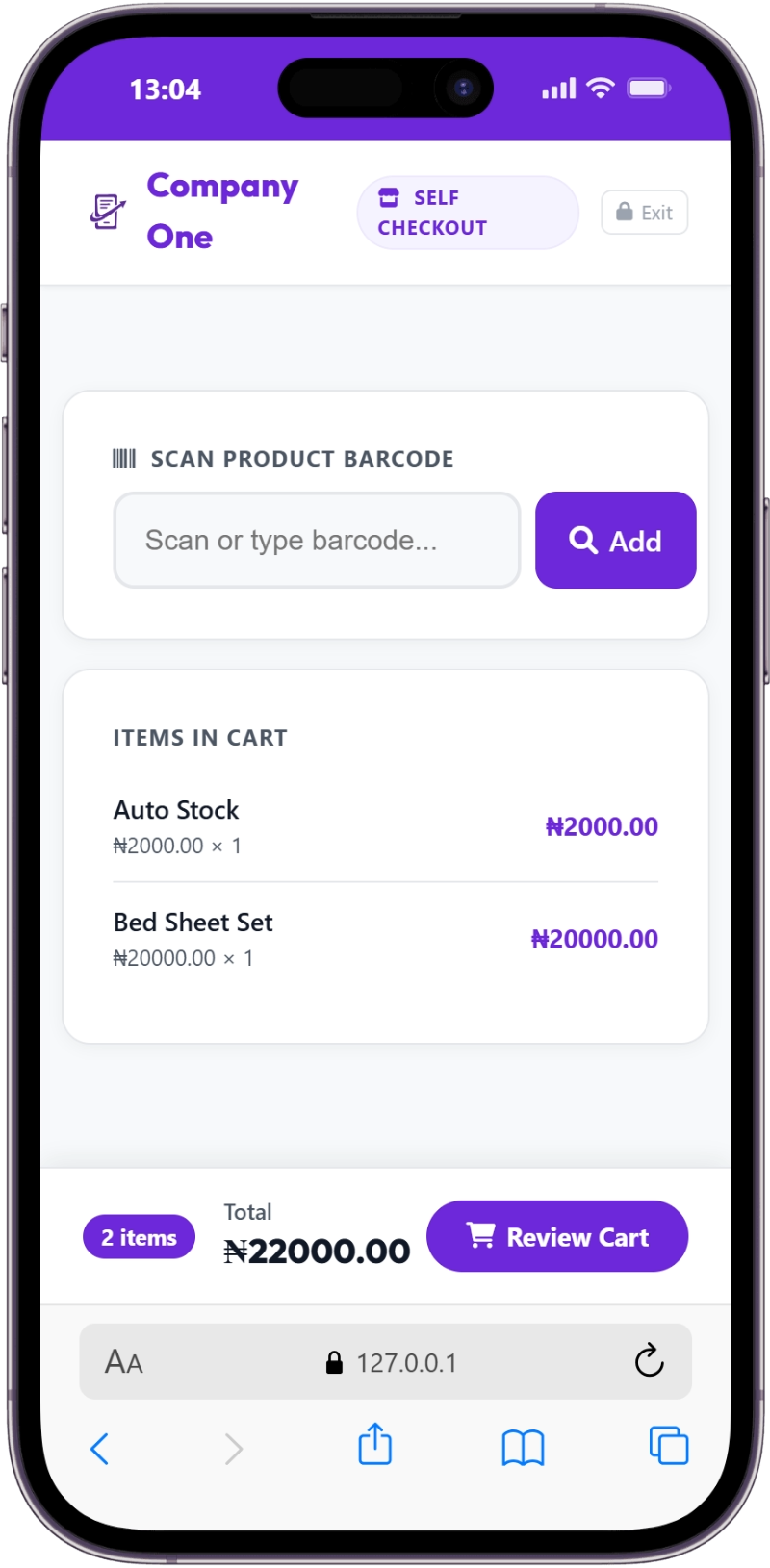 Self Checkout Customer Section - Step 3 - Review the cart
- Order Confirmation: After reviewing, the customer confirms their order. The system generates a unique order number (e.g., SC-A4K9X2) and provides instructions to proceed to the cashier for payment. An optional payment slip with a QR code can be printed.
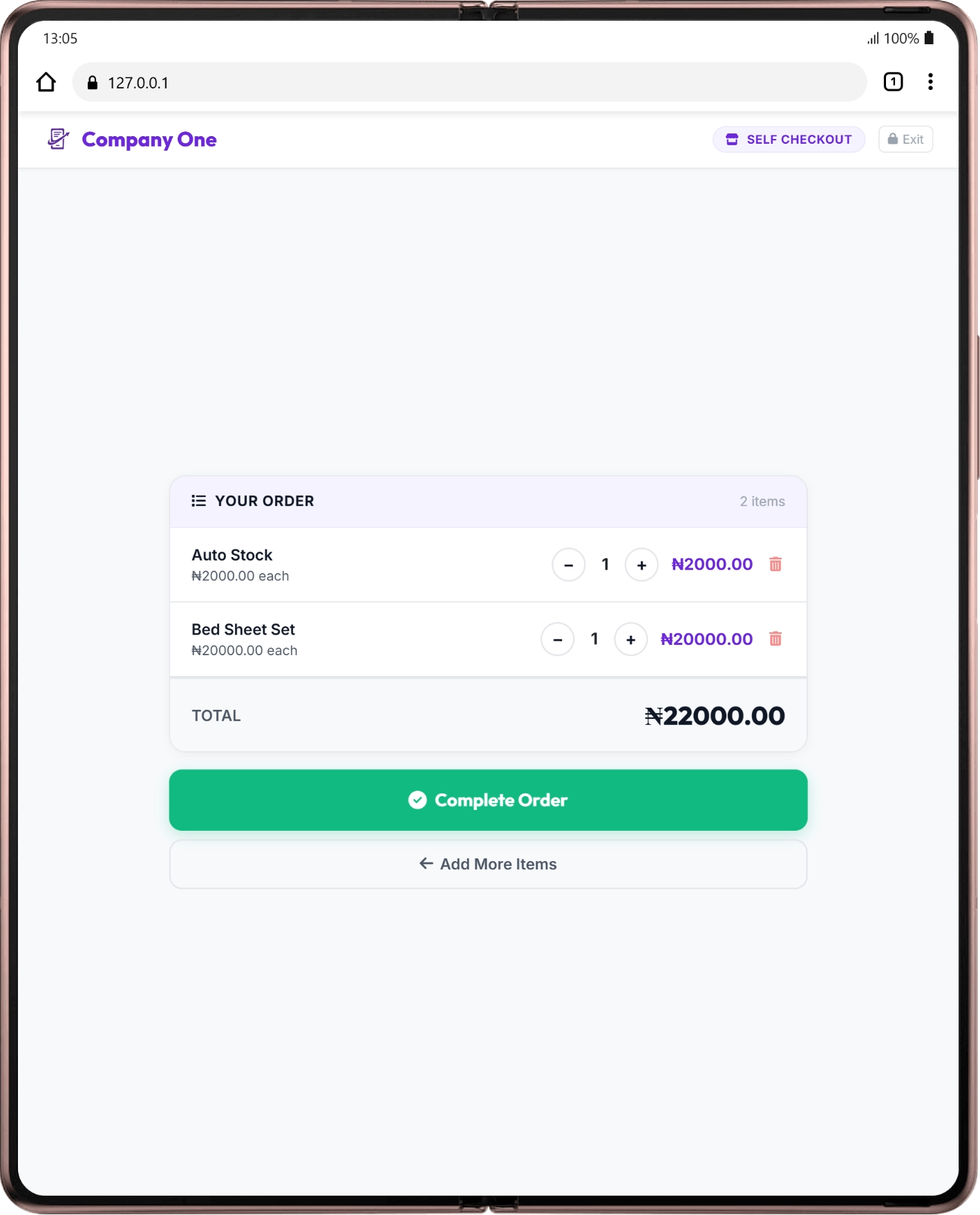 Self Checkout Customer Section - Step 4 - Complete the order
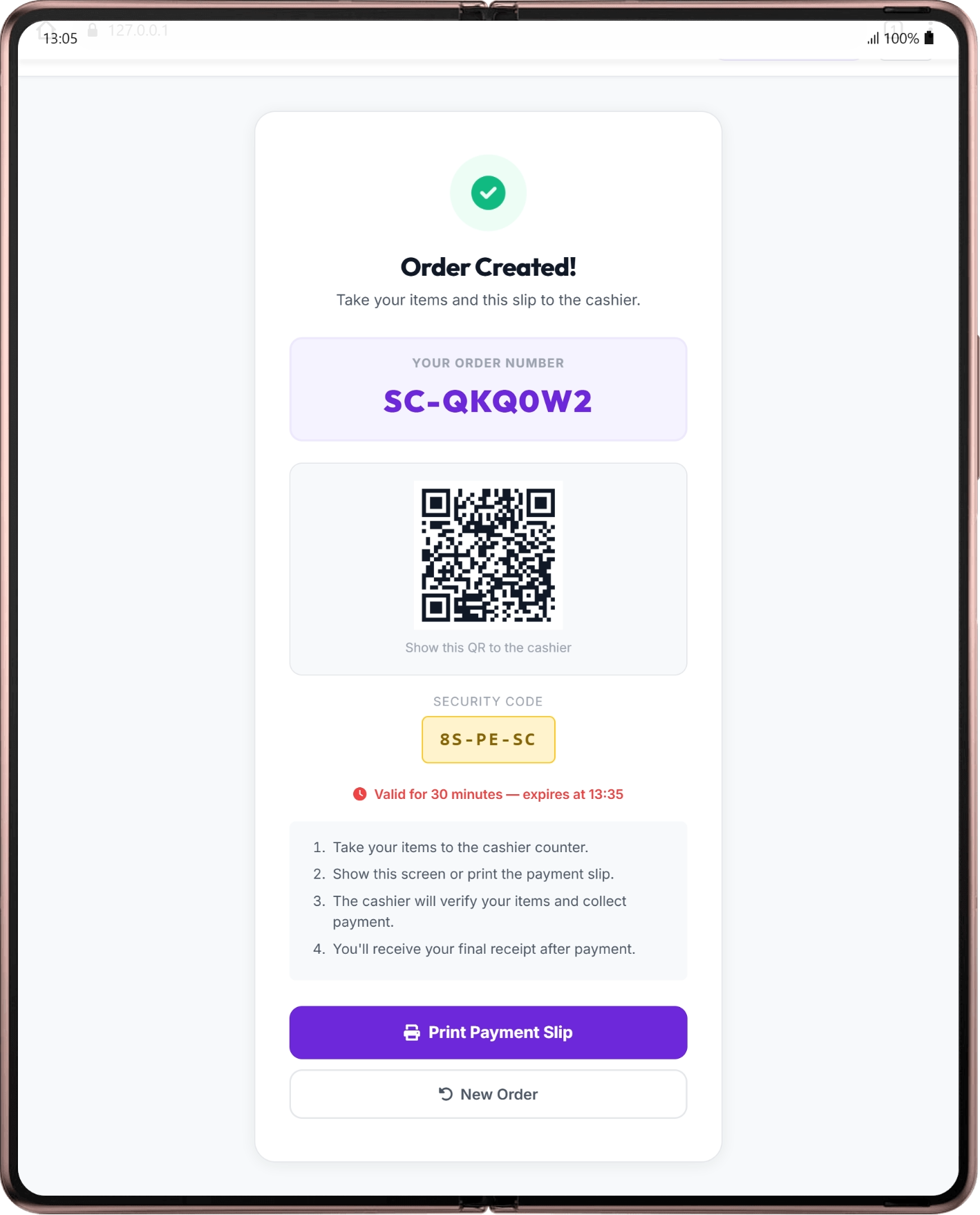 Self Checkout Customer Section - Step 5 - Print order slip
This customer-centric flow minimizes friction and empowers shoppers.
Step 5: Cashier Verification and Payment Collection
This is the "assisted" part. After scanning, customers bring their items and payment slip (or simply their order number) to a cashier.
- Cashier Locates Order: The cashier accesses the "Pending Orders" section in their POS system. They can quickly find the customer's order by scanning the QR code on the payment slip, entering the order number, or using a security code provided to the customer.
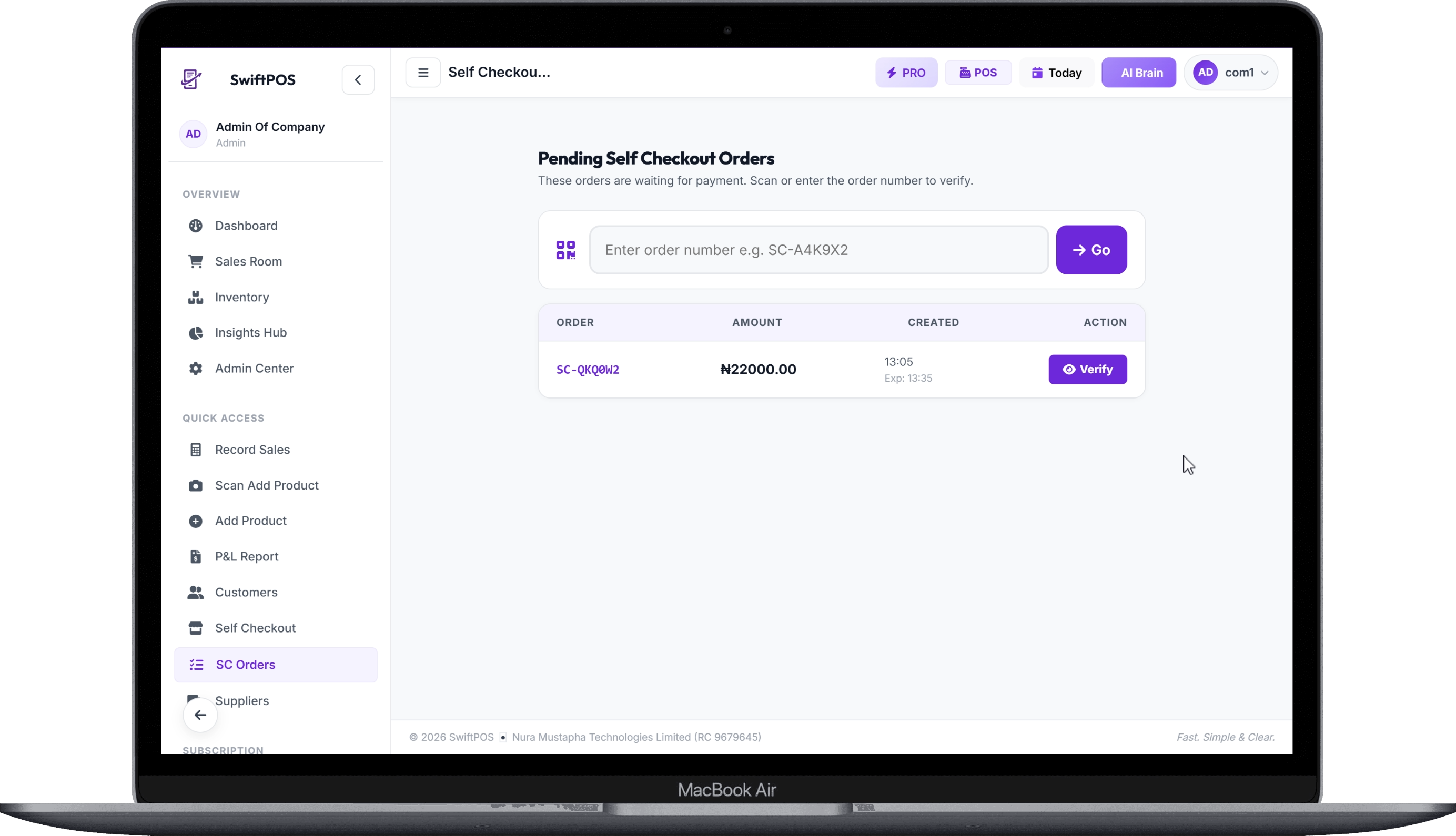 Self Checkout Cashier Section - All pending orders, chose or search and chose and verify
- Verify and Collect Payment: The cashier verifies the physical items against the digital order, ensuring accuracy. They then collect payment using various methods (cash, POS terminal, bank transfer).
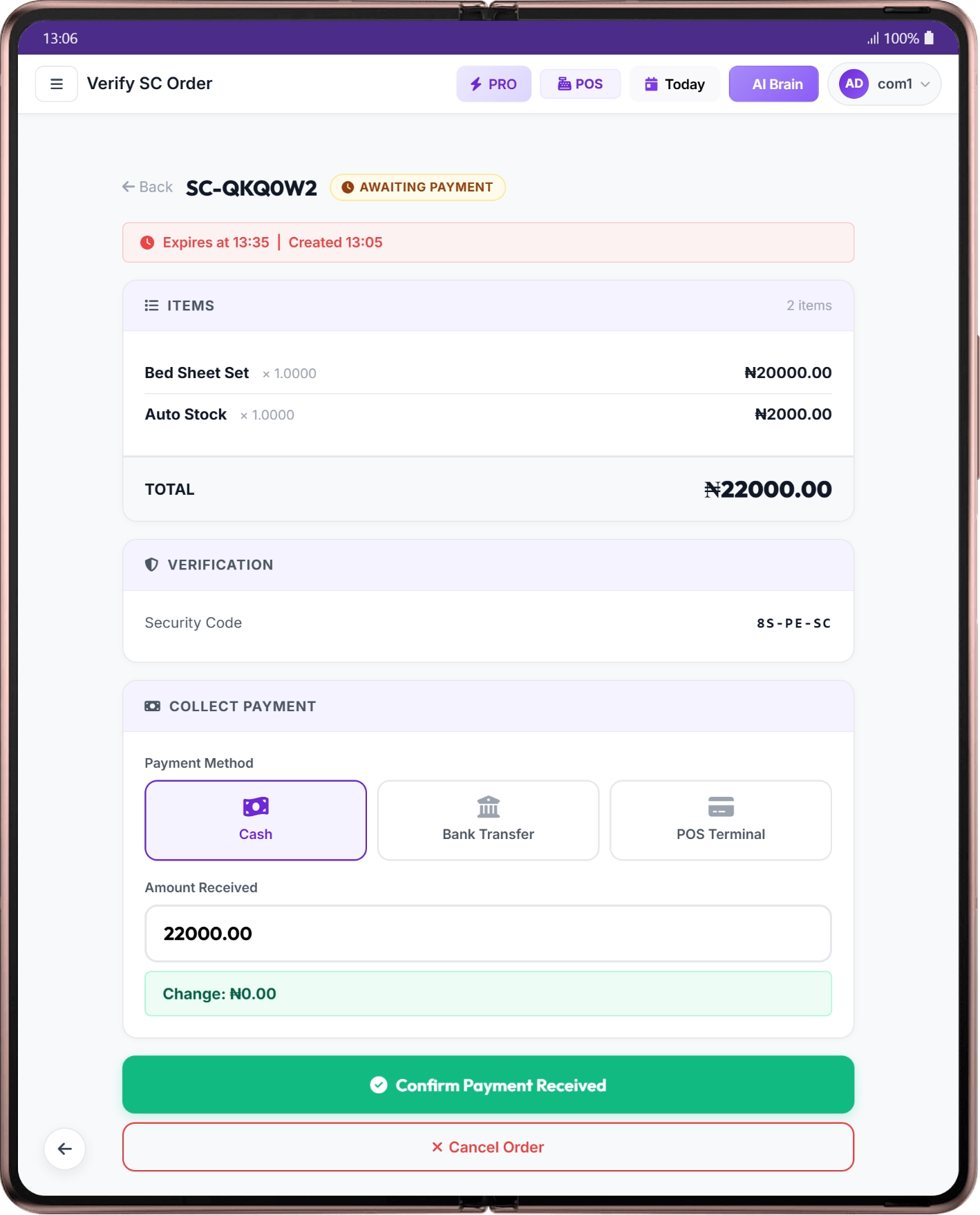 Self Checkout Cashier Section - Confirm Payment and print receipt
- Finalize Transaction: Once payment is confirmed, the system marks the order as paid, deducts stock (if not already done), and the cashier issues the final receipt. This ensures all transactions are properly recorded and inventory is accurate, a critical aspect of retail inventory management.
Step 6: Train Your Staff and Customers
No new system works without proper training. Your staff needs to be comfortable assisting customers with the self checkout system, troubleshooting minor issues, and efficiently processing payments. Similarly, simple signage and possibly a staff member dedicated to guiding customers initially will help them adapt to the new retail checkout solution. SwiftPOS offers comprehensive tutorials to help your team get up to speed quickly.
Common Mistakes to Avoid
Implementing a new retail checkout solution, even an assisted self-checkout, can have pitfalls if not approached carefully.
- Poor Signage and Communication: Customers won't use a self-checkout kiosk if they don't understand how it works or where to go next. Clear, concise instructions are vital.
- Inadequate Staff Training: Staff must be confident in assisting customers, resolving issues, and verifying orders. Untrained staff can lead to customer frustration and abandoned carts.
- Ignoring Inventory Accuracy: If your product barcodes are incorrect or your inventory isn't up-to-date, the self-checkout system will cause more problems than it solves. This is a common challenge for Nigerian retailers, as highlighted in our article on Inventory Management Mistakes Crushing Your Profits.
- Underestimating Internet Needs: A slow or unreliable internet connection can cripple a cloud-based self checkout system, leading to delays and dissatisfied customers.
- Lack of Security Measures: Without proper controls like cashier verification and exit PINs, a self-checkout system can be vulnerable to theft or misuse.
- Overlooking Customer Feedback: Pay attention to what your customers are saying. Their feedback is invaluable for refining the process and improving their experience with the self checkout system.
How to Track and Grow After Launch
Once your assisted self-checkout system is operational, it’s crucial to monitor its performance to ensure it’s delivering the expected benefits.
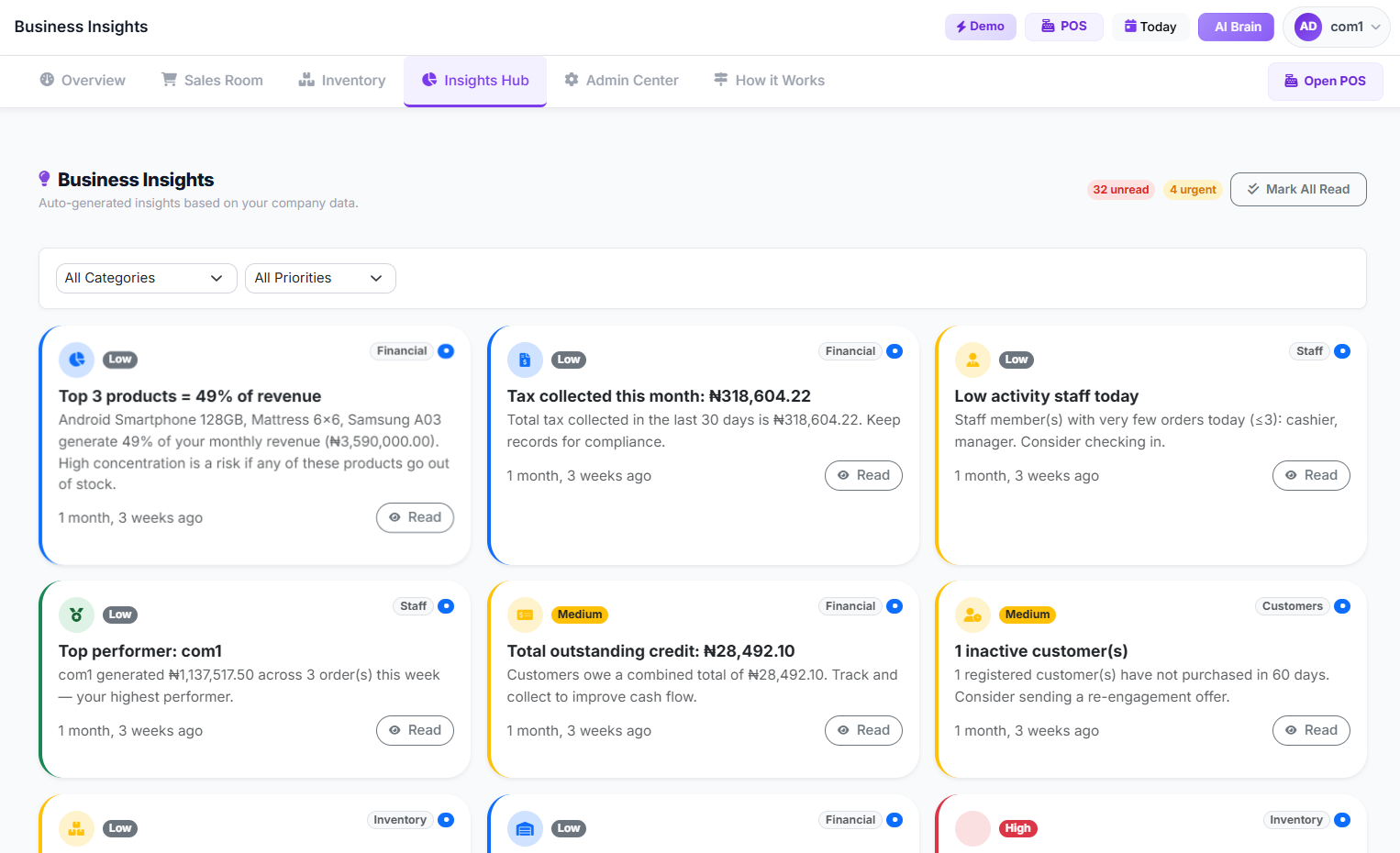
- Key Performance Indicators (KPIs): Track metrics like average transaction time, customer throughput, number of self-checkout orders vs. traditional cashier orders, and any changes in customer satisfaction. This data will show you the real impact of your self checkout system.
- Sales Data Analysis: Dive into sales reports to see if the faster checkout process is correlating with increased sales volume, especially during peak hours. Look for patterns that indicate improved efficiency.
- Inventory Insights: Monitor your stock levels more closely. With an effective self checkout system, your inventory data should become more accurate in real-time, helping you avoid stockouts or overstocking, a topic we explore further in How to Predict When Products Will Run Out of Stock in Nigeria.
- Staff Productivity: Observe how your cashiers are utilizing their freed-up time. Are they engaging more with customers, restocking shelves, or handling other valuable tasks?
- Customer Feedback Loops: Actively solicit feedback from customers about their experience with the self-checkout kiosk. Use surveys or direct conversations to understand what’s working and what needs improvement.
 Business Insights Page
Frequently Asked Questions
Is assisted self-checkout secure for my business in Nigeria?
Yes, assisted self-checkout is designed with security in mind. The customer scans items, but payment is always handled by a human cashier. This allows for verification of items, age-restricted purchases, and ensures that all payments are processed correctly, reducing the risk of theft or error. SwiftPOS, for example, includes features like a Kiosk Exit PIN and security codes for order verification to enhance security.
How much does it cost to set up an assisted self-checkout kiosk in Nigeria?
The cost can vary widely depending on the hardware and software you choose. A basic setup with a tablet and scanner might cost ₦150,000 - ₦500,000. More robust kiosks with integrated payment terminals can range from ₦750,000 to ₦2,500,000. Software subscription fees for a self checkout system typically run from ₦15,000 to ₦150,000 monthly, depending on the features. Installation and training will add to these initial costs. For a comprehensive cost breakdown, see our blog on How Much Money Do I Need to Open a Mini Supermarket in Nigeria in 2026?.
Can an assisted self-checkout system work without internet?
Many modern POS systems, including some self-checkout solutions, offer offline capabilities for core functions. This means transactions can still be recorded during internet outages and then synchronized once connectivity is restored. However, stable internet connectivity is generally recommended for optimal performance, real-time inventory updates, and cloud-based reporting. Read more about offline POS functionality.
How will a self checkout system affect my staff?
Assisted self-checkout doesn't replace staff but reallocates their roles. Cashiers spend less time scanning and more time on customer service, verifying orders, or helping on the sales floor. This can improve staff efficiency and morale, allowing your team to focus on higher-value tasks and better customer engagement. It's about optimizing their time, not eliminating their jobs.
Is this suitable for small provision stores or only large supermarkets?
Assisted self-checkout is scalable and beneficial for various retail sizes. Even a small provision store can benefit from a single kiosk to reduce queues during busy periods, offering customers a faster option. For larger supermarkets, multiple self-checkout kiosks can significantly enhance customer flow and operational efficiency. The key is to choose a system that fits your specific business needs and budget, as discussed in our guide on How to Start and Run a Profitable Provision Store or Mini Mart in Nigeria in 2026.
 Customer scans items at a modern self checkout
Ready to Streamline Your Checkout Process?
Implementing an assisted self-checkout system can transform your retail business, reducing queues, improving customer satisfaction, and boosting operational efficiency. If you're ready to explore how this modern retail checkout solution can benefit your shop, learn more about the benefits of SwiftPOS and its comprehensive features. Visit our pricing page to find a plan that fits your business, or simply contact us to speak with a specialist.