How to Reduce Supermarket Checkout Lines (Without Hiring More Staff)
SwiftPOS Team
Published September 24, 2026
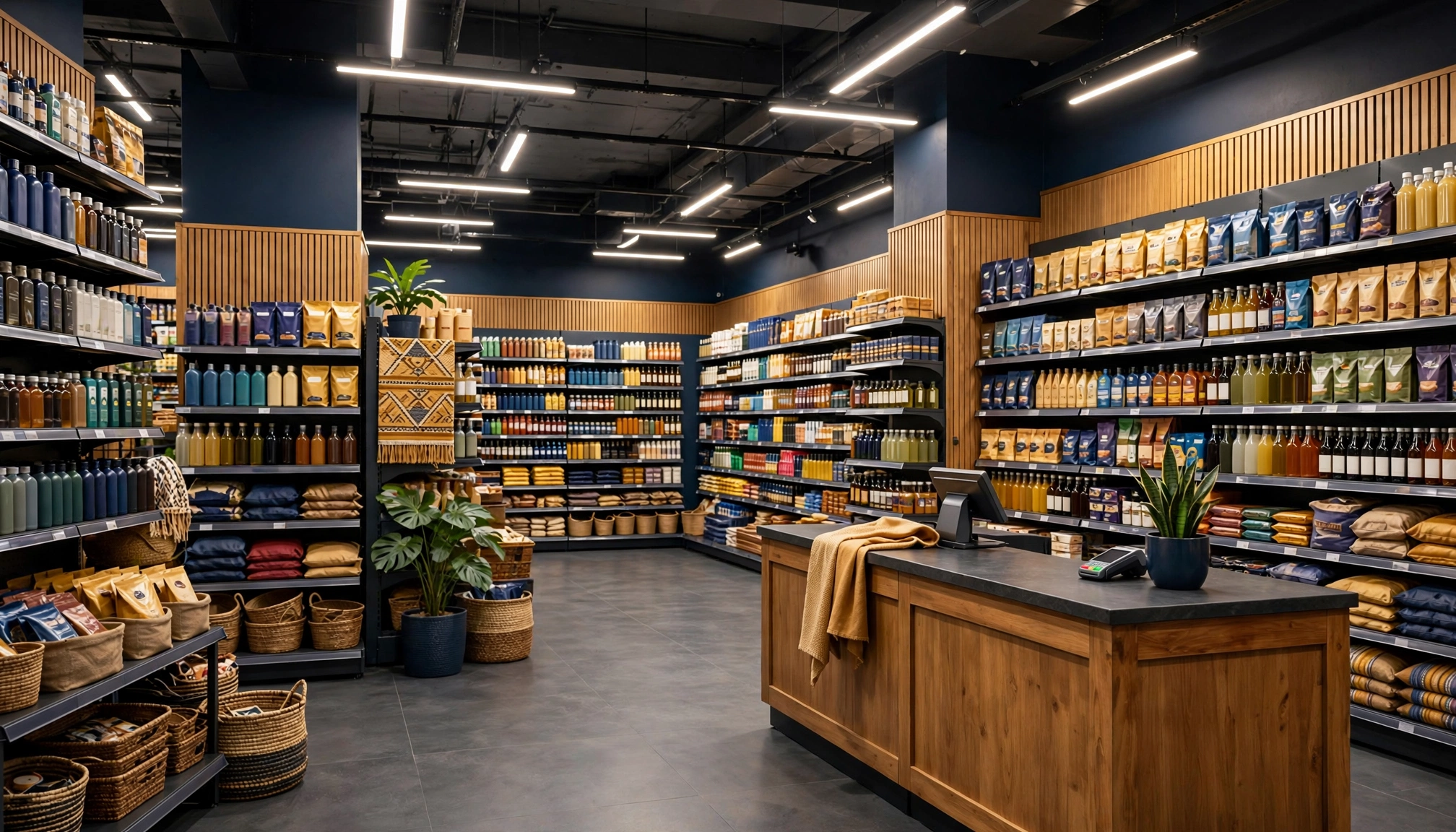
Imagine your supermarket on a busy Saturday afternoon: lines stretch to the back, customers grumble, and your cashiers are overwhelmed. This isn't just an inconvenience; it's lost sales and damaged reputation. In Nigeria's competitive retail landscape, efficiency at the checkout is no longer a luxury, but a necessity for survival and growth.
Busy supermarket checkout with long queuesThe Evolving Landscape of Nigerian Retail in 2026
The Nigerian retail sector is dynamic, marked by increasing customer expectations and the relentless pressure to optimize operations. According to recent market analysis, consumer spending habits are shifting, with a growing preference for faster, more seamless shopping experiences. Supermarkets and mini-marts are particularly affected, as they deal with high transaction volumes and diverse product ranges. The average Nigerian shopper values speed and convenience, and long queues are a significant deterrent, often leading to abandoned carts and lost loyalty.
The cost of hiring and retaining experienced cashiers is also on the rise. With typical cashier salaries ranging from ₦40,000 to ₦80,000 per month, increasing staff to manage peak hours can significantly impact your bottom line. Furthermore, training new staff and managing human resources adds another layer of complexity. This financial pressure, coupled with the need for improved customer flow, is driving many forward-thinking Nigerian retailers to explore innovative solutions beyond traditional staffing models. The goal is to maximize throughput without necessarily expanding the payroll.
What You Need Before You Start
Before diving into retail checkout automation, particularly self-checkout solutions, ensure you have these foundational elements in place:
- Reliable Internet Connectivity: A stable internet connection is crucial for seamless operation of modern POS and self-checkout systems. Expect to budget ₦25,000 - ₦80,000/month for reliable fiber optic, depending on your location.
- Adequate Power Backup: Nigeria's power supply can be erratic. An inverter/battery solution capable of powering your systems for 4-6 hours is essential, costing anywhere from ₦300,000 - ₦1,200,000.
- Clear Store Layout: A well-organized store layout helps guide customers to self-checkout areas and reduces congestion.
- Existing POS System (or plan for one): Self-checkout integrates with your core sales system. If you're still on manual records, a digital POS system is your first step. Learn more about the real costs of manual operations in Nigeria by reading about the Hidden Costs of Manual Retail Operations in Nigeria.
- Barcode-Enabled Products: For efficient scanning, all your products should have scannable barcodes.
- Dedicated Space: Even an assisted self-checkout kiosk requires a designated, well-lit area.
- Staff Buy-in: Your existing staff will be key to assisting customers and managing the new system. Prepare them for the change.
Step-by-Step: Implementing Assisted Self-Checkout to Reduce Supermarket Checkout Lines
Implementing an assisted self-checkout system can significantly reduce customer wait times and improve operational efficiency without the need to constantly hire more cashiers. Here’s a step-by-step guide to get you started:
Step 1: Assess Your Current Checkout Flow and Pain Points
Before making any changes, observe your existing checkout process. Identify peak hours, average transaction times, and common bottlenecks. Are customers waiting too long? Are cashiers struggling with product lookups or payment processing? Understanding these issues will help you determine the best approach for retail checkout automation. Consider using a simple stopwatch to time transactions during different periods of the day. This data will be invaluable for measuring the impact of your new system.
Step 2: Choose the Right Self-Checkout Solution
Not all self-checkout systems are created equal, especially for the Nigerian market where direct payment integrations can be complex. For many supermarkets, an "assisted" self-checkout model is ideal. This means customers scan their items, but a cashier still handles the final payment and verification. This approach offers the speed benefits of self-service while maintaining human oversight, reducing theft risks, and providing customer support. Look for a solution that integrates seamlessly with your existing POS system or offers a comprehensive all-in-one platform.
For instance, SwiftPOS offers an assisted self-checkout solution that allows customers to scan their own products at a kiosk. This streamlines the initial scanning process, reducing the burden on your cashiers and speeding up the overall transaction.
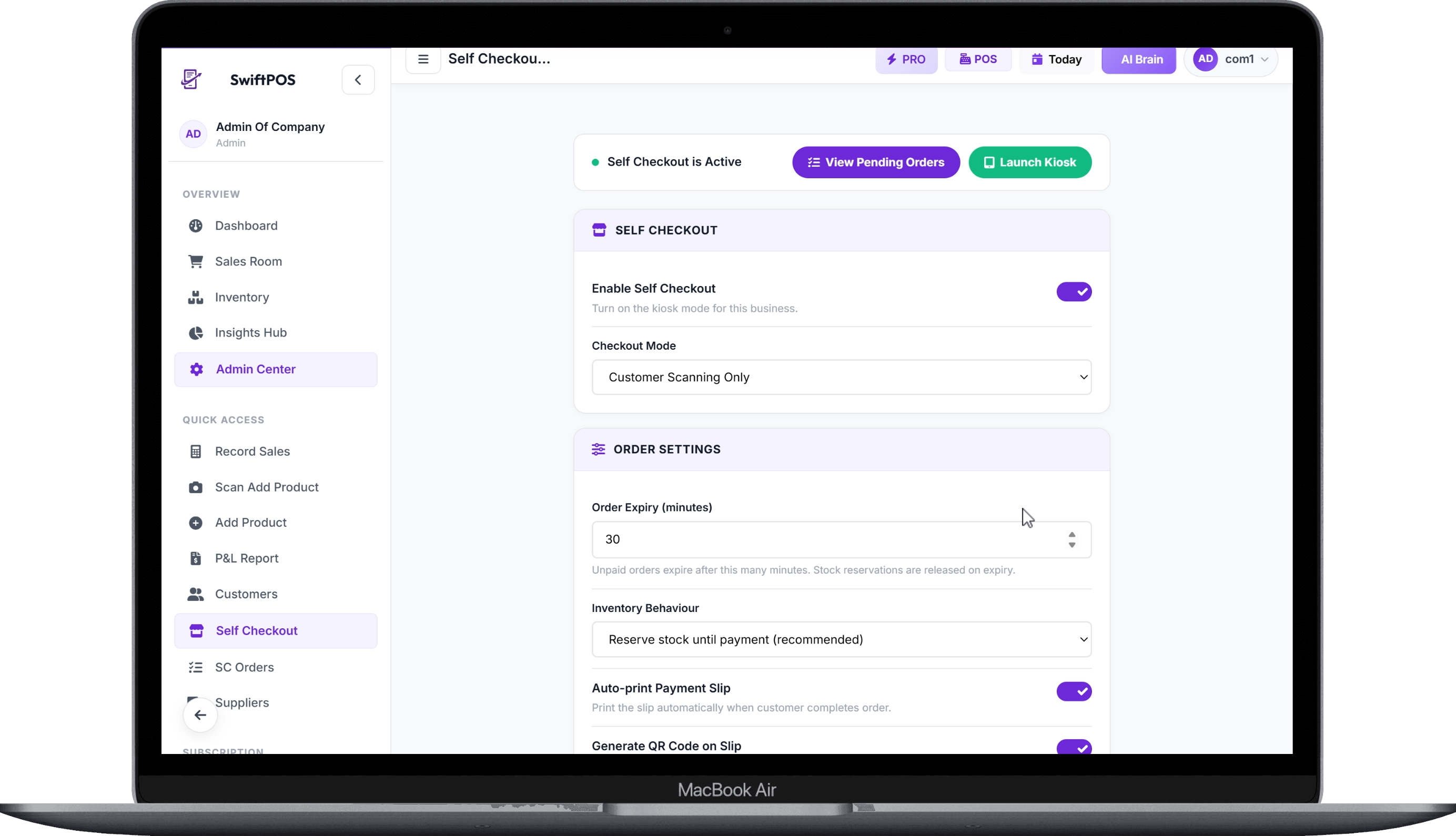 Self Checkout Settings Page - Enable
Step 3: Set Up Your Kiosks and Software
Once you've chosen your solution, the next step is the physical and digital setup. This involves installing the self-checkout kiosks and configuring the software.
- Hardware Installation: Basic self-checkout kiosks can range from ₦350,000 - ₦800,000, while advanced ones with integrated scales and scanners might cost ₦900,000 - ₦2,500,000. Ensure your kiosks are strategically placed for easy customer access and visibility for your staff.
- Software Configuration: This is where you define how the system operates. With SwiftPOS Self Checkout, you can enable or disable the feature, choose your checkout mode (e.g., "Customer Scan + Cashier Collects Payment"), set order expiry times (e.g., 30 minutes), and configure inventory handling. You can also decide if payment slips should print automatically and if QR codes should be generated for easy order retrieval by cashiers.
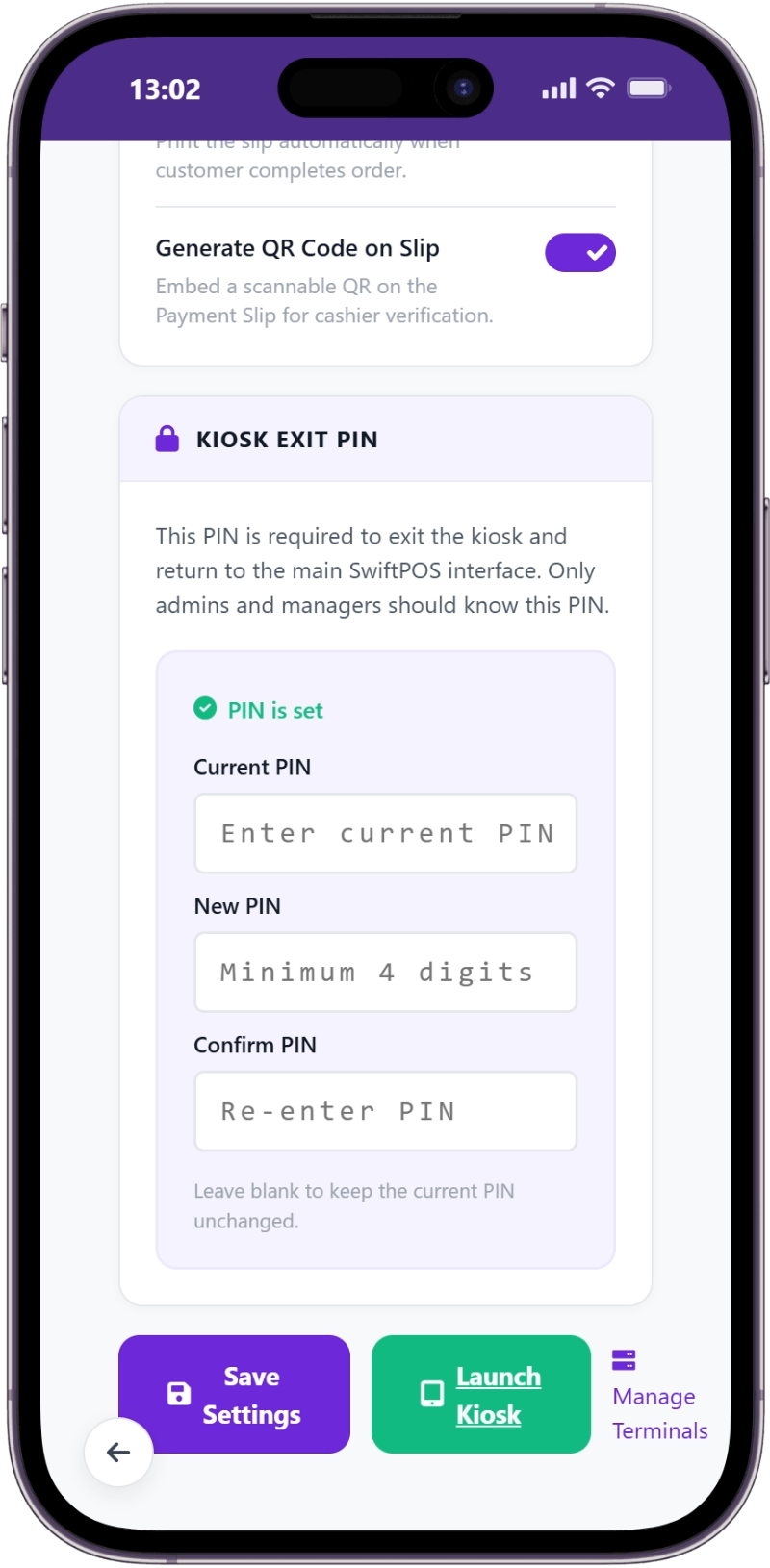 Self Checkout Settings Page - PIN Setup Section
This configuration phase is critical for optimizing the system to your supermarket's specific needs. For businesses with multiple locations, SwiftPOS allows you to manage multiple kiosk terminals, assigning unique IDs and names to each.
Step 4: Train Your Staff
Your staff are the bridge between your customers and the new technology. Comprehensive training is vital. Each staff member should understand not just how to operate the system, but also how to assist customers who may be new to self-checkout. Training costs can range from ₦10,000 - ₦30,000 per staff member, depending on whether it's in-house or external.
- Cashier Training: Cashiers need to know how to locate pending self-checkout orders, verify items, process payments, and issue final receipts. They should also be trained on how to handle common customer questions or issues with scanning.
- Floor Staff Training: Even non-cashier staff should be aware of the self-checkout process to direct customers and offer initial assistance.
- Manager Training: Managers need to understand the full configuration, how to troubleshoot minor issues, and how to access reports and insights from the system.
Step 5: Introduce the System to Your Customers
Clear communication is key to successful customer adoption. Use signage, in-store announcements, and even temporary staff dedicated to guiding customers through their first self-checkout experience.
- Welcome Screen: The system itself should have a friendly and clear welcome screen explaining the process. SwiftPOS Self Checkout, for example, starts with a simple welcome screen that instructs customers to "Start Scanning" and explains that a cashier will collect payment.
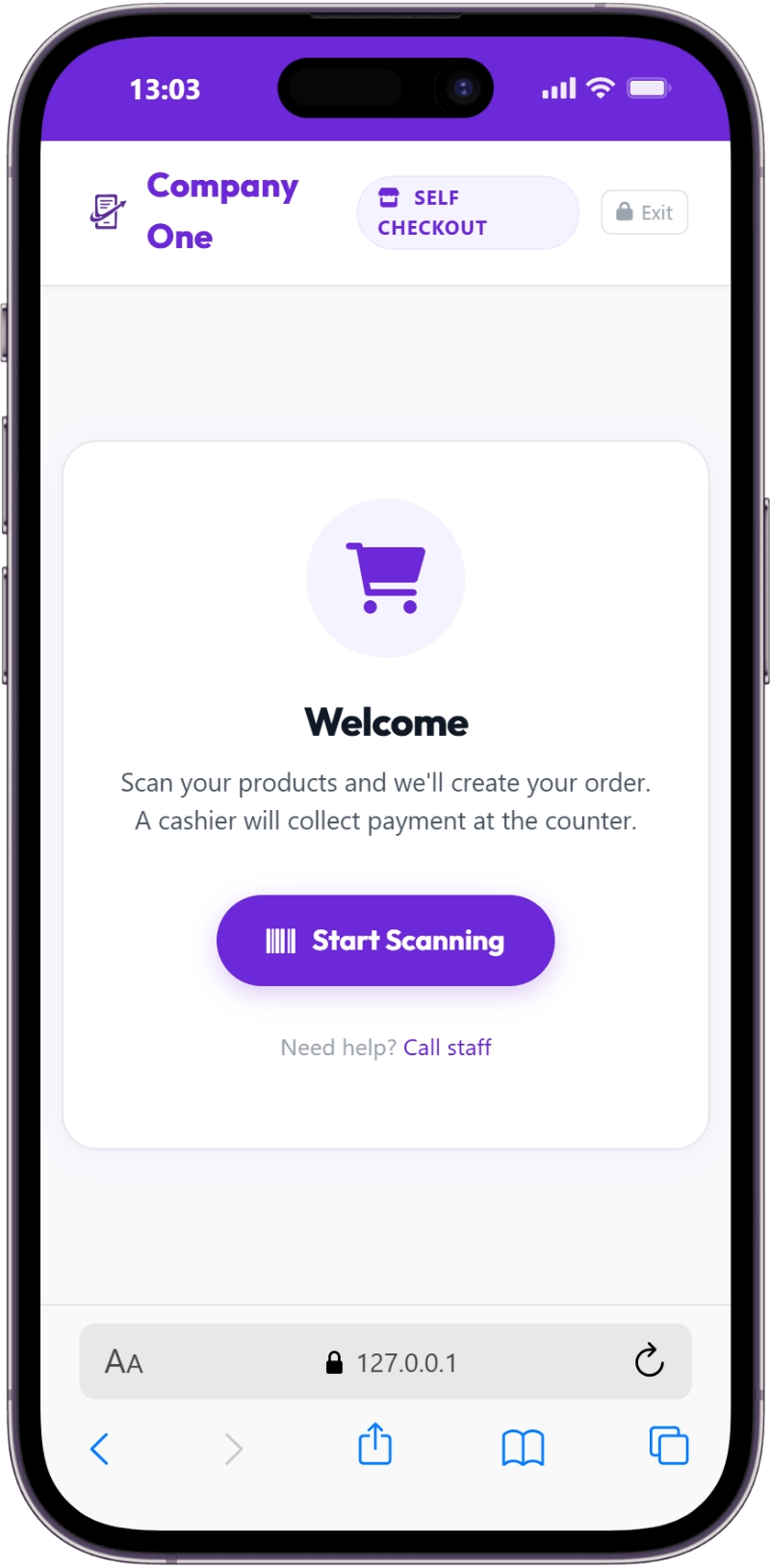 Self Checkout Customer Section - Step 1 - Welcome Screen and "Start Scanning" Button
- Scanning Process: Customers use a barcode scanner to add items. The system should display the product name, unit price, quantity, and running total clearly. If a barcode isn't recognized or an item is out of stock, clear error messages are crucial.
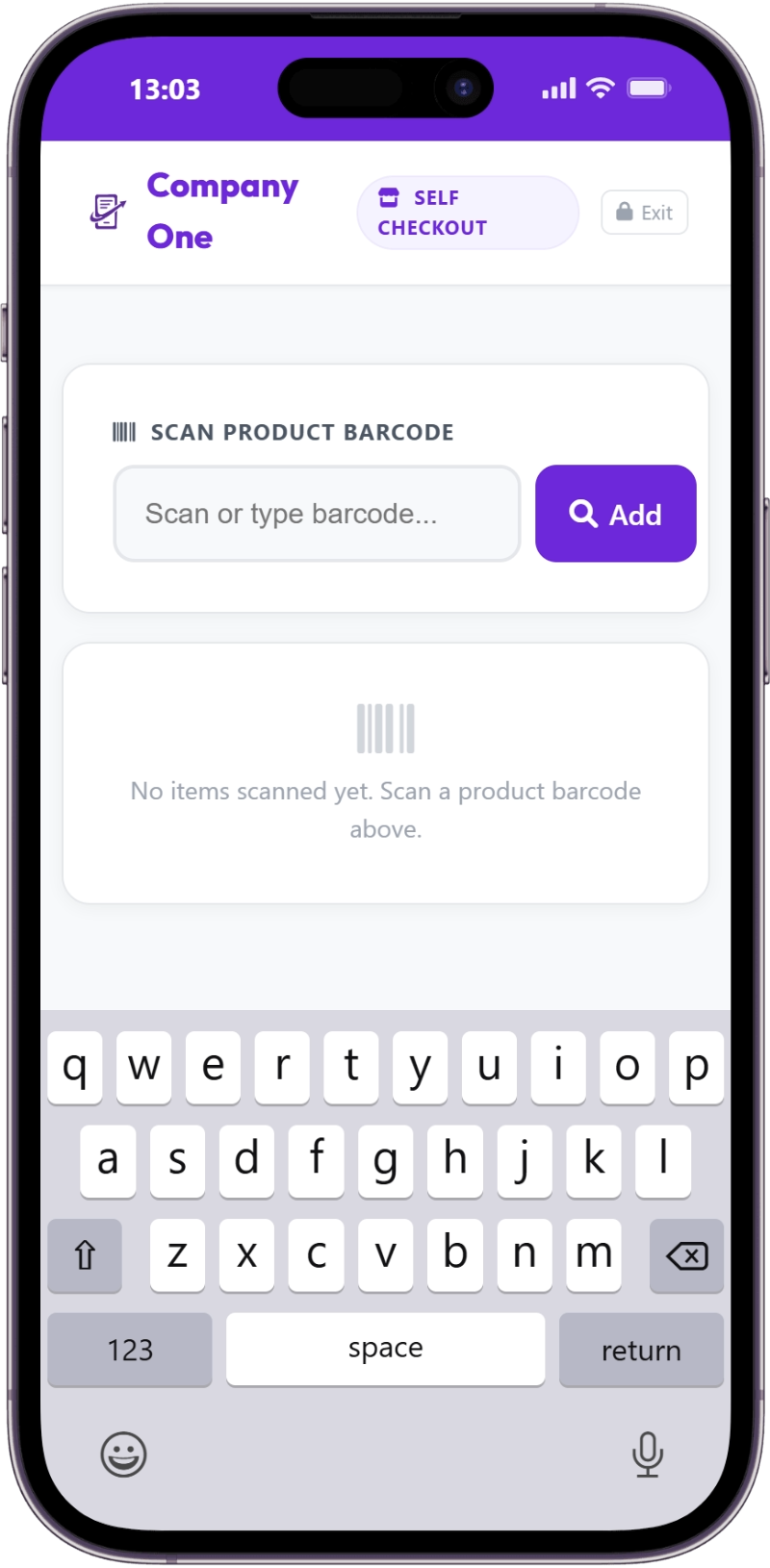 Self Checkout Customer Section - Step 2 - Scan the Items
- Cart Review: Before confirming, customers should have a chance to review their cart, adjust quantities, or remove items. This reduces errors and improves customer satisfaction.
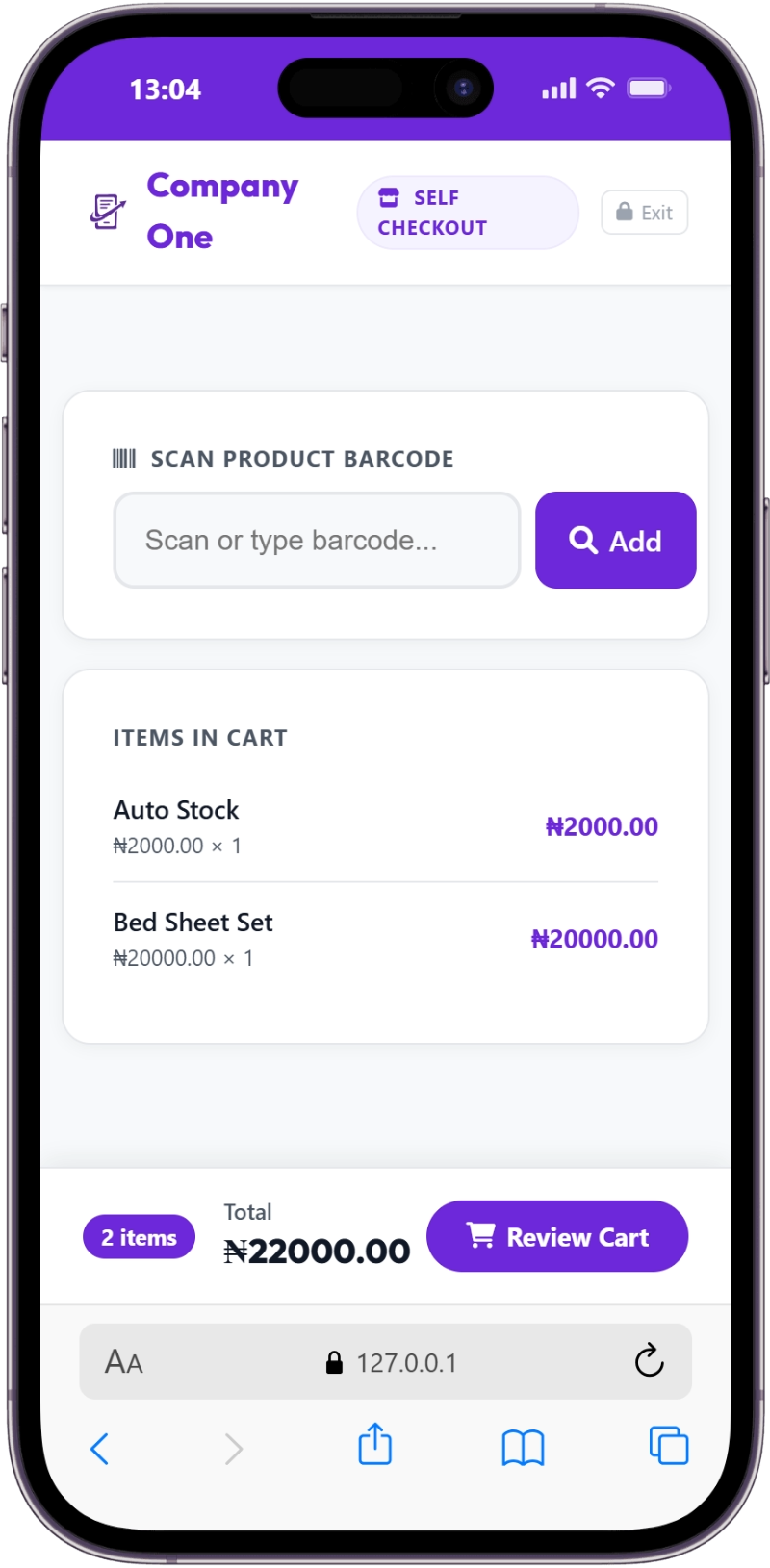 Self Checkout Customer Section - Step 3 - Review the cart
- Order Confirmation and Payment Slip: Once the customer completes their scan, the system generates an order number and a payment slip. This slip, which can include a QR code and security code, directs the customer to the cashier for final payment. This ensures the cashier retains oversight while the customer handles the scanning.
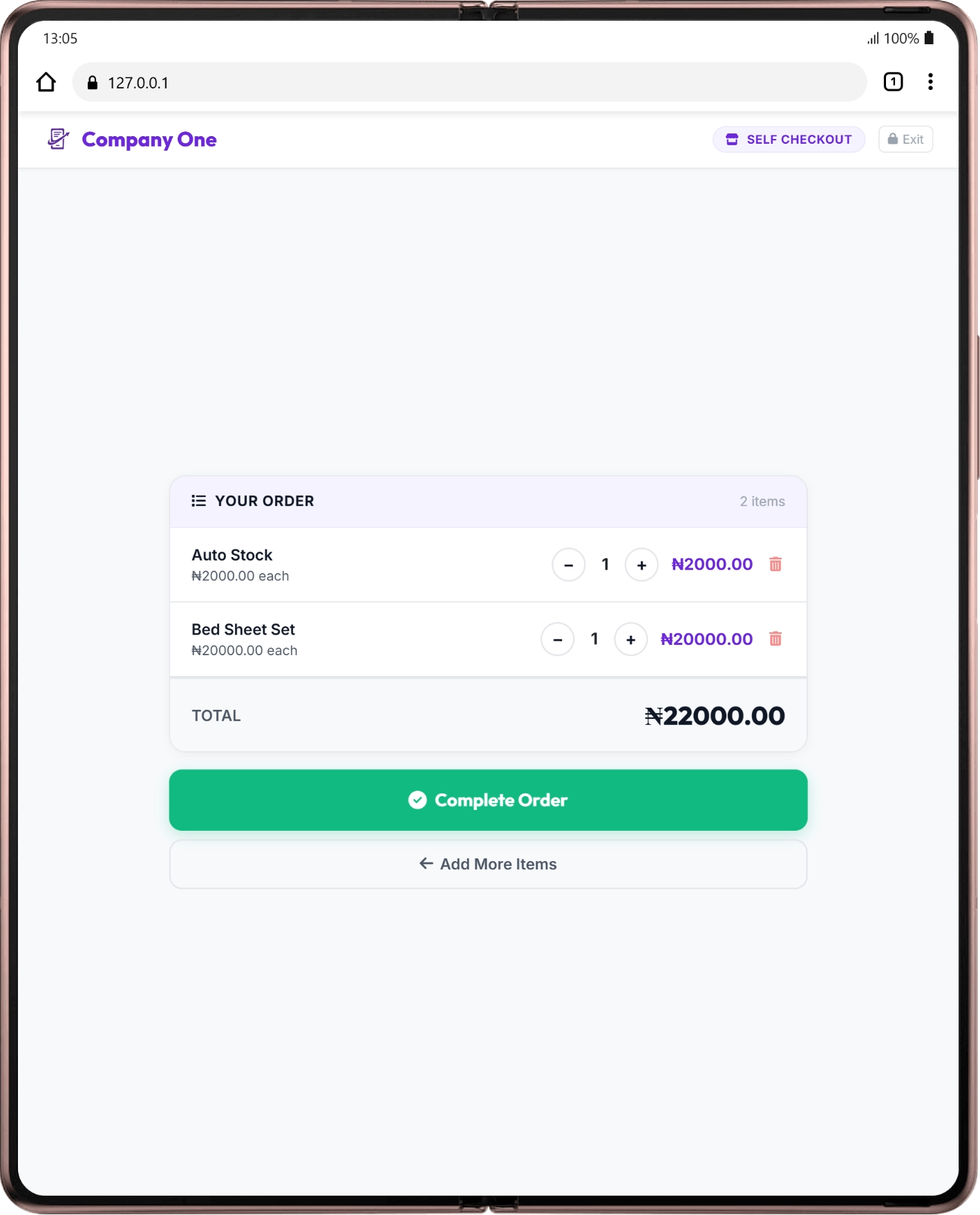 Self Checkout Customer Section - Step 4 - Complete the order
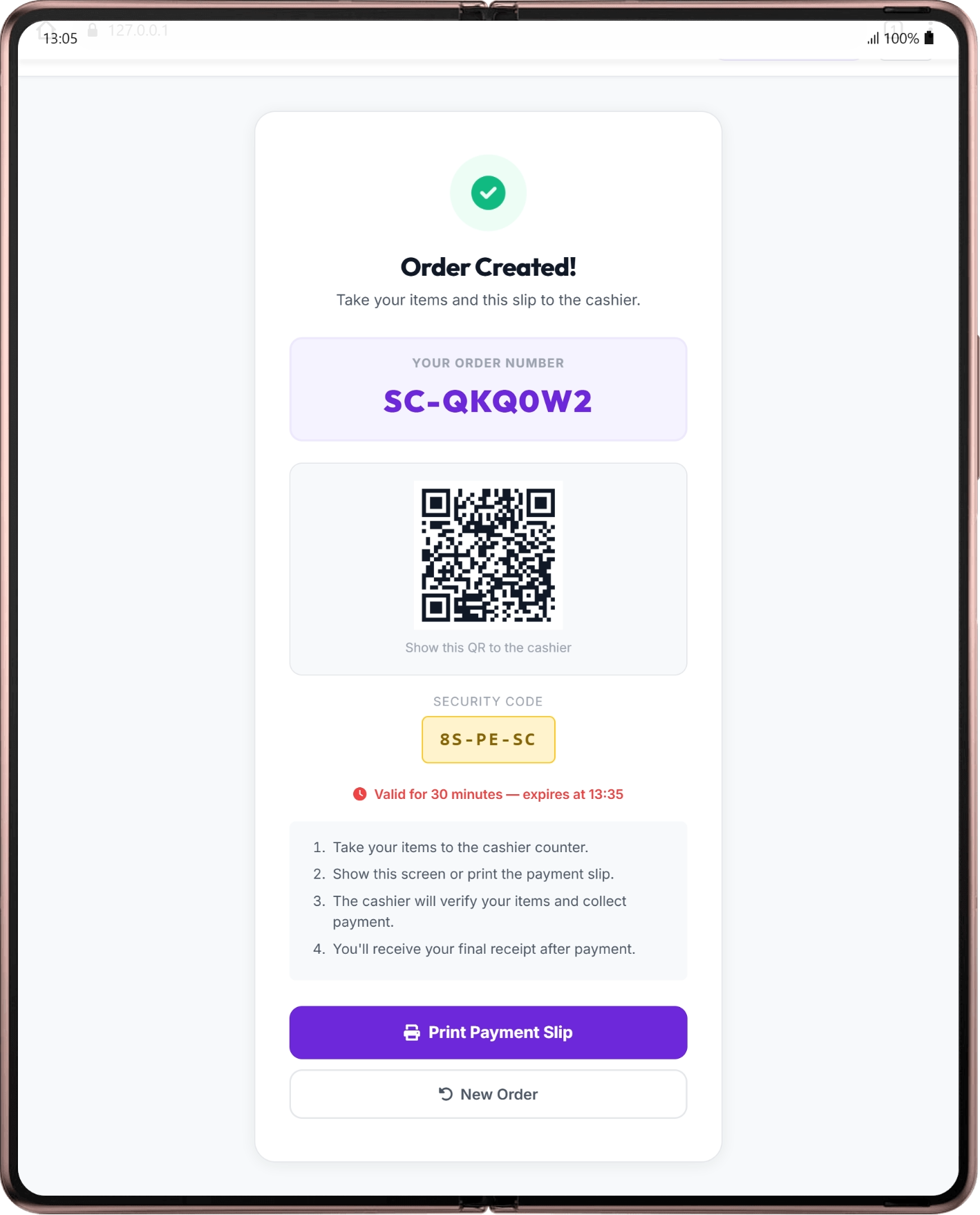 Self Checkout Customer Section - Step 5 - Print order slip
Step 6: Cashier Verification and Payment Collection
This is the final, crucial step where your cashiers ensure accuracy and collect payment.
- Retrieve Order: The cashier accesses the pending self-checkout orders, usually via a dedicated section in their POS interface. They can use the order number, QR code from the payment slip, or the security code to quickly pull up the customer's order.
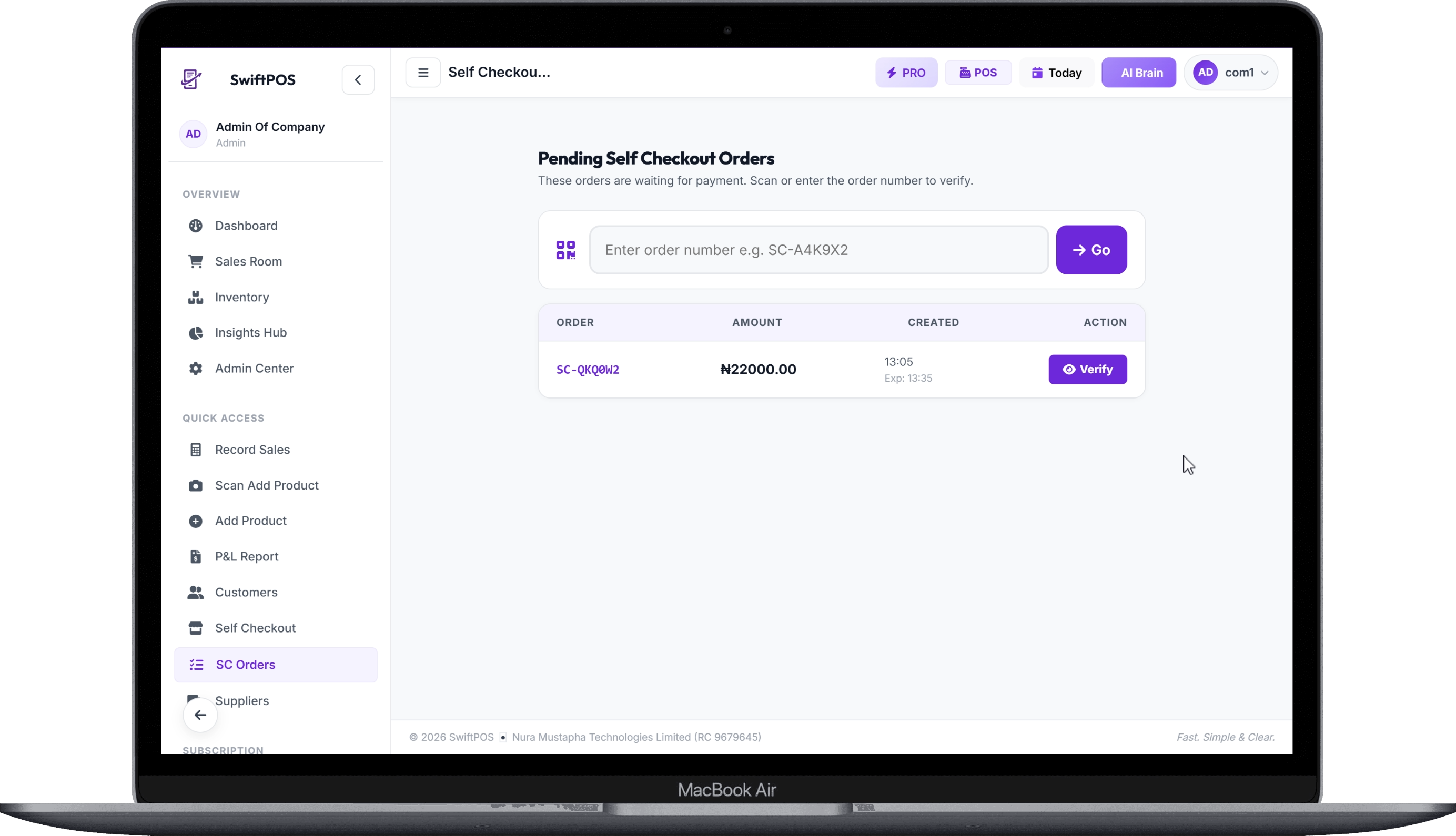 Self Checkout Cashier Section - All pending orders, chose or search and chose and verify
- Verify Items: The cashier compares the items in the customer's cart with the digital order. This human verification step is vital for preventing fraud and ensuring accuracy.
- Collect Payment: Once verified, the cashier processes payment through traditional methods (cash, POS/card, bank transfer).
- Issue Receipt: After payment, the cashier issues the final, official receipt.
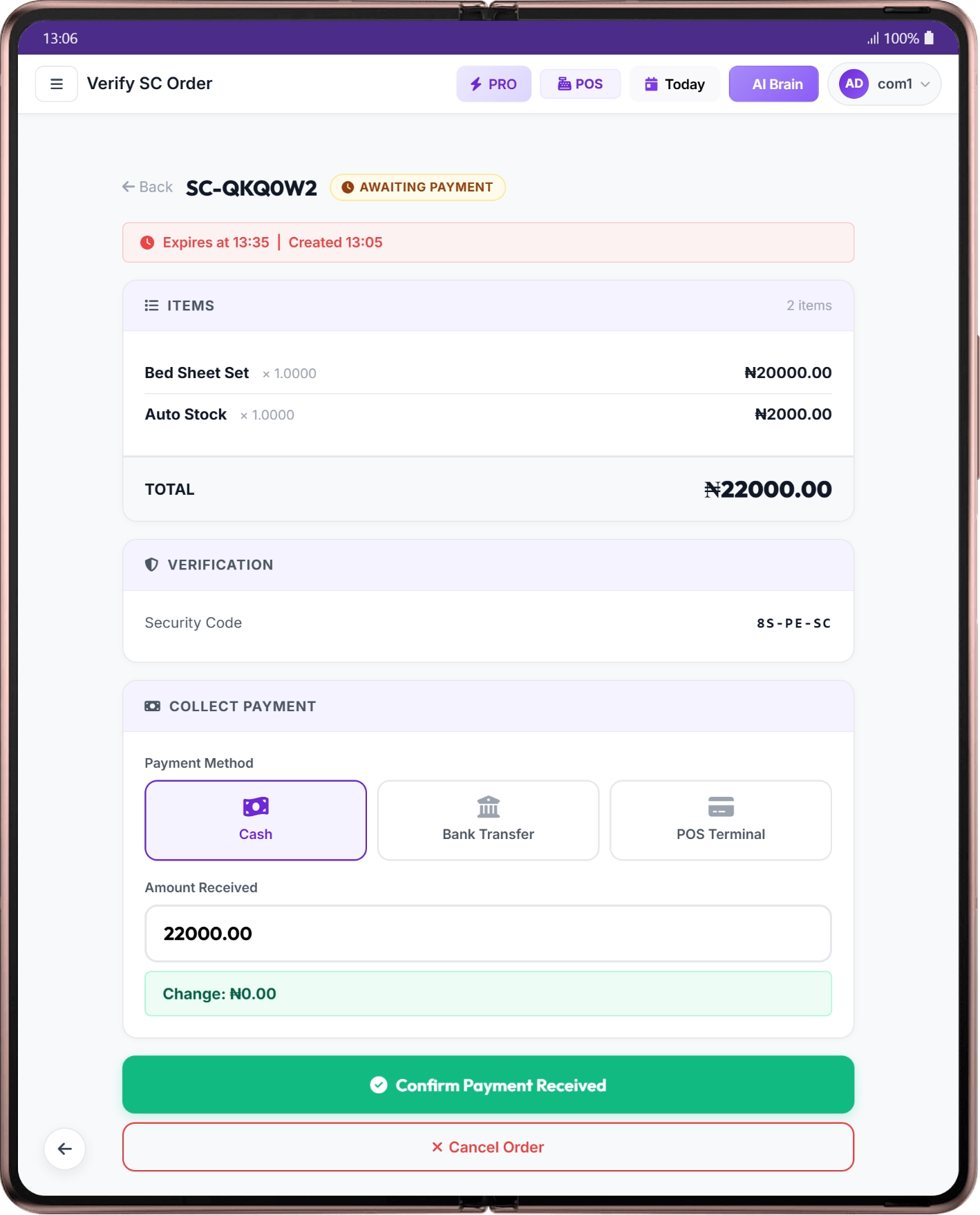 Self Checkout Cashier Section - Confirm Payment and print receipt
This assisted model ensures that while customers enjoy faster scanning, the business still benefits from the security and customer service provided by your cashiers.
> "The queuing experience is often the lasting impression a customer has of a store. Shorten the wait, and you lengthen their loyalty."
Common Mistakes to Avoid
Implementing new technology, especially in a busy supermarket environment, comes with its challenges. Avoiding these common pitfalls can save you time, money, and customer frustration:
- Underestimating Staff Training: Rushing staff training leads to errors, frustration, and a poor customer experience. Invest adequately in comprehensive training.
- Poor Signage and Guidance: Customers need clear instructions and visible signage to understand and use self-checkout. Don't assume they'll figure it out. Marketing and signage for adoption can cost ₦20,000 - ₦100,000.
- Ignoring Technical Issues: Unreliable internet, frequent power outages, or slow hardware will quickly negate any benefits. Invest in robust infrastructure and a reliable maintenance contract (₦100,000 - ₦500,000 annually).
- Lack of Human Oversight: Fully automated self-checkout can be prone to errors or even theft. The assisted model, where a cashier supervises, is often a better fit for Nigerian retail realities.
- Inadequate Product Barcoding: If your products aren't consistently barcoded, self-checkout will be a frustrating experience for customers and staff alike. Ensure 100% barcode coverage.
How to Track and Grow After Launch
Once your assisted self-checkout system is operational, continuous monitoring and adaptation are crucial for maximizing its benefits and ensuring it contributes to your supermarket's growth.
- Monitor Key Performance Indicators (KPIs): Track metrics like average transaction time at self-checkout vs. traditional lanes, customer adoption rate, number of abandoned self-checkout carts, and any reported errors or discrepancies. Tools like the can provide detailed reports on sales performance, staff activity, and inventory movement, allowing you to see the direct impact of your new system.
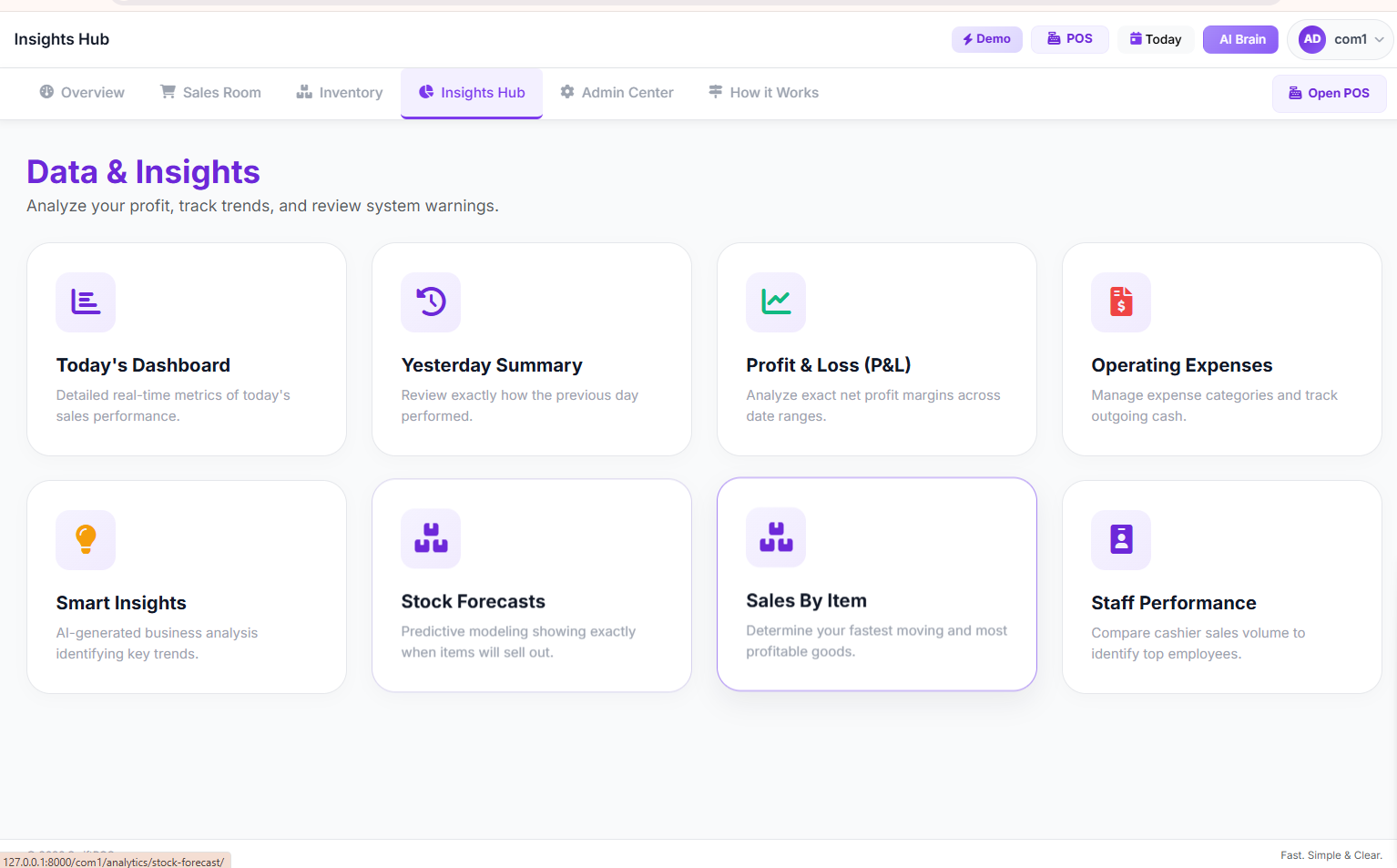 SwiftPOS Insights Hub
 - Gather Customer Feedback: Actively solicit feedback from your customers about their self-checkout experience. Use short surveys, suggestion boxes, or direct conversations. This feedback is invaluable for making improvements.
- Optimize Staff Deployment: With self-checkout handling a portion of transactions, you can reallocate cashier staff to high-value tasks like customer assistance, shelf stocking, or managing peak periods more effectively. This allows you to serve more customers without increasing your payroll.
- Regular System Maintenance: Ensure your kiosks and software are regularly maintained to prevent downtime. This includes hardware checks, software updates, and ensuring connectivity is robust.
- Expand Gradually: If the initial implementation is successful, consider adding more self-checkout kiosks or exploring further retail checkout automation features to handle even higher volumes.
Frequently Asked Questions
Q1: Is self-checkout suitable for all types of supermarkets in Nigeria?
Self-checkout is particularly beneficial for supermarkets with high foot traffic and a significant number of customers purchasing fewer items. It can also free up cashiers to handle larger, more complex orders. While a small provision store might not need multiple advanced kiosks, even a basic self-checkout station can improve efficiency.
Q2: How much does it cost to set up an assisted self-checkout system in Nigeria?
The initial investment varies. A basic self-checkout kiosk can cost between ₦350,000 - ₦800,000, while more advanced systems with integrated scales and scanners can range from ₦900,000 - ₦2,500,000. This doesn't include the cost of POS system upgrades (₦50,000 - ₦150,000/year for software license), hardware like scanners (₦80,000 - ₦250,000), reliable internet, and power backup. However, the return on investment through reduced staffing needs and increased customer satisfaction can be substantial. You can calculate your potential ROI with this POS System ROI calculator for Nigerian Retailers.
Q3: What about theft? Does self-checkout increase shrinkage?
This is a common concern. However, an assisted self-checkout model, where a cashier oversees the final payment and verification, significantly mitigates theft risks. The cashier can visually inspect items against the scanned list. Additionally, security features like unique order numbers and security codes within systems like SwiftPOS provide layers of verification.
Q4: Will self-checkout replace my cashiers?
The goal of assisted self-checkout is not to eliminate cashiers, but to optimize their roles. By offloading the scanning task to customers, cashiers can focus on verification, customer service, and managing more complex transactions. This allows you to handle more customers during peak hours without hiring additional staff, making your existing team more efficient and valuable.
Q5: How long does it take for customers to adapt to self-checkout?
Customer adoption rates vary, but with clear instructions, helpful staff, and a user-friendly interface, most customers adapt quickly. Initial resistance is common, but as they experience faster checkout times, many customers will prefer the self-service option. Consistent encouragement and visible assistance from staff are key during the initial weeks.
Q6: Can I manage multiple self-checkout kiosks across different branches?
Yes, many modern POS systems designed for multi-branch operations allow you to manage and monitor multiple self-checkout kiosks from a central dashboard. This includes setting configurations, tracking performance, and managing inventory across all locations. For businesses with multiple branches, understanding multi-branch retail operations is crucial.
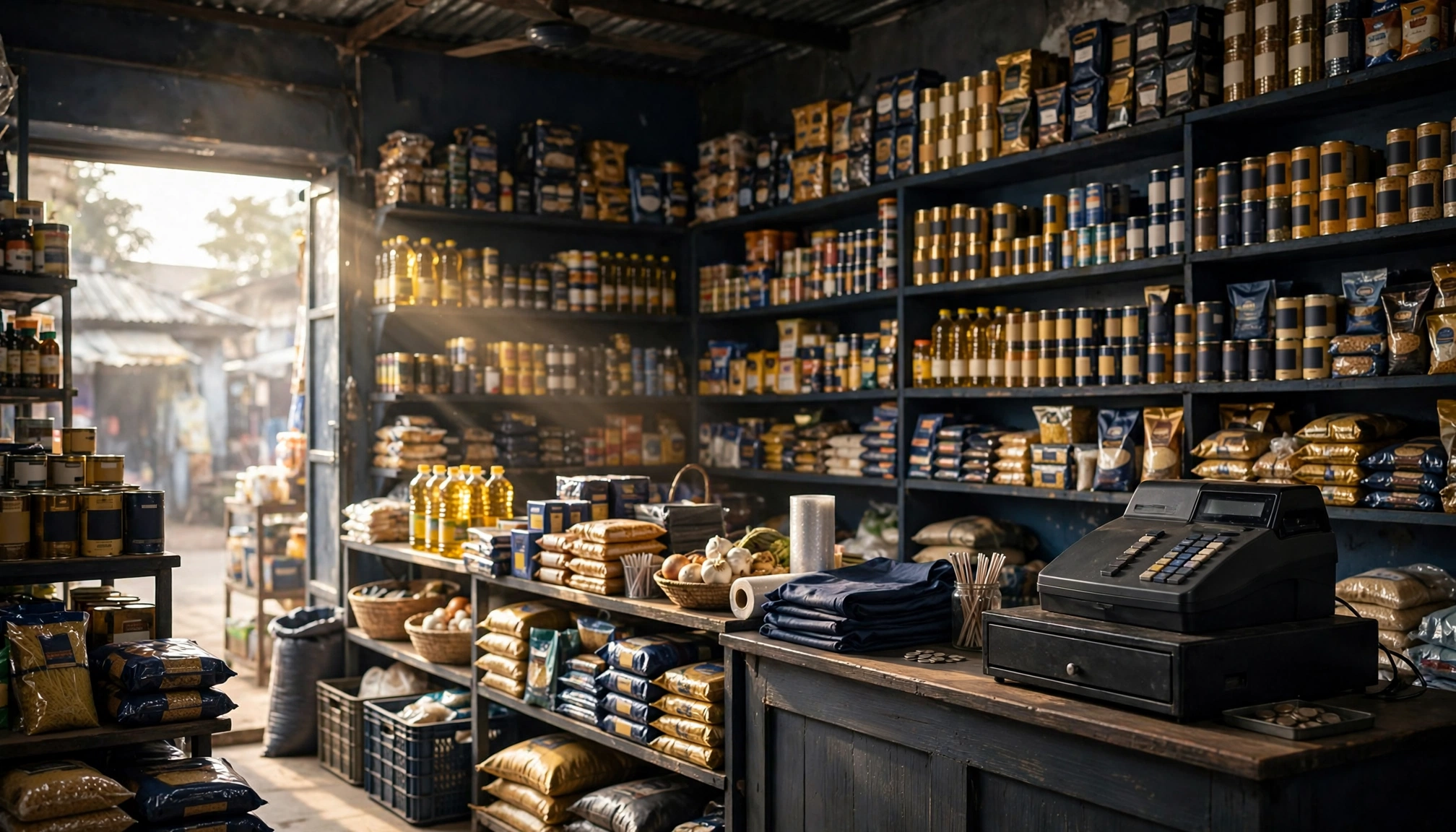 Nigerian supermarket shelves stocked with goods
Ready to Streamline Your Supermarket Checkout?
Long queues are a thing of the past for businesses embracing smart retail checkout automation. By implementing an assisted self-checkout system, your supermarket can significantly reduce wait times, enhance customer satisfaction, and optimize staff efficiency—all without the constant pressure of hiring more cashiers. Explore how a comprehensive POS solution can transform your operations. Visit our features page to learn more about how SwiftPOS can help your business thrive, or contact us directly to discuss your specific needs on our contact page.
How Much Does It Cost to Open a Pharmacy in Nigeria?
Sep 23, 2026
How to Prevent Inventory Shrinkage in Retail: A Comple…
Sep 22, 2026
Assisted Self-Checkout for Retailers: How It Works & W…
Sep 20, 2026