7 Best Retail POS Systems for Small Businesses in 2026: An Expert Guide
SwiftPOS Team
Published September 27, 2026
Are you still tracking sales on paper ledgers or struggling with spreadsheets that barely keep up? In Nigeria's dynamic retail landscape, relying on outdated methods in 2026 isn't just inefficient; it's actively costing you money and customers. The good news is, upgrading your operations with a modern Point-of-Sale (POS) system is more accessible and affordable than ever before.
Nigerian shop owner checking inventory on a tabletThe Evolving Retail Landscape in 2026: Why POS is Non-Negotiable
The Nigerian retail sector is experiencing rapid transformation. Customers expect faster service, diverse payment options, and a seamless shopping experience. Businesses that fail to adapt risk being left behind. In 2026, a robust POS system is no longer a luxury for large enterprises; it's a fundamental tool for every small to medium-sized business looking to thrive.
Consider these realities:
- Digital Payment Surge: With increased adoption of cashless transactions, a POS system capable of handling card payments, bank transfers, and mobile money is essential. Relying solely on cash limits your customer base.
- Inventory Control is King: Stockouts mean lost sales, while overstocking ties up valuable capital. Manual inventory tracking is prone to errors, leading to significant revenue leaks. Studies show that poor inventory management costs Nigerian retailers thousands of Naira annually. You can learn more about avoiding these pitfalls by reading about Nigerian Retailers: Inventory Management Mistakes Crushing Your Profits.
- Data-Driven Decisions: Understanding your best-selling products, peak sales hours, and customer preferences can transform your business. Without a POS system, gathering and analyzing this data is nearly impossible. This is why tracking 7 Key Retail Metrics Nigerian Businesses Must Track for Profit Growth is so important.
- Staff Efficiency: A streamlined checkout process reduces queues and staff workload, allowing your team to focus on customer service rather than manual calculations.
> "The true cost of manual retail operations isn't just the time spent, it's the invisible losses from errors, missed opportunities, and poor insights that erode profit margins daily."
Many small businesses are realizing the hidden costs of manual operations. Transitioning from traditional bookkeeping to POS software can have a significant return on investment, as highlighted in our article on POS System ROI: Calculating True Value for Nigerian Retailers.
What You Need Before You Start
Before diving into choosing the best retail POS system for small business operations, a bit of preparation will save you time and money.
- Budget Assessment: Determine what you can realistically afford for both initial setup and ongoing monthly costs.
- Software Subscription: Expect to pay between ₦5,000 - ₦15,000/month for basic features, or ₦20,000 - ₦50,000/month for advanced/multi-store capabilities.
- Hardware: A basic tablet/smartphone setup with a printer might cost ₦80,000 - ₦150,000. A dedicated terminal with peripherals could range from ₦250,000 - ₦600,000.
- One-time Setup/Installation: Budget ₦15,000 - ₦70,000 for initial configuration.
- Internet Data: A reliable connection will cost ₦5,000 - ₦15,000/month.
- Consumables: Thermal printer paper rolls (box of 10) typically cost ₦3,000 - ₦7,000.
- Backup Power: Factor in ₦10,000 - ₦50,000/month for generator fuel if your area has unreliable electricity.
- Clear Business Needs: List your top priorities. Do you need robust inventory management, customer loyalty programs, multi-branch support, or detailed reporting?
- Internet Connectivity: A stable internet connection is crucial for most cloud-based POS systems. While some offer offline capabilities, regular synchronization requires internet. Understand if your POS system can work without internet.
- Staff Readiness: Prepare your staff for the change. Training is key to successful adoption.
Step-by-Step: Choosing the Best Retail POS System for Your Small Business in 2026
Selecting the right POS system involves more than just picking the cheapest option. It's about finding a solution that grows with your business and solves your unique challenges.
Step 1: Define Your Core Requirements
Before you even look at a single system, sit down and list what your business must have. Are you a small provision store needing quick sales and basic stock tracking, or a multi-branch supermarket requiring complex inventory, staff management, and detailed financial reporting?
Consider specific features like:
- Inventory Management: Can it track stock levels in real-time, manage product variations (sizes, colors), handle expiration dates, and support bulk imports?
- Sales & Checkout: Does it offer fast checkout, support various payment methods (cash, card, mobile money), and print clear receipts?
- Customer Management: Can you track customer purchases, manage credit, and build loyalty programs?
- Reporting & Analytics: Does it provide insights into sales performance, profit margins, and staff activity?
- Multi-Location Support: If you have more than one branch or a warehouse, can it manage stock transfers and unified reporting?
- Offline Capability: Is it designed to work even when internet connectivity is unstable, common in many parts of Nigeria?
Step 2: Research Available POS Solutions
Once your requirements are clear, begin researching systems that align with them. Look for providers that specifically cater to the Nigerian market, understanding local payment methods, business practices, and economic realities. Read reviews from other Nigerian business owners.
Look for systems that offer comprehensive features, from basic sales to advanced inventory and insights. A system like SwiftPOS, for instance, provides a complete business management and POS platform designed for Nigerian businesses. It connects sales, inventory, customers, staff, expenses, profit, purchasing, branches, warehouses, and business reporting all in one system.
Step 3: Evaluate Hardware Compatibility and Costs
A POS system isn't just software; it's also hardware. Decide whether you need a full-fledged dedicated POS terminal or if a more flexible setup using a tablet or smartphone will suffice.
- Dedicated POS Terminal: These are robust, all-in-one units often found in supermarkets. They typically include a built-in screen, printer, and card reader. Costs can range from ₦250,000 to ₦600,000.
- Tablet/Smartphone POS: This is a more affordable and flexible option, turning your existing device into a POS. You'll likely need to purchase a stand, a barcode scanner (₦30,000 - ₦80,000), a cash drawer (₦20,000 - ₦50,000), and a thermal receipt printer (₦80,000 - ₦150,000 for a basic setup).
- Barcode Printing: If you sell many products, a system that allows you to create and print your own barcode labels is invaluable for efficient checkout.
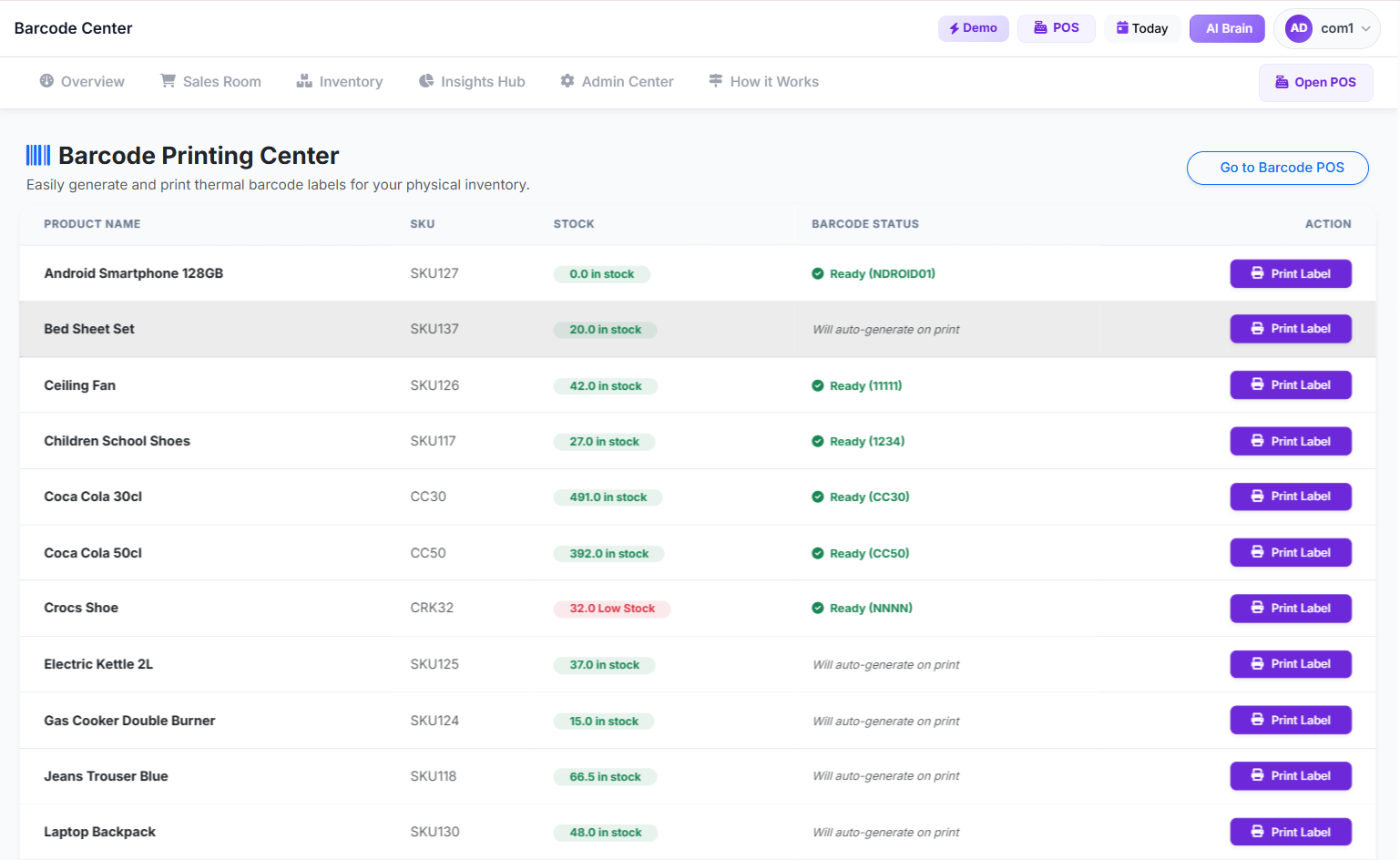 Barcode Printing Center
When considering hardware, think about durability and ease of use for your staff. You can find a complete guide to POS hardware setup for supermarkets to help you decide.
Step 4: Understand Pricing Models and Hidden Fees
POS systems usually come with a monthly or annual subscription fee. Be wary of systems that have many hidden costs.
- Subscription Tiers: Basic plans (₦5,000 - ₦15,000/month) offer core features, while advanced plans (₦20,000 - ₦50,000/month) include multi-store support, advanced reporting, and more users.
- Transaction Fees: If the POS integrates with payment processors, understand the transaction fees (typically 1.5% - 2.5% per transaction).
- Support Costs: Some providers charge extra for premium customer support or on-site training (₦20,000 - ₦100,000).
- Scalability: Ensure the pricing model allows you to easily upgrade as your business grows without prohibitive costs.
Always ask for a transparent breakdown of all costs. Most reputable providers will offer a free trial period, allowing you to test the system before committing. SwiftPOS, for example, offers a 14-day free trial. You can check out the pricing details for various plans.
Step 5: Test Drive the System and Train Your Staff
Never commit to a POS system without thoroughly testing it. Take advantage of free trials and demos.
- User Interface: Is it intuitive and easy for your staff to learn? A complex system will lead to errors and frustration.
- Key Features: Test the features most important to your business. If inventory management is critical, add products, adjust stock, and run reports.
- Offline Mode: If internet stability is a concern, test the system's offline capabilities to ensure sales can still be processed without connectivity.
- Staff Training: Once you've chosen a system, invest time in training your staff. A well-trained team will maximize the system's benefits. Many providers offer tutorials and support to get you started, such as the SwiftPOS onboarding guide.
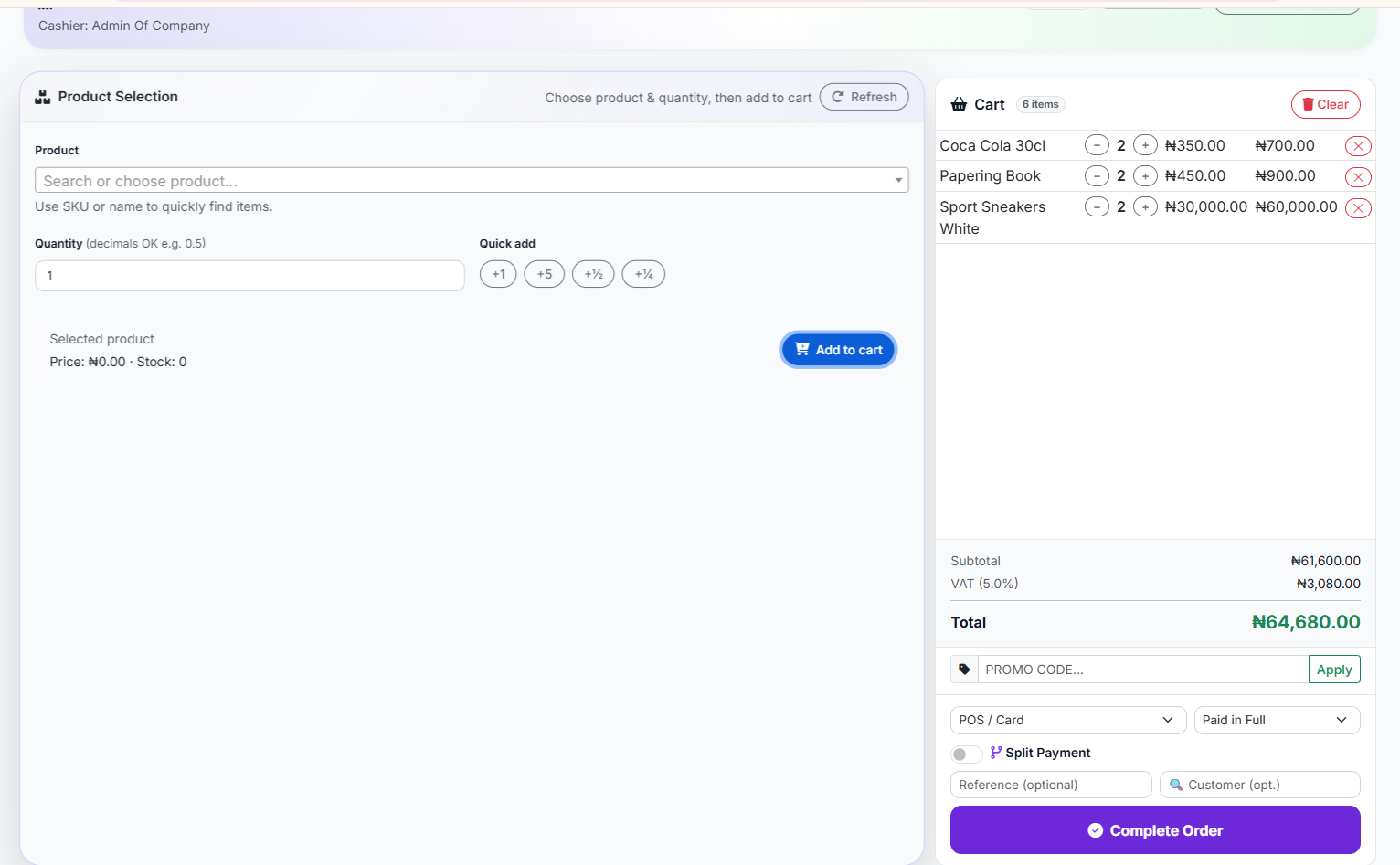 Classic POS Interface (List select)
A good system, like SwiftPOS, offers various POS interfaces, including Classic, Smart Grid, and Barcode POS, to suit different retail environments, making staff training more adaptable.
Common Mistakes to Avoid
Choosing and implementing a new POS system can be complex. Here are some common pitfalls Nigerian retailers face:
- Underestimating Internet Needs: Assuming any internet connection will do. A slow or unreliable connection can cripple a cloud-based POS.
- Ignoring Offline Capabilities: In areas with inconsistent power or internet, a POS that cannot function offline will halt your operations during outages.
- Skipping Staff Training: A powerful POS system is only as good as the people using it. Inadequate training leads to errors, slow service, and staff frustration.
- Not Defining Clear Needs: Choosing a system based on hype rather than your specific business requirements often leads to overspending on unnecessary features or lacking essential ones.
- Overlooking Scalability: Selecting a system that can't grow with your business means you'll have to switch again in a few years, incurring more costs and disruption.
- Neglecting Customer Support: Poor customer support from your POS provider can leave you stranded when issues arise, especially during peak business hours.
How to Track and Grow After Launch
Implementing a new POS system is just the beginning. The real value comes from leveraging its capabilities to track performance, identify trends, and drive growth.
- Monitor Sales Performance: Regularly review sales reports by day, week, month, and even by product or staff member. This helps identify best-sellers, slow-moving items, and peak periods.
- Analyze Inventory Turnover: Use your POS data to understand how quickly products are selling. This informs reordering decisions and helps prevent stockouts or overstocking. Systems like SwiftPOS offer
to predict when stock may run out.
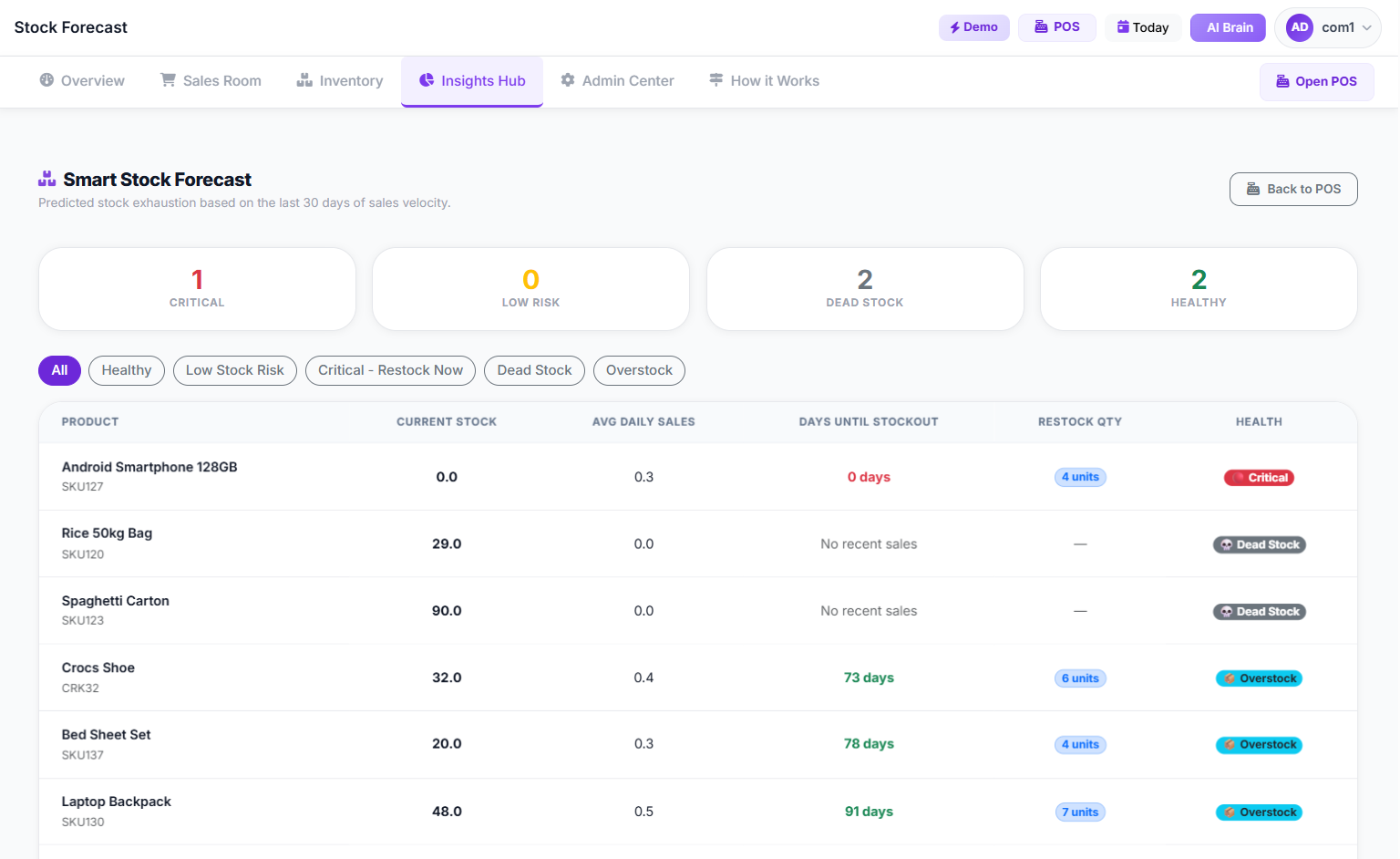 smart stock forecasting
 - Track Profit Margins: Beyond just sales, understand your gross and net profit on different products and categories. This helps you identify your most profitable offerings. A comprehensive system will provide a clear
.
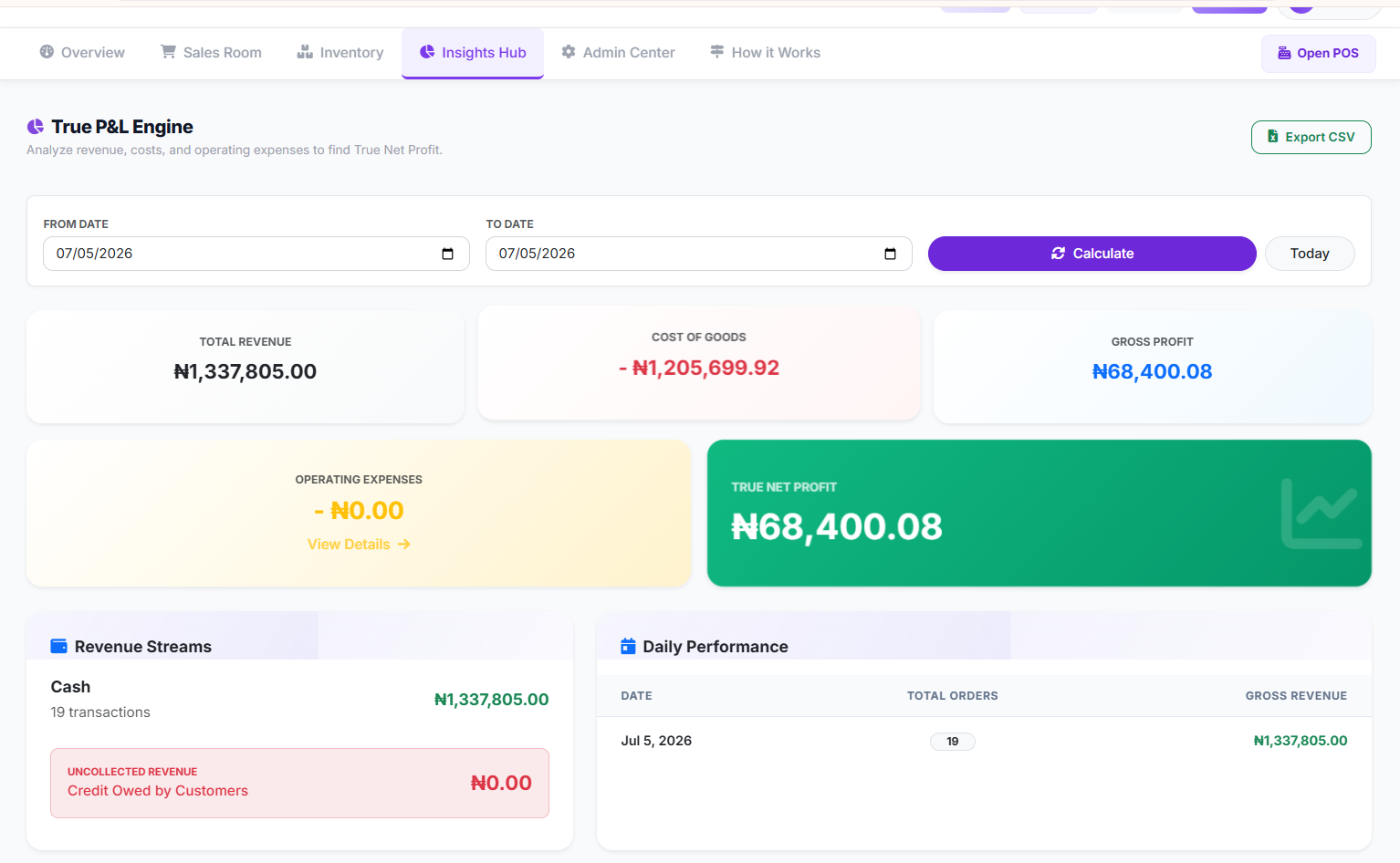 Profit and Loss Page
 - Manage Expenses: Record all your business expenses within the system. This gives you a holistic view of your financial health and helps calculate true net profit.
- Leverage Customer Data: Use sales history to identify your most loyal customers, offer personalized promotions, and improve customer retention.
- Identify Suspicious Activity: Keep an eye on audit logs and suspicious activity reports to prevent internal theft or errors. This is a key feature in modern POS solutions.
- Utilize Business Insights: Many advanced POS systems, like SwiftPOS, provide AI-powered business insights to highlight trends, potential problems, and growth opportunities, helping you make smarter decisions. For more on this, check out How to Manage Your Retail Store Using AI in Nigeria.
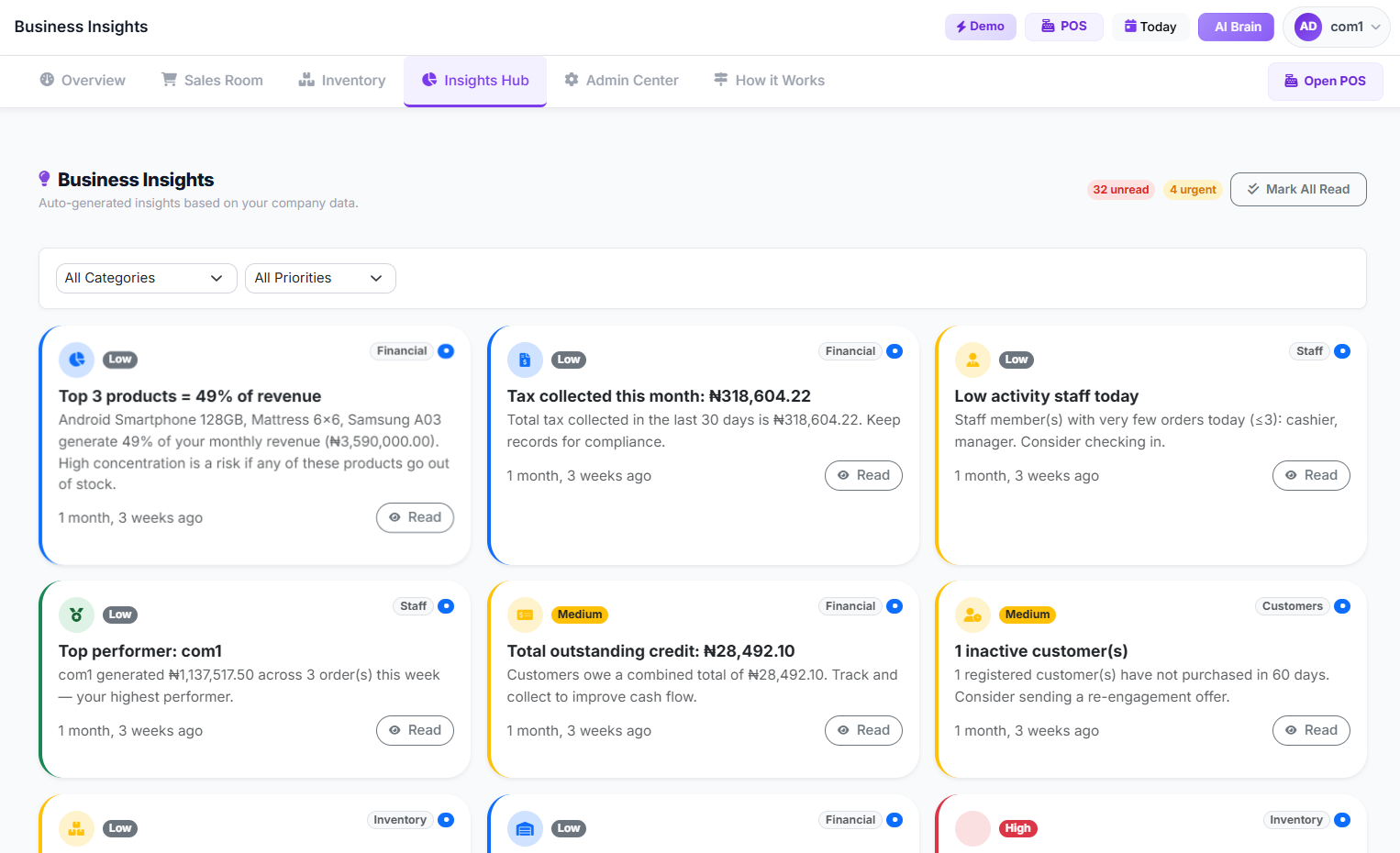 Business Insights Page
By consistently using the reporting and analytics tools within your POS, you move from guesswork to data-driven strategy, positioning your small business for significant growth in 2026 and beyond.
Frequently Asked Questions
Q1: How much does a good POS system cost for a small business in Nigeria?
A: The cost varies significantly based on features and hardware. A basic software subscription can be ₦5,000 - ₦15,000/month, while advanced plans go up to ₦50,000/month. Hardware can range from ₦80,000 for a tablet setup to ₦600,000 for a dedicated terminal. Don't forget one-time setup fees (₦15,000 - ₦70,000) and ongoing internet costs (₦5,000 - ₦15,000/month).
Q2: Can a POS system work without an internet connection in Nigeria?
A: Many modern cloud-based POS systems, including SwiftPOS, offer offline mode capabilities. This means you can continue processing sales even without internet, and the data will synchronize once connectivity is restored. This is a critical feature for Nigerian businesses.
Q3: What's the difference between a cash register and a POS system?
A: A cash register primarily records sales and calculates change. A POS system is a comprehensive business management tool that handles sales, inventory, customer management, staff tracking, reporting, and more. It connects various aspects of your business for better control and insights. For a deeper dive, read our article comparing Cash Register vs. POS System.
Q4: Is it difficult to learn how to use a new POS system?
A: Most modern POS systems are designed to be user-friendly and intuitive. With proper training and access to tutorials, staff can typically learn the basics within a few hours to a few days. The complexity depends on the system and the features being used. Many providers offer comprehensive guides and support to ease the transition.
Q5: Can a POS system help manage multiple branches?
A: Yes, many advanced POS systems are built with multi-branch capabilities. They allow you to manage inventory across different locations, track sales from each branch, transfer stock between stores, and view consolidated reports from a central dashboard. This is essential for scaling your retail business, as discussed in our Multi-Branch Retail Guide.
Ready to Transform Your Retail Business?
Choosing the best retail POS system for small business operations in Nigeria is a strategic decision that can significantly impact your profitability and growth. If you're ready to move beyond manual record-keeping and embrace a modern, efficient solution, explore the features and benefits a comprehensive POS platform offers. Visit our main SwiftPOS App For Companies to start your journey towards smarter retail management today.

How to Start a Clothing Business in Nigeria: A Step-by…
Sep 26, 2026
How to Reduce Supermarket Checkout Lines (Without Hiri…
Sep 24, 2026
How Much Does It Cost to Open a Pharmacy in Nigeria?
Sep 23, 2026